
Free Google Ads Performance Grader
Are you wasting money in Google Ads?
Find out now! Get an instant audit with the Free Google Ads Grader.
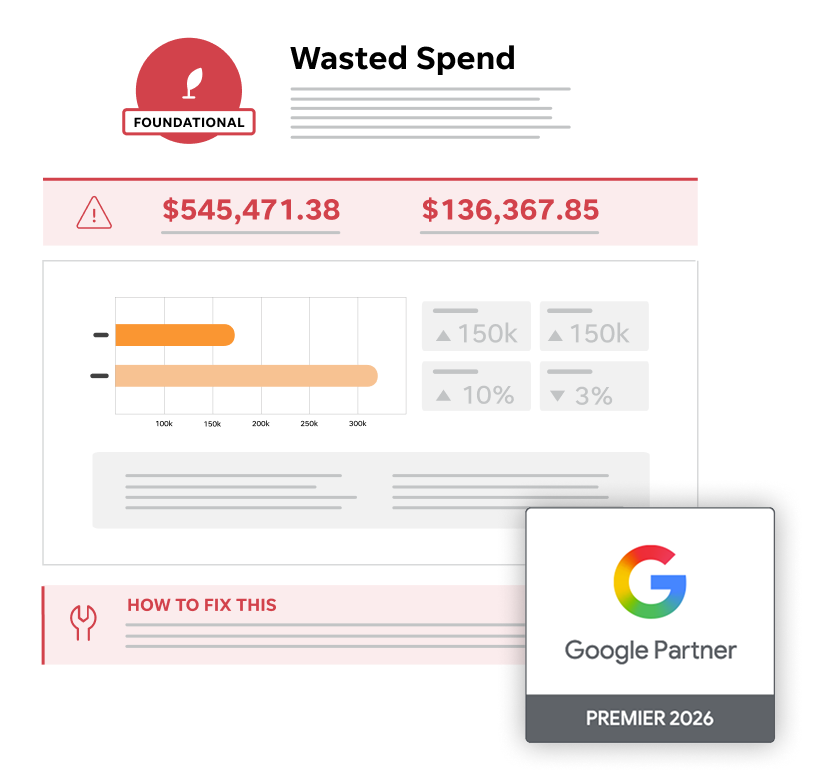
See how your Google Ads are really performing
This free assessment, designed with small businesses and agencies in mind, grades your account against 10 key metrics and offers deep insights, actionable next steps, and an overall account score to help you understand what’s working and where you can improve.
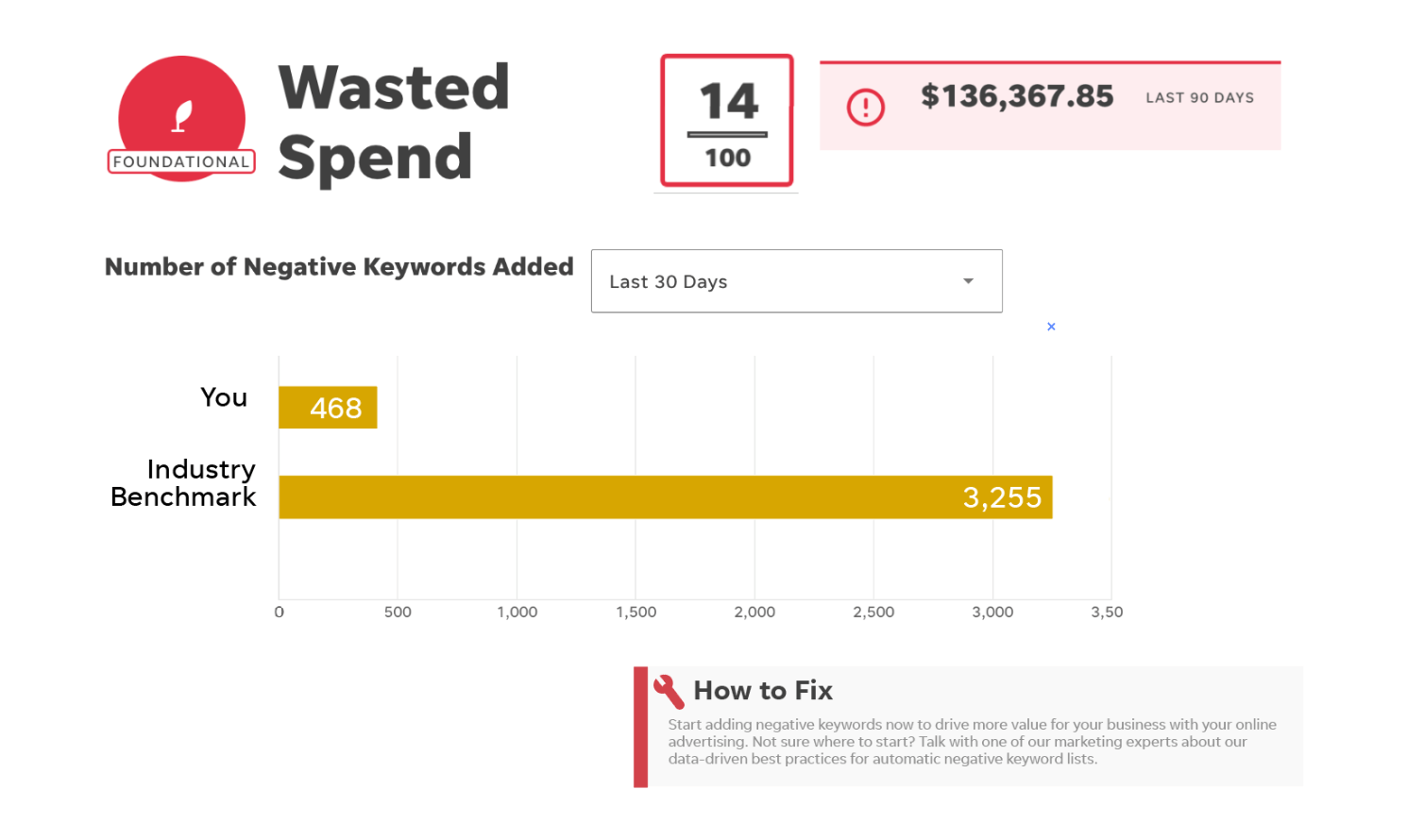
Eliminate your wasted spend
Save thousands of dollars and improve your ROI with negative keywords.
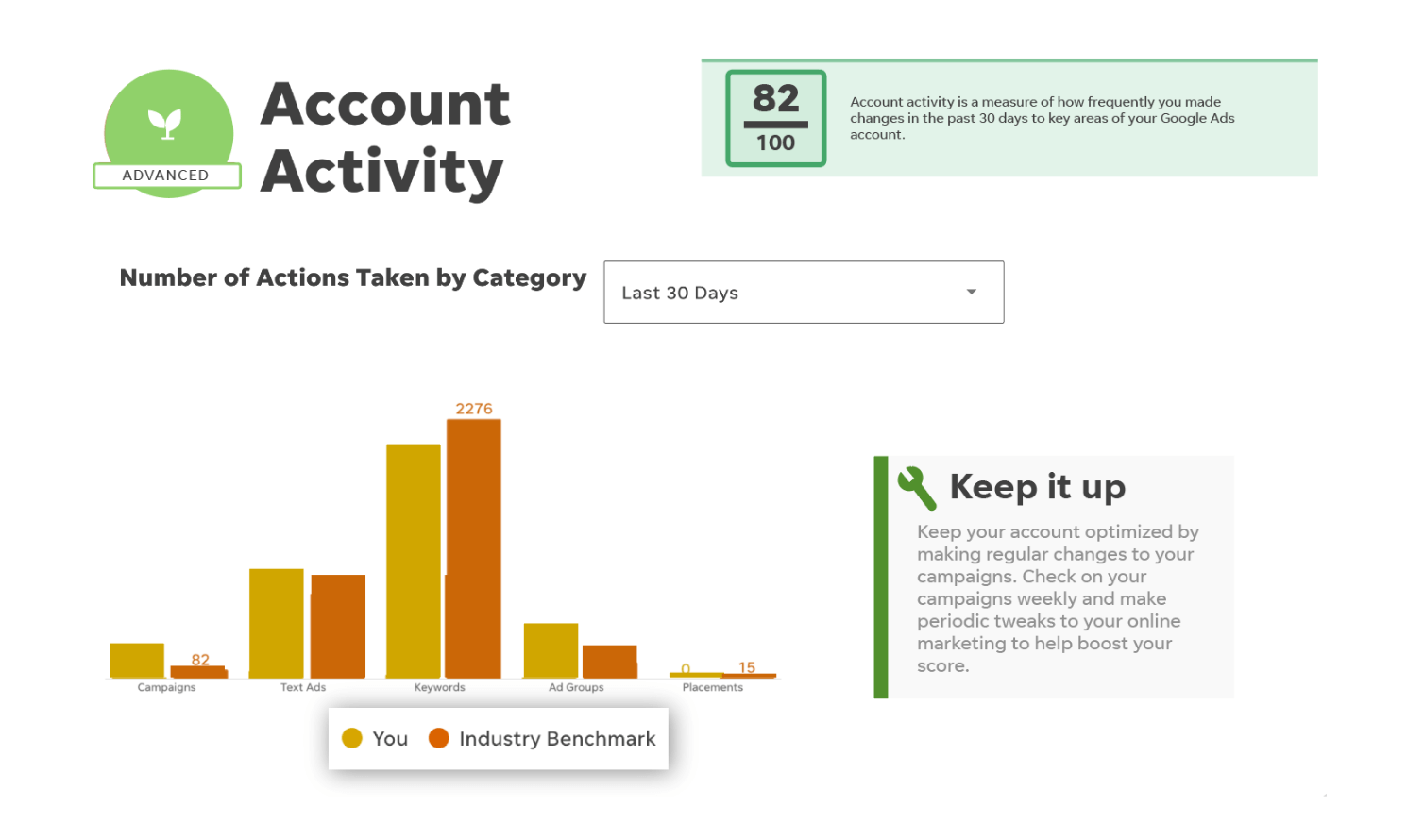
Monitor your account activity
Stay ahead of competitors by keeping up with specific actions in your account.
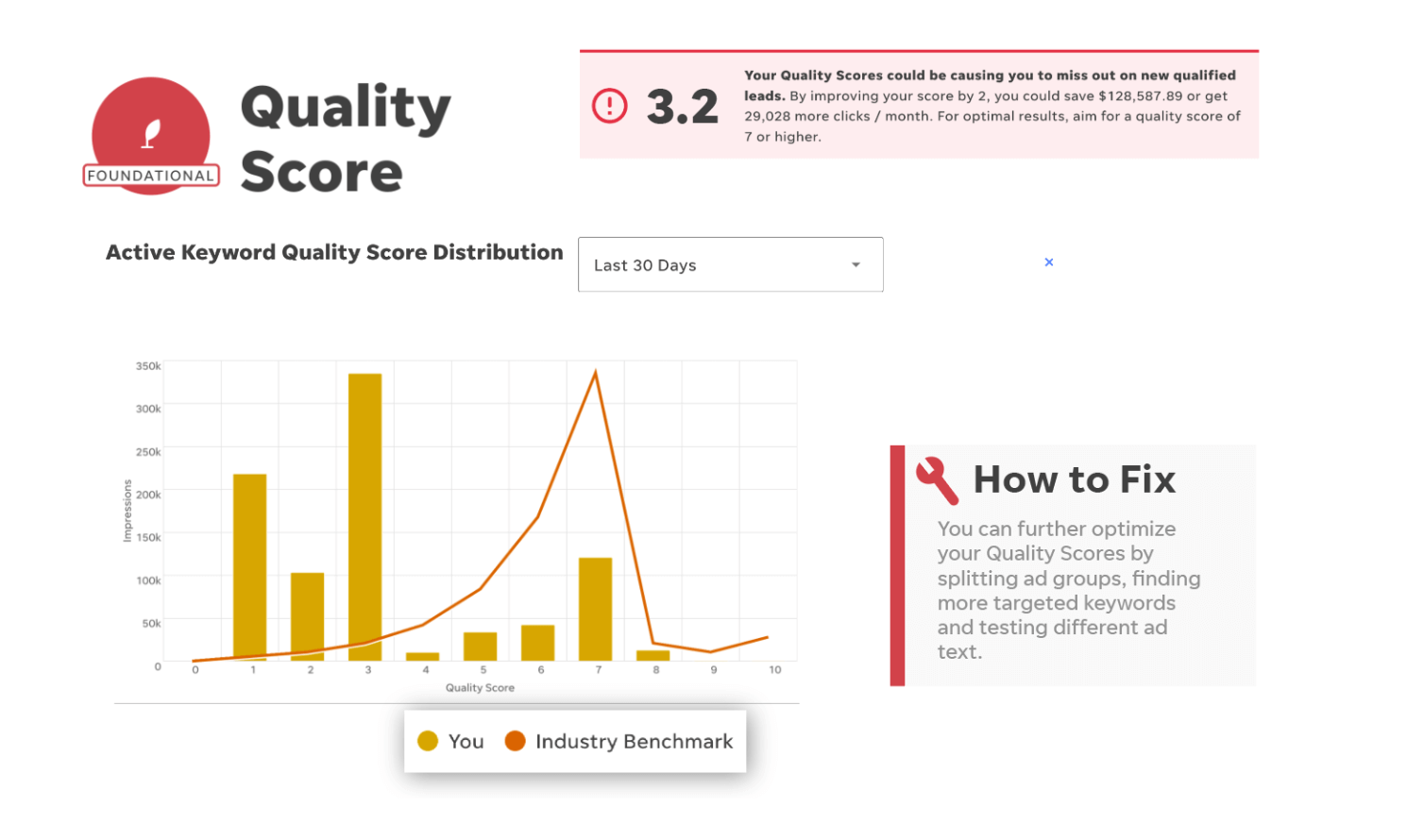
Improve your quality score
Compare yours with industry benchmarks and learn how to improve it so you can raise your Ad Rank and lower your cost per click.
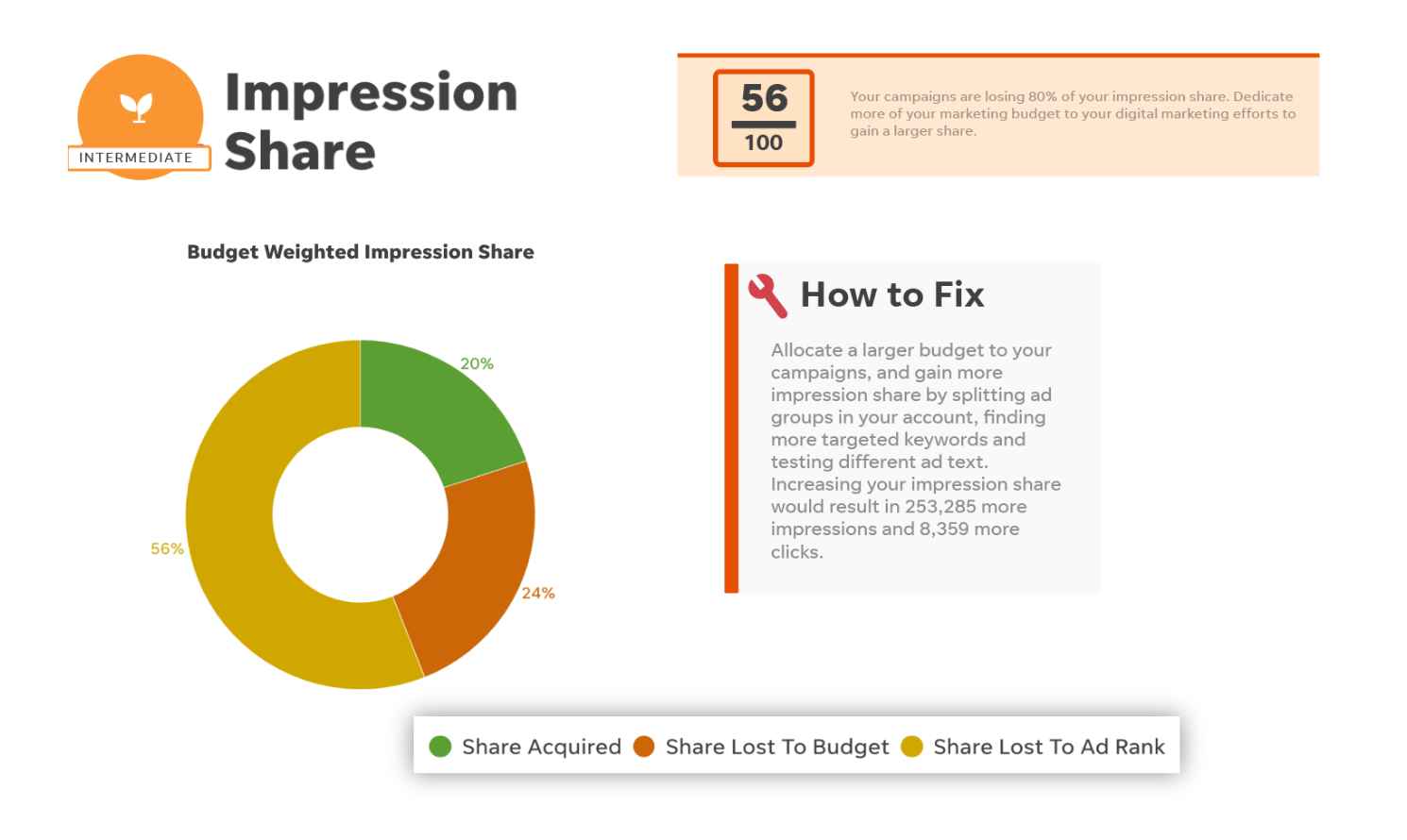
Maintain your impression share
Make sure you’re getting the exposure you need to stay profitable with budget weighted impression share metrics.
The Google Ads Grader that millions of businesses trust
6,536,213
Total free Google Ads reports generated
$37,810,234,867
Google Ads spend analyzed
318,313,573
Account improvements suggested

The tool is efficient enough to provide insightful analysis on par with the audits one would receive from an agency or consultant.


Navneet Kaushal
Page Traffic Buzz
Stop guessing — get your grade
Get your detailed report now and start getting more out of your Google Ads budget!
- Quality score
- Benchmarks
- Impression share
- Account activity
- Wasted spend
- Best practices
- Best & worst text ad
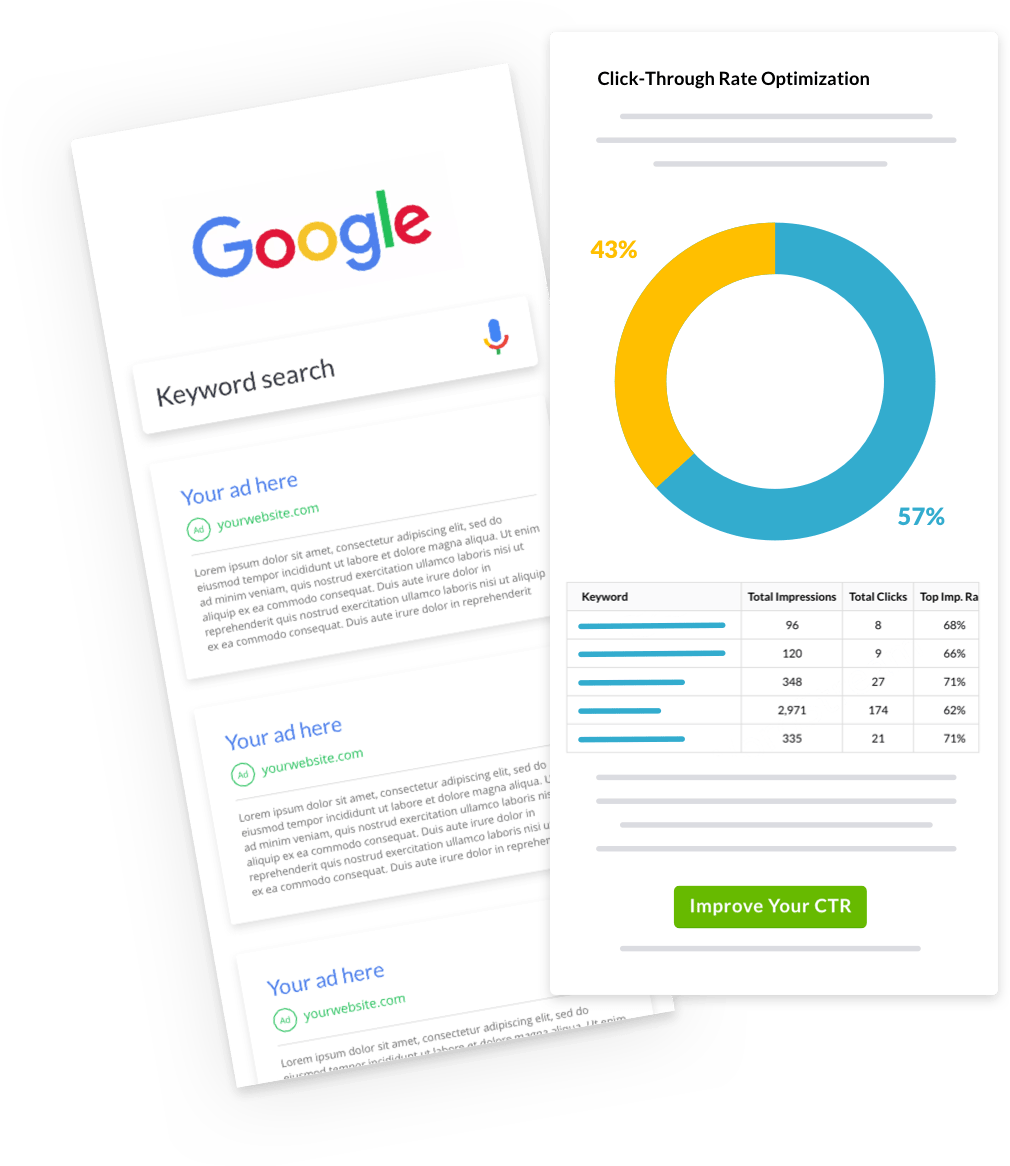
- Click-through rate
- Account structure
- Performance tracker
- Display & Shopping ads
Powered by our Premier Google Partnership

WordStream will only use your personal information and Google Ads credentials to analyze your account. We’ll never share your Google Ads data for any reasons (see our Privacy Policy).
Start driving better results for your business with Google Ads.
Get your personalized Google Ads score today, for free.
Frequently asked questions
What if my grade isn’t great?
Growing your business with Google Ads can be confusing and complicated. We can help!
Whether you’re a busy small business owner, a marketing freelancer, an agency executive, or your company’s digital marketing lead, we can help you find the right solution to address any issues the Grader uncovers in your Google Ads account. Our solutions can empower you to drive meaningful business results with online advertising—not just on Google, but also on Facebook, Instagram, Microsoft Ads, and more. Whatever your goals, we’re a trusted business partner you can count on. Learn more about how WordStream by LocaliQ can help.
What is Google Ads, formerly known as Google AdWords?
Google Ads is a pay-per-click (PPC) advertising platform that enables businesses to run ad campaigns on Google properties.
The most popular Google Ads campaign type is paid search ads, where users pay to have their ad appear at the top of the search engine results page (SERP) for queries relevant to their offer.
How does Google Ads work?
- Google Ads works like an auction, where advertisers bid on keywords, the terms their potential customers are typing into Google. However, winners aren’t determined by bid alone, which levels the playing field for businesses big and small.
- This is due to Quality Score, which Google assigns to ads based on their relevance to the targeted keyword, landing page experience, and expected click-through rate.
- Relevance and Quality Score also play a role in Display campaigns, where AdSense technologies are used to figure out what ads to show on what pages throughout the Google Display network.
How does the Google Ads Performance Grader work?
The Google Ads Performance Grader is a free tool to help Google advertisers better understand how well their campaigns are performing compared to PPC best practices. Using a proprietary grading algorithm, the Google Ads Performance Grader generates a free, easy-to-read report that includes an overall grade as well as individual grades in four key areas of pay-per-click marketing:
- Wasted spend – Are you making proper use of negative keywords? Or are you wasting hundreds, even thousands of dollars per month on irrelevant keywords that never convert?
- Quality Score – Are your campaigns Google-approved? High Quality Scores have a major impact on your ROI, improving your rankings and lowering your costs.
- Impression share – How often do your ads appear for relevant search queries? Increased impression share can improve exposure and multiply your lead generation results.
- Account activity – To maintain performance, you need to spend active time in your account. How often are you checking under the hood?
- You’ll learn how well you’re really doing in each of these important areas, as well as how you can improve your performance, driving more leads and sales at lower costs.
What improvements have been made to the Google Ads Performance Grader?
- Performance Tracker: Automatically track and analyze your account every 30 days, so you can see how your overall performance and key metrics are trending over time. For example, advertisers can use Performance Tracker to easily monitor and act on changes in Quality Score, something Google just doesn’t offer.
- Mobile Readiness Score: Assess your mobile PPC preparedness and optimization, including an evaluation of your account’s adherence to mobile best practices.
- New and Improved Benchmarks: We’ve revisited our competitive benchmarks for PPC, so all of the KPIs in your performance report (including Quality Score, click-through rate, account activity, and wasted spend) are more current based on the thousands of accounts we’ve analyzed.
What are some Google Ads best practices?
In addition to a full breakdown of your current Google Ads account performance, your report will include actionable tips on how you can improve your score specifically. But here are some overall best practices for Google Ads account management:
- Filter out wasteful, irrelevant clicks and non-converting traffic with negative keywords.
- Maximize relevance across your campaigns for higher Quality Scores.
- Raise click-through rates with strong keyword, text ad, and ad group targeting and organization.
- Practice regular, active account management and optimization.
You can also stay up to date on the latest tips and best practices with The WordStream Blog.
What are some other reasons to use the Google Ads Performance Grader & get free Google Ads help?
- Do you have a sneaking suspicion that your Google Ads (AdWords) campaigns could be doing better?
- Need to justify greater investment in PPC to your management?
- Just curious if all your hard work in PPC has paid off?
- Want to show off to your coworkers what a PPC rock star you are?
Any and all of these are great reasons to use the Google Ads Performance Grader to get a free, instant report on your account and see how your PPC metrics stack up against best practices.
Need one more great reason to use the Google Ads Performance Grader? It’s an award-winning tool that was recognized in the 2012 Massachusetts Innovation & Technology (MITX) Innovation Awards for Best Customer Engagement Driver.
MITX 2012 Innovation Awards Winner
How do I use the Google Ads Performance Grader?
The Performance Grader is used in different ways:
- New advertisers – Learn where to focus your efforts for a profitable and efficient campaign.
- Experienced advertisers – Get a thorough and comprehensive report on where you can improve results and save money.
- Agencies – Use the reports to explain your work to clients in a format they can easily understand.
Try out our free Google Ads Performance Grader and let us unlock the secrets of Google Ads for you.
How can I improve my Google Ads Performance Grader Score?
Your performance report will give you specific action items to improve your score, but here are some general suggestions to boost your Google Ads performance.
- Prioritize relevance. Make sure that whatever you’re offering in your ad matches the intent of the keyword you’re targeting.
- Test your ad copy. Have 2-4 active ad variants in each ad group so you can test and achieve optimal click-through rates.
- Follow landing page best practices. Have clear copy, make sure it’s an extension of the ad, keep form fields to a minimum, optimize for mobile, and more.
- Keep a clean account structure. No more than 7-10 ad groups per campaign, no more than 2-3 ads per ad group, and no more than 20 keywords per ad group.
- Bid high enough. So you can get on the SERP and gather sufficient data to make optimizations.
- Have a local PPC strategy. Google offers plenty of features in the way of location targeting.
- Proactively manage your account. Check in and make adjustments to keyword lists, bids, campaign settings, ad groups, and more.
You’ll also find tips and strategic advice in WordStream’s PPC University.
I work at a digital marketing agency. How Can I improve my client’s Google Ads Performance Grader score?
Consider the advice of Stefan van Vliet, co-owner of Dutch agency Compass Online Marketing, who completed the second interview in our second series of ongoing interviews with those who received high scores with the Google Ads Performance Grader.
In our full interview with Stefan, he explains some of the mistakes he made early on when first beginning his campaigns:
“I chose to set the budget to virtually limitless and tried to optimize our campaign while running, but just couldn’t keep up (and honestly didn’t know what I was doing). So only 1 week and almost €10k in losses later I pulled the plug. So for an extensive lesson in AdWords management: always test before you allocate serious budgets.”
Stefan explains his company’s successful Google Ads strategy:
- Get sufficient data by bidding high and getting in spot #2-3 (above organic results).
- Keep track of conversionsKeep track of conversions, cost per conversion and value per conversion (using conversion tracking with dynamic value tracking).
- Adjust bidding to meet a cost per conversion which is roughly 50% of the value per conversion.
- Optimize ads and try to improve conversion rates.
When asked for his advice for low-scoring marketers, Stefan suggests to:
- Leverage negative keyword lists
- Split campaigns on a low level
- Leverage advanced CPC bidding in Google Ads Editor
- Use the comments function within Google Ads Editor to make notes of what you do
For more detailed information about Stefan’s winning techniques and suggestions, read the full interview on our blog.
Can I manage Google Ads by myself?
What is Google Ads Quality Score?
Quality Score is a score between 1 and 10 that Google assigns to your ads, that measures how helpful it is to the users it’s targeting. Because Google strives to serve the most relevant and helpful ads possible, the higher your Quality Score, the higher your chances are of winning a top ad position. Even better, a high Quality Score leads to:
- Lower costs – Google rewards advertisers with high Quality Scores by lowering their cost per click (CPC), which can subsequently lower your cost per conversion.
- More exposure – When you have high Quality Scores, your ads will display more often and in better positions. You can get more exposure, more clicks, and more conversions without having to raise your bids.
What is a good Quality Score in Google Ads?
Quality Score is a keyword-level metric, meaning there is no such thing as a Quality Score for your campaign or entire account. But you can calculate the average Quality Score across all the keywords in your Google Ads account (which the Google Ads Grader takes care of).
A good Quality Score depends on the type of keyword you’re targeting. For example:
- Branded keywords: 8-10
- High-intent commercial keywords: 7-9
- Low-intent keywords: 7
- Competitor keywords: 3+
How do I improve my Google Ads quality score?
- Keyword relevance: Write ads that closely match the intent behind the keywords they’re targeting and build tight ad groups to make this easy for you. If you’re targeting a keyword with intent to learn rather than purchase, your ad should be for a guide or resource and describe it as such.
- Landing page relevance: Make sure the copy matches that of the ad and makes it easy for your prospects to do what they need to do.
- Click-through rate: Think carefully about what your prospects are trying to accomplish and shape your offers and ad copy to match their goals.
It can be difficult to manage the varying factors that contribute to Quality Score single handedly. We offer a set of award-winning software and service solutions specifically designed to improve your Google Quality Score.
What Is a good click-through rate (CTR) in Google Ads?
Click-through rate (CTR) measures the percentage of clicks advertisers receive on their ads per the number of impressions (views). If your ad has a lot of impressions but no clicks, you will have a low CTR, which reduces the effectiveness of your campaigns.
The higher your click-through rate, the better your Quality Score and ad position and the lower your costs.
Learn more in our guide to PPC metrics.
What are negative keywords in Google Ads?
Adding a negative keyword to your Google Ads ad group or campaign ensures that your ad will not appear for search queries containing, closely related, and/or having the same meaning as that term. Negative keywords in your Google Ads campaign are essential because they ensure your ads appear for the most qualified audience and that you don’t waste money on unwanted impressions and non-converting clicks.
Digging through Google’s search query reports to find negative keywords can be a tedious process, and Google Ads limits how much query data is visible to advertisers. You can use our Free Keyword Tool to find negative keywords easily.
How do I discover negative keywords?
WordStream offers an innovative negative keyword tool that makes finding negative keywords easy. It’s also a proactive method of negative keyword discovery, enabling you to weed irrelevant keywords out of your campaigns before they can cost you a cent.
To learn more about how to use negative keywords, read our free white paper on negative keywords.
What makes a good landing page for Google Ads?
High-quality landing pages are a necessary part of a good Google Quality Score. Everything should be tailored to helping the user obtain what they clicked the ad for (i.e., complete a conversion!).
There are a number of landing page best practices, but here are a few key elements to improve your Quality Score and conversion rates.
- Keyword segmentation – Different types of keywords should take visitors to different landing pages that match intent.
- Clean, attractive design – Organize your information and make sure it’s trustworthy, professional, and consistent with your brand.
- Clear copy – A strong headline relevant to your keyword and compelling features and benefits.
- Easy experience – Short forms, intuitive navigation, and an eye-catching, prominent, and clear call to action.
Note that a “good” conversion rate depends on what the conversion is and your industry. While conversions can range from 0-50%, 2% is quite common. See how you stack up with our conversion rate benchmarks.
Why aren’t my Google ads showing up?
There are a number of reasons for Google Ads not showing, but here are a few:
- Your ads weren’t getting clicked. It’s possible they were initially showing up, but if those impressions weren’t turning into clicks, that would signify to Google that your ads weren’t resonating with the users who saw them.
- Your keywords and ads don’t closely match. When determining which ads to show for a particular search query, Google Ads looks closely at keyword relevance—a measure of how closely your ads match the keywords they’re tied to.
- Your ads and landing pages don’t closely match. When picking the winners of a particular ad auction, Google Ads doesn’t only look at the relationship between your target keywords and your ads; you’re also judged on the relationship between your ads and your landing pages. Simply put, you need to deliver a seamless, cohesive user experience across your ads and landing pages.
WordStream By LocaliQ is requesting to manage my Google Ads account – what does that mean?
We will only use your personal information and Google Ads credentials to analyze your account and we will never share your Google Ads data for any reason (see our Privacy Policy). By running this report you agree to our key terms and conditions.