Keyword Match Types: The Complete 2026 Google Ads Guide
Keyword match types are the four settings in Google Ads (broad, phrase, and exact, plus negative keywords) that decide which searches can trigger your ad. Broad match is the least restrictive, exact match is the most restrictive, and negative keywords serve as exclusions in your account.
Google has kept the basic match types largely the same since the beginning of Google Ads (when it was called AdWords) but the behavior of these match types have changed some over time.
Modified broad match was a match type effectively between broad and phrase match which was retired in 2021. Phrase match absorbed MBM’s word-order flexibility. Exact match now matches same-meaning rewrites, so “exact” is looser than the name suggests. And Google’s own guidance now points advertisers toward pairing broad match with Smart Bidding once a campaign has enough conversion data to learn from. A lot of the advice you will find online predates those shifts.
This matters because the clicks you generate through Google Ads are not cheap. In the 2026 Google Ads Benchmarks study, we analyzed the 13,474 US search campaigns we have proprietary access to and found that the average Google Ads cost per click is $5.42 and the average cost per lead at $66.69.
Personally, I’ve spent more than 15 years managing Google Ads campaigns and millions of dollars in ad spend working with a number of advertisers, and the relationship between keywords and search queries is one of the most common areas I’ve seen quietly leaking money.
Understanding how match types work can help you make adjustments that will mean the difference between profitable and unprofitable campaigns.
This guide will walk you through that process, and we’ve also built this match type tester – put in specific keywords and search queries to see how your keywords would match to the exact thing that a searcher types in.
This article has been fully reviewed and updated for accuracy as of September 29, 2026.

Google Ads Match Type Simulator
Type a keyword to see how Google Ads renders it across all four match types. Then add a sample search query to simulate which match types would actually catch it.
Leave the query blank to see example matches. Type a query to test it against your keyword live.
Contents
- What are keyword match types?
- The three positive keyword match types
- All about negative keywords
- What changed in 2021: Phrase match and modified broad match
- How to choose match types for a new campaign
- How to audit match types in an existing account
- Match type symbols quick reference
- Keyword match types FAQs
What are keyword match types?
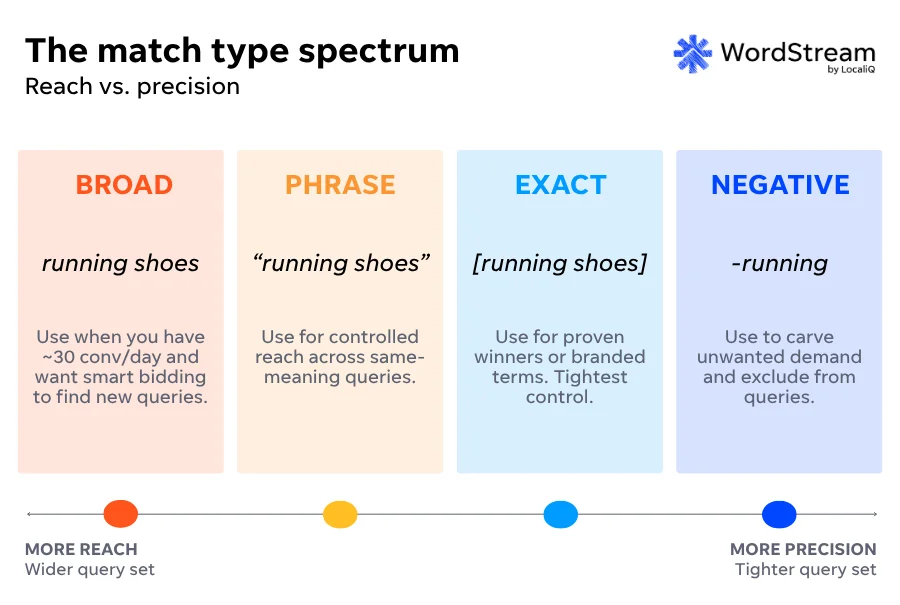
Keyword match types in Google Ads are the rules that tell Google how loosely or strictly to map your keyword to a search query before a live search is eligible to show your ad. There are four of them: broad match (loosest), phrase match (moderate), exact match (strictest), and negative match, which excludes searches instead of triggering on them.
The distinction between a keyword and a search query is an important one: You designate keywords in your Google Ads campaigns (with associated match types), and those keywords then get matched to search queries (the actual thing that a searcher is typing into Google) based on the match type you’ve used. So if your keyword is running shoes, it might be matched to a search query like best running shoes, running shoes for kids, what brand of running shoes won’t wear out if I run 2 miles a day, etc.
The first three match types (broad, phrase, exact) range from loose to strict, and negative keywords act as a veto to override specific terms. Because match type is set on each individual keyword inside an ad group, a single campaign can run broad, phrase, and exact keywords side by side.
🛑 Want to know how your Google Ads campaigns are doing right now? Find out with a free, instant audit >> Google Ads Performance Grader
The three positive keyword match types
1. Broad match
Broad match is the default for new keywords, and it tells Google your ad can show on queries related to your keyword.
Logistically, when adding the keyword to the campaign, there is no symbol: A keyword written as running shoes, with no quotes or brackets, will be interpreted as a broad match.
Per Google’s own documentation, the system weighs the keyword’s meaning, the searcher’s recent activity, your landing page content, the other keywords in your ad group, and your bidding signals to decide whether to serve your ad on a given query, so two accounts bidding on the same broad keyword can match quite different traffic.
Broad match can serve a couple of functions:
- Discovery: Finding new terms to add as keywords, and finding negative keyword candidates.
- Reach: If you have enough volume to run smart bidding and maximize for conversions, running broad match terms can help get more reach at efficient costs–just check to make sure the conversion quality is there if your action isn’t a hard sale and is a lead.
If you let broad match run, particularly with limited data and without monitoring the queries your keyword is getting matched against, you can run into lower-quality traffic.
2. Phrase match
Phrase match wraps your keyword in straight quotation marks: “running shoes.” It matches queries that contain the meaning of your keyword, with word order changing only where “meaning is preserved”–so it gives Google some leeway beyond just exact match, but nowhere near as much as broad match.
In most well-structured Google Ads accounts, phrase match is the workhorse. It gives you more reach than exact without the full discovery cost of broad, and the meaning-based matching catches most plurals, prepositions, and semantic variants you would want anyway. That said, “meaning-based” is doing a lot of work in that sentence, so I still review phrase-match search terms regularly rather than assuming the matching will stay tight.
3. Exact match
Exact match wraps your keyword in square brackets: [running shoes]. It is the tightest control you have over which queries trigger your ad, but it has loosened steadily, so I would describe it as relative tightness rather than an absolute.
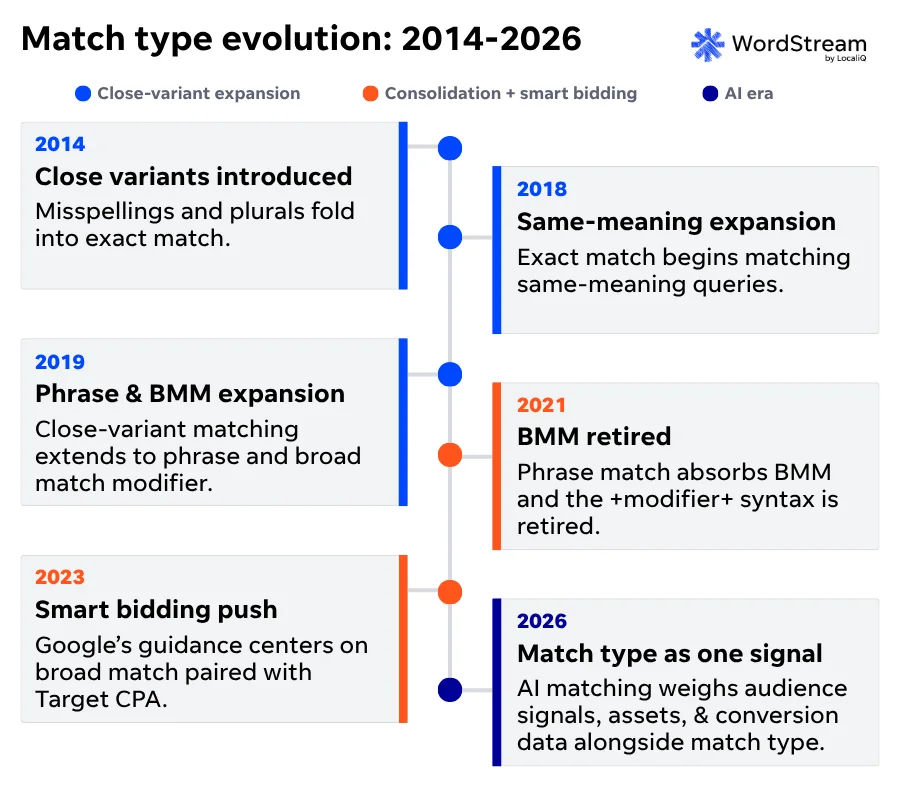
Since Google introduced close variants in 2014, exact match has matched misspellings and plurals. Since September 2018, it has matched same-meaning rewrites, so [running shoes] can also trigger on shoes for running.
I use exact match for proven converters, branded terms, and any query I have specifically validated in the Search Terms Report. It is the right home for the keywords I want to bid most aggressively on, with the caveat that I still audit it like the others.
⚡️ Is your Google Ads account set up for success? Download now >> The Last Guide to Google Ads Account Structure You’ll Ever Need
What are negative keywords?
A negative keyword tells Google your ad must not show on queries containing that term. You apply them at three levels (shared list, campaign, or ad group), and they support three modes (broad negative, phrase negative, and exact negative), per Google Ads Help.
So if you’re advertising for running shoes and want to make sure your ad isn’t matched against searches for tennis shoes, you could set tennis as a negative. One important note about negative keywords is that the matching function for these terms works differently than standard match types:
Negative vs Standard Keyword Match Types
The same three match types behave differently as standard keywords versus negative keywords. Compare the two sides match type by match type in Google Ads Search campaigns.
The rule that catches advertisers out: standard keywords expand, negative keywords do not. Standard broad, phrase and exact keywords all match close variants, and broad reaches related searches through Google AI. Negative keywords block only the literal terms you enter. They auto-handle casing and obvious misspellings, but they will not block plurals, synonyms or close variants, so you have to add those yourself.
| Standard keyword: your ad CAN show when… | Negative keyword: your ad is BLOCKED when… |
|---|---|
| Broad match running shoes -running shoes Standard broad expands outward with Google AI. Negative broad stays literal and needs every term present. | |
| The search is related to your keyword, including synonyms, close variants and even queries that do not contain your words. Google AI weighs context, recent searches and your landing pages. Widest reach. | The search contains all of your keyword terms, in any order. If only some terms appear the ad can still show, and no synonyms or close variants are blocked. |
| Phrase match "running shoes" -"running shoes" Standard phrase matches meaning and can reorder. Negative phrase needs the literal phrase, in order. | |
| The search includes the meaning of your keyword. The meaning can be implied or a more specific form, close variants are included and word order can flex when meaning is preserved. | The search contains your exact terms in the same order. Extra words are allowed, but reordered terms and close variants are not blocked. |
| Exact match [running shoes] -[running shoes] Standard exact still expands to same-meaning close variants. Negative exact blocks only the literal query. | |
| The search has the same meaning or intent as your keyword, including close variants such as plurals, misspellings, paraphrases and reordered terms. Narrowest reach. | The search is your exact terms, in the same order, with no extra words. Plurals and same-meaning variants are not blocked. |
Source: Google Ads Help, About keyword matching options and About negative keywords. Reflects Search campaign behavior as of June 2026. Built by WordStream.
Our 2026 Google Ads Benchmarks put the average Google Ads cost per click at $5.42 and the average cost per lead at $66.69, and in an expensive vertical like Attorneys and Legal Services, those climb to $9.87 per click and $131.63 per lead. Making sure you have the correct keywords excluded could save you significant spend quickly.
If you’re not sure which terms to set as negative keywords, our free keyword tool is a great place to start.
What changed in 2021: Phrase match and modified broad match
In February 2021, Google consolidated modified broad match (BMM) into phrase match, retiring the +word+ syntax that had been a staple of ad group structure since BMM launched in 2010 and folding word-order flexibility into phrase match’s logic.
Per Google’s announcement, phrase and BMM keywords began matching the same traffic on February 18, 2021, and Google stopped accepting newly created BMM keywords later that July. The change did not touch exact match, broad match, or negatives.
Some older vendor docs and agency playbooks still reference BMM as if it exists. It does not, and any documentation describing active +modified+ syntax after February 2021 is out of date. That is a small but reliable tell that a guide has not been updated.
Close variants
“Exact match” has slowly become a bit of a misnomer through more than 10 years of close-variant expansion.
In 2014, Google folded misspellings and plurals into exact match. In 2018, it expanded exact match to same-meaning rewrites, so [running shoes] started triggering on shoes for running and similar. In 2019, the same-meaning expansion was extended to phrase match and the old BMM. And as matching has shifted toward intent in the AI era, the close-variant set has kept widening, which is the direction Google has signaled it intends to keep going.
What this means for you is that exact match has to be audited the same way broad and phrase do. Reviewing the Search Terms Report on an exact-match keyword fairly routinely surfaces queries you would not call equivalent. The patterns I see most are commercial-research queries triggering keywords I meant for transactional intent, and plural or near-synonym variants triggering keywords I deliberately kept narrow.
The fix is not to abandon exact match, since it is still the tightest control available, but to treat its tightness as relative and to apply close-variant negatives when the matching drifts.
How to choose match types for a new campaign
For most new campaigns, I recommend advertisers primarily use phrase match. It strikes the best mix of reach and control: enough room for Google to match relevant searches, without the open-ended spend of broad.
Broad match is a valuable tool for discovery and expansion once you have phrase-matched keywords working from an ROI perspective, and you want to expand into new inventory: converting queries you would not have thought to add.
Generally, exact match is most valuable when used on your high-value terms and the segments of the campaign you most want to fund. Exact lets you push budget toward the queries you have already proven convert and bid them more aggressively.
How to audit match types in an existing account
Auditing match types in your account essentially comes down to analysis of the Search Terms Report in Google Ads.
To pull it, open the account in Google Ads, go to the Insights and reports menu, and choose search terms. Set the date range to the last 30 to 90 days and sort by cost, so the biggest spenders sit at the top where the waste usually hides.
Work down the list and pull out the poor performers: both individual queries and whole groups of related queries that spend without converting. Those are your negative candidates. The groupings matter as much as the one-offs, because a recurring theme like a wrong audience, a free or job-seeker intent, or an adjacent product you do not sell is better handled with a single phrase or broad negative than with a dozen exact ones.
You can sort that data in Excel, and AI tools like Claude now do a pretty good job of analyzing this data (though you always have to check and verify the data they’re sourcing before following their recommendations).
Then look at where the waste concentrates by keyword. If a specific keyword is generating a lot of underperforming traffic, the better fix is often to tighten its match type rather than to keep bolting on negatives: Move it from broad to phrase, or from phrase to exact, so Google has less room to interpret it. I save that move for keywords where the search terms show consistent drift, not for one-off bad queries.
Match type symbols quick reference
If you’re uploading a large number of keywords into your account via the Google Ads interface or the Google Ads Editor, a quick reference for the symbols to use by match type for a specific keyword is below:
Match Type Symbols Cheatsheet
The syntax for each Google Ads keyword match type, with the keyword "running shoes" as the example.
running shoesNo symbol. Write the keyword as plain words.
"running shoes"Wrap the keyword in straight double quotes.
[running shoes]Wrap the keyword in square brackets.
-running-"running shoes"-[running shoes]Prefix a minus sign. You can negate in broad, phrase or exact mode.
Reflects Google Ads syntax as of June 2026. Built by WordStream
Keyword match types FAQs
What are keyword match types in Google Ads?
Keyword match types are four controls (broad, phrase, exact, and negative) you set per keyword to govern how closely a search must align with it before your ad can show. Broad allows the loosest matches, exact the strictest, and negatives exclude searches outright. The symbols are none, quotes, brackets, and a minus sign.
What is the difference between broad, phrase, and exact match?
The difference is how far a search can stray from your keyword. Broad match shows on loosely related searches and synonyms, even without your words. Phrase match needs your keyword’s meaning present, with flexible word order. Exact match needs the same meaning or intent; it’s the strictest of the three. Negatives block rather than trigger.
Which match type should I use first?
Start with phrase match for most new campaigns. It gives the best balance of reach and control, capturing relevant variations without wasting spend on guesses. Add broad later to expand once Smart Bidding has conversion data to guide it, and reserve exact for proven high-value terms. Apply a shared negative list from day one.
Do match types still matter with Smart Bidding?
Match types still matter with Smart Bidding, though their job has narrowed. Smart Bidding sets a bid for every auction in real time, yet your match type still decides which searches your ads can enter, which is the pool of queries it learns from. Match type now sets how wide you reach, while audience and conversion signals drive precision.
What are negative keywords and how do they work?
Negative keywords are terms you add to block your ad from showing when a search contains them, the reverse of normal keywords. You set them at the account, campaign, or ad group level in broad, phrase, or exact mode. The catch: They match literally, so they will not block plurals, synonyms or close variants. You add each variation yourself.
Ready for the next step?
- For beginners: Download our PPC 101 guide >>
- For active advertisers: Try our free Google Ads Performance Grader >>
- For the overwhelmed: Let us take PPC off your plate! Talk to one of our experts >>

Meet The Author
Tom Demers
Tom Demers is the co-founder and managing partner of Measured SEM. He has over a decade of experience helping businesses generate meaningful growth through SEO, PPC, content marketing, and online publishing. Formerly the Director of Marketing at WordStream, Tom has also worked as an in-house SEO specialist, SEO manager, agency consultant, and independent search marketing advisor. Through Measured SEM and his own publishing properties, he has driven millions of dollars in incremental pipeline and sales, generated millions of unique visitors, and built, monetized, and sold high-traffic sites. His insights have been featured in outlets including Search Engine Land, Search Engine Journal, USA Today, and Fox Business.
