
Cost Per Lead (CPL): What to Know About Cost Per Lead for PPC
Cost per lead refers to the amount you pay for a lead from your pay-per-click (PPC) marketing campaign. In this article, we’re sharing everything you need to know about cost per lead. You’ll find answers to common questions, including what it is, how it’s calculated, what a good cost per lead is, and more.
What is cost per lead?
Cost per lead, or CPL, is a straightforward way to measure how much you’re spending to generate each new lead. As a reminder, a lead is someone who has shown interest in your business by taking an action you care about. Think filling out a contact form, requesting a quote, signing up for an email list, or even calling your business. The cost per lead is the marketing metric that helps you approximate how much you spend to acquire each lead.

🛑 Worried you’re wasting spend in Google Ads? Find out with a free, instant audit >> Google Ads Performance Grader >>
How to calculate cost per lead
To calculate cost per lead, you need to divide the amount you spent on marketing by the number of leads you generated.
Cost per lead (CPL) = Total marketing spend ÷ number of leads generated
Let’s consider an example. If a home remodeling company spends $2,000 on Google Ads in a month and generates 40 leads, the cost per lead is $50.

Google Search Sponsored Results and Sponsored Products for the query “wallpaper services.”
Now, here’s where CPL not being the whole story comes in. If those 40 leads turn into just two customers, the company is spending $1,000 to acquire each customer. Meanwhile, another campaign might cost $75 per lead but generate 10 customers from 40 leads. That’s a higher CPL but a much lower customer acquisition cost.
This is why it’s important to look at CPL alongside metrics like lead quality, conversion rate, and customer acquisition cost. And in order to do that, you need to be clear on how these metrics work together and how they’re different. Let’s take a deeper look at that.
Cost per lead vs. cost per click
While cost per lead tells you how much it costs to turn your marketing efforts into leads, cost per click (CPC) tells you how much you pay to get clicks on your ad. For example, you might pay an average of $2 per click on a Google Ad, but if it takes 10 clicks to generate one lead, your CPL would be $20. CPC measures the cost of generating traffic; CPL measures the cost of turning that traffic into potential customers.
Cost per lead vs. customer acquisition cost
Cost per lead measures what you spend to generate a potential customer, while customer acquisition cost (CAC) measures what you spend to acquire an actual customer. Here, the difference is what happens after someone becomes a lead. For example, if you spend $1,000 to generate 20 leads, your CPL is $50. If five of those leads become customers, your customer acquisition cost is $200.
So CPL can tell you how efficiently you’re generating leads, while CAC gives you a better picture of what it costs to grow your actual customer base.
Cost per lead vs. cost per impression
Cost per lead measures the cost of generating a lead, while cost per impression (CPM) measures the cost of getting your ad in front of people. CPM is typically expressed as the cost per 1,000 impressions, regardless of whether someone clicks or takes another action.
For example, a campaign might have a CPM of $10, meaning you pay $10 for every 1,000 times your ad is shown, while its CPL could be $40 if those impressions generate leads at that rate.
While CPL focuses on lead generation, CPM is primarily a measure of reach and visibility. Now, reach and visibility are important marketing goals as well, but it’s a big distinction.
Cost per lead vs. cost per action
Cost per lead measures how much you spend to generate a lead, while cost per action (CPA) measures how much you spend when someone completes a specific action you define as a conversion. This action could be making a purchase, signing up for a free trial, downloading an ebook, or filling out a form.
In other words, CPL is a specific type of cost-per-action measurement. All leads are actions, but not all actions are leads.
🚨 What results can you expect from Google Ads? Download our latest Google Ads Benchmarks to find out!
Why is cost per lead an important metric?
Whether you’re working on your own business venture or in a marketing department for a bigger company, marketing budgets are rarely unlimited. Chances are that you need to know not just whether people are seeing your ads or clicking on them, but how much you’re spending to generate an actual opportunity for your business. That’s where cost per lead comes in.
As a metric, CPL gives you a relatively simple way to connect your marketing spend to the people who have taken a meaningful step toward becoming customers—plus, it gives you a number you can compare across campaigns, channels, and time.
CPL helps maximize your marketing budget
Cost per lead is an important metric to focus on because it offers a practical way to compare lead-generation efforts. Let’s consider this. A home services company spends $2,000 on Google Ads and generates 25 leads. Its CPL is $80. If it spends another $1,000 on a different campaign and generates five leads, that campaign’s CPL is $200.
Now, this doesn’t automatically mean the first campaign is better in conversions or higher ranking. Remember, the second campaign could be producing higher-value jobs. But this stark comparison prompts you to dig deeper and find out where the budget is going and how that looks in terms of conversions and customer lifetime value.
That’s why CPL is such an important metric. It helps keep you in check and helps you ensure your budget is working strategically, whether that means tweaking your ad copy or adjusting your targeting.
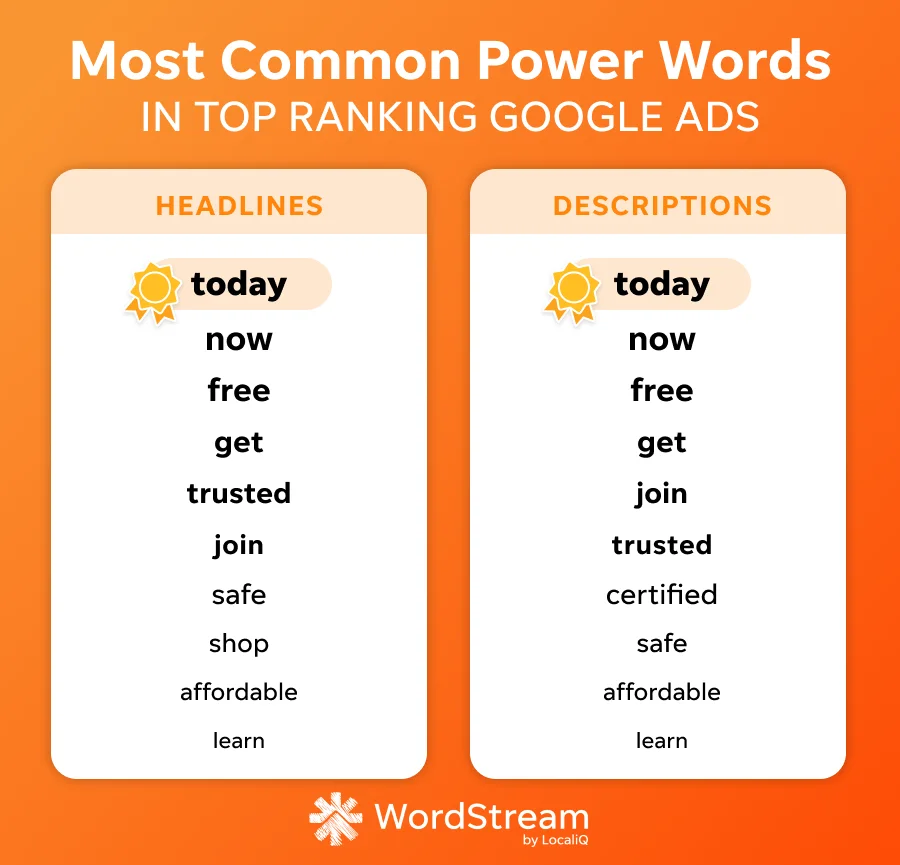
We found key similarities in our analysis of 180 top-ranking Google Ads.
📚 Free guide download >> The 42 Best Call to Action Phrases Ever (& Why They Work)
It gives you insight into post-click behavior
This is especially clear in comparison to other metrics. CPC tells you what you’re paying to bring someone to your website. But cost per lead tells you whether those clicks and actions are actually turning into potential customers. That’s an important distinction, especially for small businesses, because a campaign can generate inexpensive clicks without generating many leads.
Consider a tutoring center paying $4 per click. If 100 people click on its ad and five fill out a consultation form, the business has spent $400 to generate five leads, which is an $80 CPL. If another campaign costs $5 per click but generates 10 leads from those same 100 clicks, its CPL is only $50.
The second campaign has the higher CPC, but the lower CPL. Looking at both metrics together gives you a much clearer picture of what’s happening.
CPL makes you focus on lead quality—not just lead quantity
A low CPL can look great on a marketing report. (We all want to keep our costs low and our value high, don’t we?) But 100 inexpensive leads aren’t necessarily more valuable than 20 expensive ones if those 20 are much more likely to become customers.
Imagine a dental practice runs two campaigns:
- Campaign A: $500 spend → 25 leads → $20 CPL → 2 new patients
- Campaign B: $750 spend → 15 leads → $50 CPL → 6 new patients
Campaign A generated less expensive leads, but Campaign B generated three times as many new patients. If those patients generate enough revenue to justify the additional advertising spend, the higher CPL isn’t necessarily a problem, as long as it’s still in your budget.
This is why CPL should be considered alongside your conversion rate, customer acquisition cost (CAC), and even your business’s average customer lifetime value.
⚡️ Is your Google Ads account set up for success? Download now >> The Last Guide to Google Ads Account Structure You’ll Ever Need >>
CPL is an actionable metric
Another big benefit of tracking cost per lead: It can help you identify where to experiment. If your CPL is increasing, you can investigate potential causes: Are your ads attracting the wrong people? Is the landing page making it difficult to convert? Has competition increased? Are you targeting overly broad keywords? Is the offer compelling enough?
Each of these questions leads to a clear place to run a test or dig in: new targeting methods, competitive landscape, landing page design, CTAs, keyword research. You can run these tests, review the numbers, and actually improve your CPL, which can meaningfully impact your budget and your results.
That’s because CPL gives marketers a bridge between marketing activity and business results. Your cost per lead tells you what you’re paying to create opportunities, helps you compare campaigns more meaningfully than clicks or impressions alone, and gives you a starting point for evaluating whether your marketing spend is generating leads at a sustainable cost.
What is a good cost per lead?
A good cost per lead depends on several factors, including your industry, your average customer value, and the competitive landscape. You can use industry benchmarks to determine what other businesses like yours pay for leads on their ads.
The average cost per lead for search ads is $66.69.
However, the range of averages for specific industries is substantial. For example, the average cost per lead is $90.92 for home and home improvement, $77.48 for education and instruction, $72.97 for dentists and dental services, and $44.70 for travel. That’s nearly a $50 difference between home improvements and travel, which is a huge swing in many marketing budgets.
Here’s a look at cost per lead by industry:

The bottom line? There isn’t one CPL number that every small business should aim for. Instead, figure out your industry benchmark and use that as a guide. Then, there are a few strategies you can use to lower your cost per lead—and get more out of your marketing budget.
(You can find the average cost per lead for Facebook Lead Ads here.)
How to reduce cost per lead
As we’ve said, a lower cost per lead isn’t always a better one. But we get it. You still have a budget to keep in mind and targets to hit. The key is to approach this strategically while keeping your CPL and your lead quality in mind.
Review your targeting
One of the fastest ways to waste a small marketing budget is to pay for clicks from people who were never likely to become customers. Look at the search terms, audiences, locations, and other targeting settings generating your leads. If you’re a local business, make sure you’re reaching people you actually serve—not people hundreds of miles away.
For example, a New Hampshire landscaping company probably doesn’t need to advertise for broad searches like “landscaping ideas.” It may get more useful traffic from searches such as “landscaper near me,” “NH lawn care company,” or “spring yard cleanup Manchester NH.”
In addition to reviewing your location-based keywords, spend some time digging into your Google Ads audience targeting options, as well as other platforms.

Google Ads audience targeting options are extensive, so be sure to double-check your settings.
🕵️♀️ Want to understand who you should be targeting with your marketing? Download the guide: How to Find Your Target Audience [Simple Steps!] >>
Focus on your Quality Score components
Google evaluates ad quality and scores based on expected click-through rate, ad relevance, and landing page experience. In order to see better results, Google recommends matching ad language more closely to search terms and organizing keywords into tighter themes. Higher ad quality can also contribute to better performance and lower costs per click.
Some of this is easy to follow because it’s common sense. If your ad says one thing and your landing page says another, you’re making people work to figure out whether they’ve found what they’re looking for. In addition to providing a frustrating experience that could be connected to your brand identity, this can mean paying for clicks that never become leads.
So what does this look like in practice? For a dental practice, for example, an ad targeting “emergency dentist” should take someone to a page specifically about emergency appointments—not the practice’s generic homepage.

Improve your landing pages
You don’t necessarily need more traffic to lower your CPL. Instead, you may simply need more of your existing traffic to convert.
If 100 people click your ads and five become leads, your conversion rate is 5%. If you can get 10 of those same 100 visitors to become leads, you’ve effectively cut your CPL in half without buying another click.
When it comes to converting leads, landing page copywriting matters. You want to keep the messaging consistent, but you also need to ensure your page provides a clear, compelling call to action.

Your CTA doesn’t need to be complicated, just clear, compelling, and easy to click. A home remodeling company, for instance, could put “Request a Free Estimate” prominently above the fold, show examples of recent projects, include its service area, and make the phone number easy to find. A tutoring center could put its consultation form directly alongside information about the program rather than making visitors navigate through several pages to find it.
Don’t optimize for the lowest CPL—optimize for better leads
This may sound counterintuitive, but lowering CPL isn’t always the goal. If you make your targeting so broad that you generate lots of cheap, unqualified leads, you’ve reduced one metric while potentially making your sales team’s job harder or even wasting your budget.
Instead, track what happens after the lead comes in. Which campaigns generate qualified leads? Which produce appointments? Which ultimately generate customers?
For example, a private K-12 tutoring center might find that Facebook leads cost $15 each while Google Search leads cost $40. At first glance, Facebook looks like the obvious choice. But if 20% of Google leads become paying students compared with 3% of Facebook leads, the more expensive leads may be producing a much better return.

To get started, consider adding a “qualified lead” or “customer” column to your reporting. Compare CPL → qualified lead rate → customer conversion rate → revenue, rather than stopping at CPL.
Track CPL by channel—and give it some context
Finally, make sure you’re not lumping every marketing channel into one average CPL. Your cost per lead across Google Ads, Facebook, organic search, email, and referral can be different—and, perhaps more importantly, can tell very different stories.
For a travel company, for example, a social media campaign might generate inexpensive leads early in the customer’s research process, while Google Search might produce fewer leads who are closer to making a purchase. If you only look at your overall average CPL, you’d miss that difference.
Track CPL by channel, campaign, service, location, and audience wherever you have enough data to make the comparison meaningful. Then, you should pair it with lead quality and customer conversion data. Your goal isn’t to find the channel with the lowest number. Instead, it’s to understand where your marketing dollars are most consistently creating valuable opportunities—so that you can double down on making your budget work.
What are the best ways to track cost per lead?
Tracking cost per lead doesn’t have to mean building a complicated marketing dashboard. Remember, the basic formula is straightforward: divide your marketing spend by the number of leads generated. The challenge is making sure you’re counting the right leads and correctly connecting them to the marketing activity that generated them. Mailchimp recommends tracking CPL over a consistent timeframe and, when possible, breaking it down by individual channels so you can see where your budget is producing leads most efficiently.
Here are some of the most useful ways to track CPL.
1. Start with the simple CPL calculation
If you’re just getting started, you don’t necessarily need sophisticated software. Create a spreadsheet with your marketing spend and leads for each channel, campaign, or month. As a reminder, the formula for cost per lead is (luckily) a simple one.
CPL = Marketing spend ÷ Number of leads
For example, if you’re running a tree removal company and you’re spending $1,500 on Google Ads and generating 30 leads, your CPL for that campaign is $50. If you spend another $500 on Facebook and generate 20 leads, your Facebook CPL is $25.
Track these numbers consistently rather than calculating CPL only when you want to evaluate a campaign.
🚀 Want to learn how AI can supercharge your ads strategy? Free guide: 9 Powerful Ways to Use AI in Google & Facebook Ads >>
2. Track CPL by marketing channel
An overall CPL can tell you how much you’re spending to generate leads, but CPL by channel tells you where those leads are coming from. Separate your data for paid search, social media, email, organic search, referrals, and other channels you use.
For example:
| Channel | Spend | Leads | CPL |
|---|---|---|---|
| Google Ads | $1,500 | 30 | $50 |
| $500 | 20 | $25 | |
| $300 | 30 | $10 |
This makes it much easier to identify patterns and decide where to investigate further. But don’t automatically shift your entire budget to whichever channel has the lowest CPL. A $25 lead isn’t necessarily more valuable than a $50 lead if the latter is much more likely to become a customer. Mailchimp specifically recommends looking at CPL alongside conversion rates and customer acquisition costs rather than using CPL on its own.
3. Set up conversion tracking for your website
If you’re running digital ads, don’t rely on clicks to estimate how many leads you’re generating. Set up conversion tracking so your advertising platform can record meaningful actions, such as form submissions, quote requests, appointment bookings, or calls.
For Google Ads, conversion tracking can show how many conversions your campaigns generate and the average cost of those conversions. Google also recommends using conversion goals that correspond to meaningful lead-generation actions, such as qualified leads, converted leads, booked appointments, or quote requests.
For a medical practice, that might mean tracking appointment requests. For a home services company, it could be quote requests or phone calls. For a tutoring business, it might be consultation requests.
Just be sure to define what counts as a lead before you start measuring. Otherwise, you may end up comparing campaigns that aren’t actually measuring the same thing.

Here’s how to set up your Google Ads conversion tracking.
4. Connect your leads to a CRM
Once you’re generating leads from multiple sources, a spreadsheet can become difficult to maintain. A customer relationship management system, or CRM, can help you keep track of where each lead came from and what happens to that lead afterward.
For example, you might record:
Google Ad → Contact form → Qualified lead → Consultation → Customer
That additional information is extremely valuable because it lets you move beyond basic CPL and calculate things like cost per qualified lead and cost per customer.
5. Don’t forget phone calls and offline leads
Depending on your industry, you might be fielding intake calls in addition to the online forms. This is particularly common in trades, medical services, education, and some travel or hospitality businesses.
You want to keep track of these leads, especially when they’re connected to existing campaigns.
Google Ads has offline conversion tracking designed to connect online advertising interactions with actions that happen later offline. For example, a lead can click an ad, contact a business, enter the CRM, and eventually become a customer; that later conversion can be imported back into Google Ads.
Watch the video about offline conversion tracking.
If this is relevant to your business, make sure you take the time to set up offline tracking.
6. Score your leads
This is one of the most important steps if you want your CPL reporting to actually inform your marketing decisions, because not every lead is worth the same amount. A $50 lead for a $10,000 kitchen renovation is fundamentally different from a $50 lead for a $100 service.
If your business can reasonably estimate the value of different types of leads, consider incorporating that information into your reporting and setting up parameters to score your leads.
For example, a medical practice might assign different values to new patient appointments depending on the service, while a home services company could distinguish between a small repair inquiry and a larger remodeling project. A boutique hotel might calculate a score based on actions taken throughout the website to determine how ready a potential lead is to book a trip.
This helps you consider not only your cost per lead, but your cost per qualified lead—allowing you to focus your budget and your time even more strategically.
Track and improve your cost per lead
Understanding what cost per lead is, how to track it, and how to lower it can help you run the most effective PPC campaigns.
Ready for the next step?
- For beginners: Download our PPC 101 guide >>
- For active advertisers: Try our free Google Ads Performance Grader >>
- For the overwhelmed: Let us take PPC off your plate! Talk to one of our experts >>
