About the Author


Let’s say that an appliance repair company in Austin asks ChatGPT or Claude for keywords. They might get ideas like “overnight appliance repair Austin,” “buy refrigerator parts online,” and “appliance repair technician training.”
They sound relevant. But what if the company doesn’t offer overnight repairs, sell parts, or train technicians?
That’s the catch with AI keyword research: AI can generate keywords that sound right without knowing whether they’re right for your business.
Used blindly, that can mean irrelevant traffic, wasted ad spend, and content for services you don’t even offer. And with more searches ending in zero-click results and AI answers, a small business can’t really afford to waste pages and clicks like that.
Used well, though, AI can analyze customer emails, sort keyword data, and surface opportunities in minutes.
Here are five ways to use AI for keyword research effectively, plus five mistakes to avoid.
Contents
- What AI can and can’t tell you about keywords
- How to use AI for keyword research
- How not to use AI for keyword research
- How to review AI-generated keywords to build one keyword shortlist
What AI can and can’t tell you about keywords
People use “AI keyword research” to describe three very different things, and each one can tell you something different.
| Type of AI output | Example | What it can tell you | What it can’t tell you |
|---|---|---|---|
| Ideas a chatbot generates | Asking ChatGPT/Claude for “plumbing keywords” | Possible phrasings and topics worth researching | Whether anyone searches for them, or how often |
| Analysis of a file you upload | A Google Ads search terms report pasted into Claude | Patterns, groups, and outliers in your own data | Anything outside the data you gave it |
| Data a connected tool retrieves | An SEO platform’s built-in AI assistant working from its own keyword database | Search volume and difficulty from a named source | Whether the keyword fits your business or whether the AI reported every figure correctly |
The first kind is where most small businesses start, and it’s the least reliable. A chatbot generating keyword ideas is predicting what sounds plausible. It has no idea how many people in Austin searched for “dishwasher repair” last month.
The second kind is where AI earns its keep. Give it real data, and it sorts, groups, and flags faster than any person could.
The third kind has numbers you can trace back to a source, though it still can’t tell you whether a keyword fits what you actually sell. Tracing them matters, because the assistant summarizing those numbers can still get them wrong.
Most of the mistakes later in this guide come from treating the first kind of output as if it were the third.
🛠️ Get everything you need to know about showing up in AI search in our free guide: The AI Search Toolkit >>
How to use AI for keyword research
The methods below work best when you give AI something real to work with, and you probably already have most of it.
Pull keyword ideas from customer conversations
Your inbox is a useful starting point for keyword research. Customer emails, call notes, and booking requests show what people need and how they describe it. If a dozen customers ask about Bosch dishwasher repairs, you have a reason to investigate that keyword.
Suppose the Austin company we mentioned earlier gathers 20 recent emails and call notes, removes names and contact details, and uploads them to ChatGPT or Claude. One customer wrote: “My washer won’t drain. Can someone come today?” Another asked: “Do you fix Bosch dishwashers, or do I need to call Bosch?”
Those messages give the owner several ideas to investigate, including drainage problems, same-day appointments, and brand coverage. AI can turn them into possible search phrases, but the owner needs to see which wording came from customers and which phrases the tool suggested.
To keep that distinction clear, the owner could use a prompt like this: “Extract the problems and service questions in these messages. Keep the original wording in one column and suggest up to two search phrases in a second column. In a third column, note what we’d need to check before using each phrase. Don’t add search volume or invent problems.”
The table below illustrates what the output could look like:
| Customer wording | Keyword candidate | Next research step |
|---|---|---|
| My washer won’t drain | washing machine not draining | Check troubleshooting versus repair-booking intent |
| Can someone come today? | same day washer repair Austin | Confirm availability and check local demand |
| Do you fix Bosch dishwashers? | Bosch dishwasher repair Austin | Confirm brand coverage and review existing content |
The separate columns help you see what came from customers and what AI added. “My washer won’t drain” is the customer’s wording. “Washing machine not draining” is a suggested search phrase. It gives you a keyword to investigate, while the third column shows what you need to check before using it.
For “same day washer repair Austin,” the owner needs to confirm how often the company can offer those appointments. For “Bosch dishwasher repair Austin,” the technicians need to confirm that they service the brand. Those checks come before writing a page or running an ad.
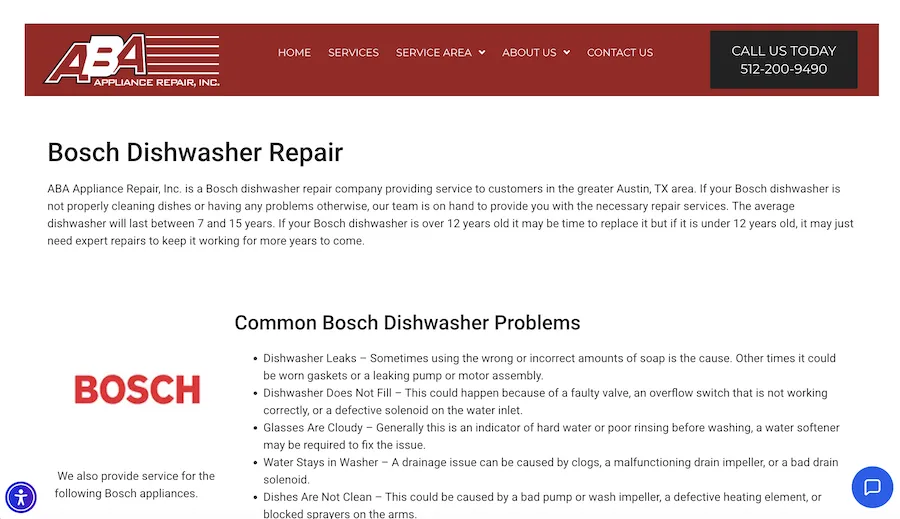
This business has a page dedicated to Bosch dishwasher repairs.
Customer conversations can reveal useful ideas in other industries too.
“To find high-intent keywords AI hasn’t saturated, I go straight to the voice of the customer on sales calls,” said Tamara Omerovic, a marketing consultant. “Prospects don’t use broad marketing lingo; they describe specific pain points. That’s how I discovered winning terms like ‘signs of a disgruntled employee’ for an employee monitoring software client.”
You can apply the same approach to questions your team hears regularly:
- A dental office might find repeated mentions of “my tooth hurts when I drink something cold,” suggesting a need for content about tooth sensitivity.
- An HVAC company might hear “AC blowing warm air” more often than the technical terms on its service pages.
- A car rental company might find that customers keep asking about credit card requirements because its booking page leaves them unclear.

This dentist’s blog post answers a common question about tooth pain when drinking something cold.
These questions show what your customers care about. They don’t tell you how often the wider market searches for it. Check the suggested phrases in a keyword tool, then review search intent and your existing pages before deciding what to create. Some questions may only need a clearer answer on a page you already have.
🔎 Need help finding the right keywords? Try our Free Keyword Tool!
Expand your list around the services you actually sell
“Give me 100 appliance repair keywords” leaves AI to guess what your business does. It fills the gaps with anything linked to the category, so the list could include searches for parts retailers, commercial repair companies, and trade schools.
A short business brief sets the boundaries. For the Austin company, it could cover five things:
- Services offered: Refrigerator, dishwasher, washer, and dryer repair.
- Service area: Austin, TX.
- Availability: Monday through Saturday, with limited same-day appointments.
- Customer type: Homeowners and renters who need residential repairs.
- Exclusions: No parts sales, commercial repairs, overnight service, or technician training.
“The most useful part of any brief I give a model is the list of things the client doesn’t do,” said Stephanie Yoder, Director of Content Strategy at LaunchSquad. “The model knows the whole category, so it fills gaps with services that sound right for a business like yours. Without exclusions, you get keywords for the average company in your industry.”
Write the exclusions as plainly as you can. “Residential repairs only, no parts sales, no overnight appointments” leaves less room for interpretation than “appliance repair.” Save the brief, reuse it in later prompts, and update it when your services change.
Then ask for a focused list: “Using this business brief, suggest 12 refrigerator repair searches covering symptoms, cost, appointment timing, and location. Explain how each one connects to our services. Exclude anything we don’t offer.”
You might get “refrigerator not cooling repair Austin,” “refrigerator leaking water repair,” and “refrigerator repair service call cost.” Because the prompt asks for a reason behind each keyword, you can see where it fits. The cost search could support a section on diagnostic fees. The leak and cooling searches belong on the refrigerator repair page.
Some of these suggest someone close to booking. “Refrigerator leaking water repair Austin” points to someone who wants local help. “Same day refrigerator repair” points to someone who needs a technician soon. Treat both as guesses until you’ve checked the data and the search results.
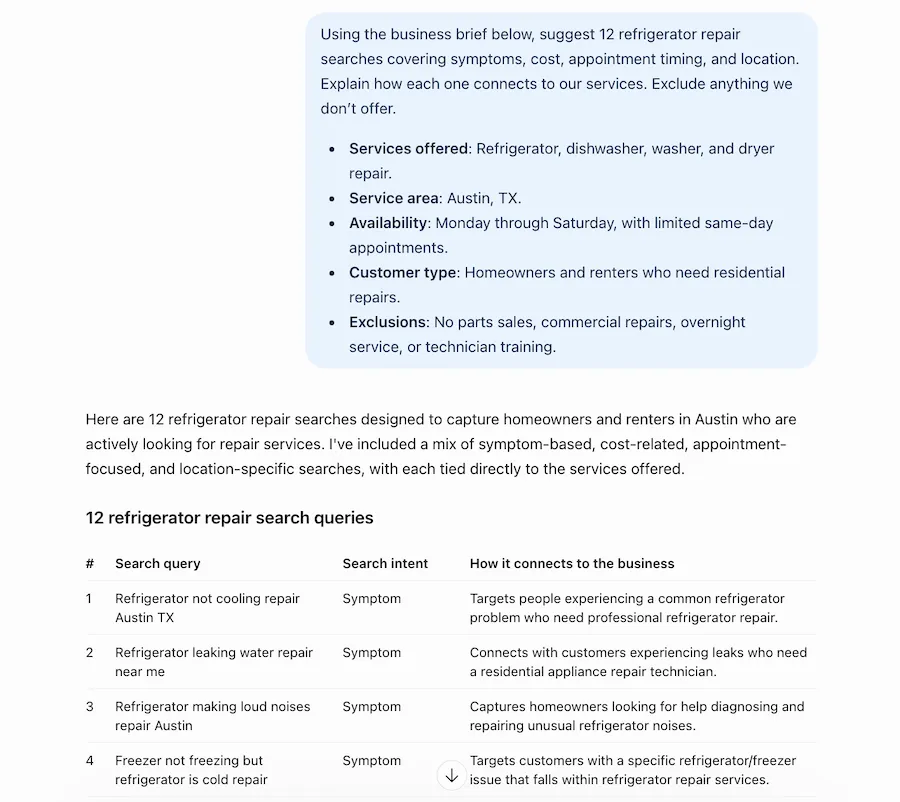
A sample response when I tested this prompt in ChatGPT.
Look up each keyword in Google Keyword Planner or another keyword tool. Set the location to the area you serve so you don’t mistake national interest for local demand. Then search the terms yourself and look at what comes up:
- Local repair companies and map listings suggest people want a service nearby.
- DIY guides and videos suggest people want to fix the problem themselves.
- A mix of both suggests the search could serve either need.
What you find there decides the next step. You might add a section to your repair page, explain your fees, or test the keyword in your ads.
Organize an SEO keyword export into page recommendations
Once you have a keyword list, you need to decide which page should cover each term. AI can make the first pass if you give it the keywords and your existing pages.
Export your queries from the Performance report in Google Search Console, or download a keyword list from Semrush or Ahrefs. Keep whatever metrics come with it, such as clicks, impressions, or search volume. Then list your URLs with a one-line description of each. For the Austin company, that means its appliance repair pages, pricing page, and careers page.
Then try this prompt: “For each keyword, suggest the most relevant page from the URLs provided. Flag terms where the right page is unclear and searches from people who aren’t looking to book a repair. Keep the supplied metrics unchanged. Group variations that could share a page, and explain any recommendation for a new one.”
For a few washer-related searches, the suggestions might look like this:
| Keyword | Initial recommendation | Review needed |
|---|---|---|
| washing machine repair Austin | Washer repair service page | Location and booking information |
| washer repair Austin | Same service page | Search results overlap |
| washing machine not draining | Leave unassigned for review | Troubleshooting versus service intent |
| washing machine repair cost | Pricing page or service-page section | Best destination for a cost answer |
| washing machine repair jobs | Remove from acquisition list | Recruitment relevance |
The first two keywords likely belong on the same washer repair page. “Washing machine not draining” could come from someone who wants to fix the washer themselves or someone who wants a technician. It might fit the service page, a troubleshooting guide, or both. The cost query could go in a section on the washer repair page, or on a pricing page that already explains diagnostic fees. The jobs query belongs on a recruitment list if you’re hiring.
Before you act on any of it, search the flagged terms on Google and look at:
- What kinds of pages rank: Service pages, DIY guides, videos, and directories point to different needs.
- Local map listings: These show that Google expects people to want a nearby business.
- Overlap between related terms: If the same URLs rank for “washer repair Austin” and “washing machine repair Austin,” one page can cover both.
Your location and search history affect what you see, even in a private window, so treat the results as a guide.
Then check the data itself. Asking AI to keep metrics unchanged doesn’t guarantee it will. Compare its output with your export for changed figures, missing rows, and numbers that appeared in empty cells. The export is also incomplete. Search Console leaves some queries out for privacy, and AI can’t fill those gaps with reliable data.
Review PPC search terms for opportunities and wasted spend
Your keyword list shows the terms you’ve chosen to target. The search terms report shows the searches that triggered your ads. Reviewing it can help you spot relevant searches worth targeting and unrelated ones using up your budget.
Google leaves some searches out for privacy, so the report gives you a partial view of the traffic you paid for. Keep that limit in mind when reviewing the results.
Export the last 30 to 90 days of search terms, including matched keywords, campaigns, clicks, cost, and conversions. If you track qualified bookings in a CRM or spreadsheet, add those too.
Check what your account counts as a conversion. A form submission or a short phone call may count, even if it never leads to a repair. Booking data helps you see which searches brought in potential customers who needed a service you offer.
Upload the report with your business brief and try this prompt: “Review these search terms against our business brief. Flag relevant searches worth investigating, searches for things we don’t offer, and terms that need more evidence. Explain each recommendation and keep the supplied figures unchanged. Don’t recommend excluding a term just because it has no bookings.”
The example below shows how that review could look for the Austin company’s dishwasher campaign:
| Search term | Clicks | Cost | Bookings | Suggested action | Reason |
|---|---|---|---|---|---|
| bosch dishwasher repair Austin | 14 | $96 | 2 | Investigate | Already producing bookings |
| dishwasher repair technician jobs | 9 | $41 | 0 | Review for exclusion | Employment intent |
| buy dishwasher replacement parts | 11 | $38 | 0 | Review for exclusion | Parts-shopping intent |
| dishwasher repair cost | 18 | $87 | 0 | Keep under review | Potential customer comparing costs |
Let’s say the Bosch search brought in two bookings at $48 each. Check that those bookings became suitable repair jobs and that the cost works for the business. Confirm which models the technicians service, then review the ad and landing page. If you see enough relevant traffic, a separate Bosch ad group could help you make the messaging more specific.
The jobs and parts-shopping searches don’t match the company’s services, so they’re worth reviewing for negative keywords. Be careful with the wording. Excluding “parts” could also block someone searching for “dishwasher repair parts and labor cost,” who may need a technician. Choose the exclusion and its match type based on the searches you want to block.
“Dishwasher repair cost” needs a different check. It spent $87 without a booking, but someone comparing prices could still become a customer. Review your call and form tracking, check that the landing page explains costs, and compare the spend with what you can afford to pay for a booking.
Asking AI to avoid exclusions based only on zero bookings helps steer the review. You still need to check its reasoning. Use the recommendations to decide what to investigate, then review the evidence before changing your targeting.
🛑 Want to know how your Google Ads campaigns are doing right now? Find out with a free, instant audit >> Google Ads Performance Grader
Build an AI search test list from customer questions
A homeowner might search Google for “dishwasher repair Austin,” then ask an AI assistant a longer question about who’s available today, what the repair costs, and what happens if a part needs ordering. Those longer questions are the ones worth testing.
Start with a real question from your calls or emails, then use AI and prompt-based keyword research to find related concerns.
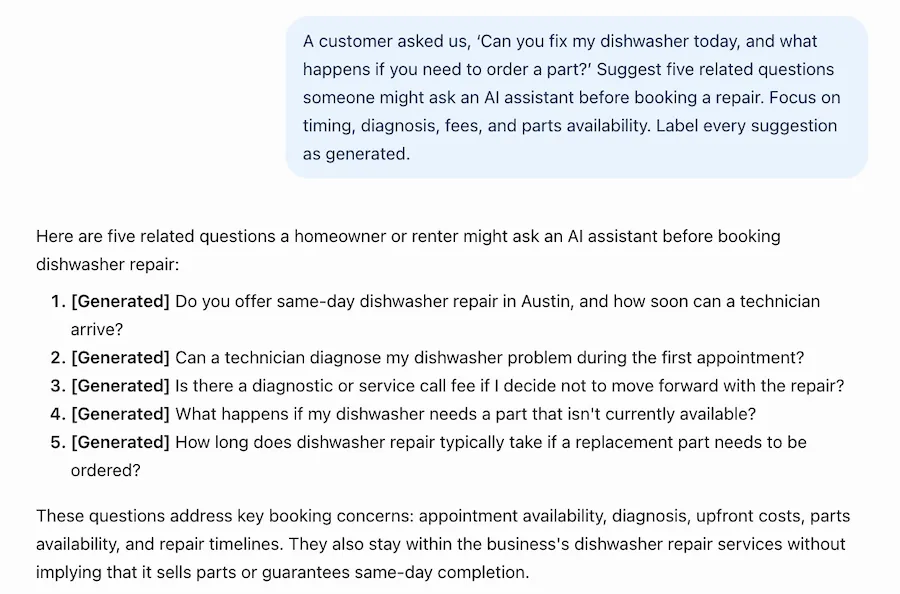
Try this prompt: “A customer asked us, ‘Can you fix my dishwasher today, and what happens if you need to order a part?’ Suggest five related questions someone might ask an AI assistant before booking a repair. Focus on timing, diagnosis, fees, and parts availability. Label every suggestion as generated.”
You might get “Will I pay a service call fee if the dishwasher can’t be repaired?” or “How long could the repair take if a part needs ordering?” Keep the ones your team already hears in calls and emails, and park the rest for later. Then make sure your website answers them with your actual policies on diagnostic fees, return visits, and parts delays. That helps customers decide whether or not to book, and whether you ever track the question in AI search.
Pick five to 10 questions and test them regularly. Use the same wording and location details in each assistant, and record the date, the businesses mentioned, the links cited, and any wrong claims about your services. Answers change, so each result is a snapshot of that test list on that day. It won’t tell you how often people ask those questions.
Read the answers for depth, too, since a thin answer gives you something to fill.
“I look for queries where AI answers are all surface and zero depth,” said Oskar Duberg, Freelance Content Specialist. “AI leaves people hungry; our job is to feed them.”
Say every assistant tells the Austin homeowner that parts delays “vary by manufacturer” and stops there. If the company’s site explains how it orders parts, how long a typical wait is, and whether the return visit costs extra, it answers what the AI skipped. That helps customers and gives AI systems something specific to draw from, though it doesn’t guarantee a mention. For other reasons AI might pass over a page, see these common reasons AI ignores content.
How not to use AI for keyword research
Each mistake below looks reasonable when it happens. The AI output is confident, well-formatted, and plausible, which is what makes it so easy to act on without checking.
Don’t trust keyword metrics without a traceable source
Say the Austin owner asks a chatbot for “the top 20 appliance repair keywords in Austin with search volume and CPC.” Seconds later, there’s a table with monthly searches, cost per click, and keyword difficulty for every term. “Dishwasher repair Austin” gets 1,900 searches a month, according to the table. Maybe it does. Nothing in the table tells you where that number came from.
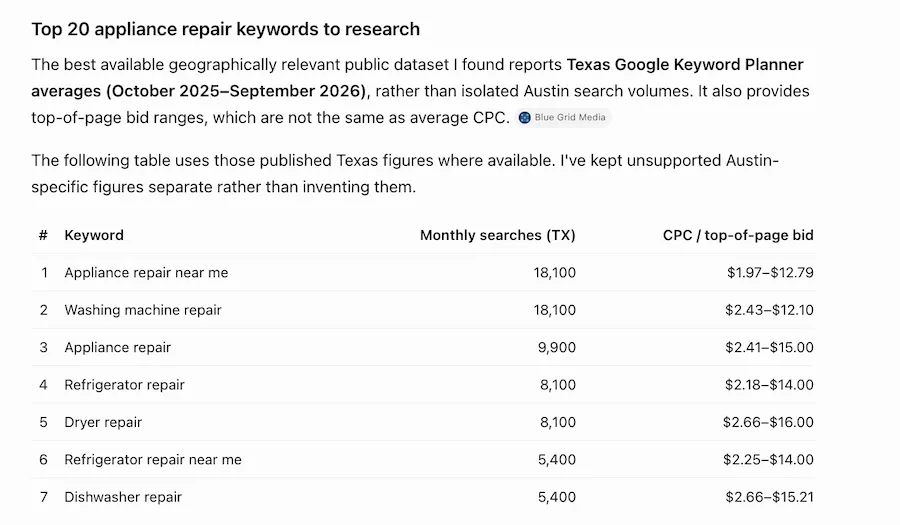
ChatGPT says the source is Google Keyword Planner, but it’s linking to a non-Google source.
A chatbot without access to keyword data predicts what a plausible figure looks like, the same way it predicts plausible keywords. Browsing access doesn’t change much, because finding a web page that mentions a number isn’t the same as pulling it from a keyword database.
Connecting the assistant to a keyword tool helps more. Several SEO platforms, including Semrush and Ahrefs, now let ChatGPT or Claude query their data through MCP (Model Context Protocol). The figures can still go wrong on the way to your screen. The tool might have no data for a low-volume local term, or return figures for the wrong country. The assistant can round numbers or mix up columns when it summarizes the results.
“Hooking a model up to a keyword tool through MCP doesn’t stop it from inventing numbers,” Stephanie said. “When the tool comes back empty for a term, the model rarely says so. It fills the row with a figure that looks exactly like the real ones. I ask for the raw tool output next to any summary, and no number goes into a plan until someone has checked it in the platform.”
Before any figure shapes your content plan or ad budget, ask the assistant to name the provider, location, date range, and definition behind each metric. If it’s connected to a keyword tool, also ask which figures came straight from the tool and which terms returned nothing.
Then open the platform and check a handful yourself, especially long-tail local terms, where keyword tools often have little or no data. Leave any number you can’t verify blank. You can also skip the problem entirely by uploading your own export and telling the AI to use only the numbers in it.
Accurate data can still lead to a bad call if the AI misreads what it measures. The competition metric in Google Keyword Planner measures how many advertisers bid on a keyword, not how hard it is to rank organically. A “low” rating can sit next to search results full of established sites with strong content. Check those results before you decide a keyword is easy to win.
👀 Looking for more ways to drive people to your site? Free guide >> 25 Ways to Increase Traffic to Your Website
Don’t let AI invent services to fill out your list
Give AI a brief that mentions “limited same-day availability” without saying the company doesn’t work nights, and it can turn that into “24-hour appliance repair Austin,” along with a recommendation to build an overnight emergency repair page.
That page promises something the company can’t deliver. It attracts calls at 11 p.m. that go to voicemail, frustrates the people who made them, and puts claims on the website the business can’t stand behind. Some of those callers will leave reviews about it.
Brand terms carry the same risk. “Bosch dishwasher repair” is fine if the company repairs Bosch dishwashers. “Authorized Bosch repair” is a different claim entirely. Servicing a brand doesn’t make a company an authorized provider, and the AI won’t know the difference unless you tell it.
The same trap shows up in other verticals:
- A car rental company that requires a deposit gets “no deposit car rental” in its keyword list.
- A dental practice that closes on weekends gets “emergency dentist open Sunday.”
- A plumbing company that doesn’t do sewer work gets “sewer line replacement cost.”
Spell out those limits in your brief, then ask AI to explain which service supports each suggestion. Check the answers against your actual services, policies, and credentials. Remove any keyword that would lead you to promise something you can’t deliver.
Don’t turn every keyword variation into a new page
Ask AI for a content plan, and it might suggest separate pages for “washer repair Austin,” “washing machine repair Austin,” “washing machine repair service Austin,” and “local washer repair Austin.”
Those searches likely describe the same need. Creating four pages could leave you with repetitive content and make it harder to decide which page should rank. You’d also have four places to update whenever your prices or service area change.
Start by grouping those terms under one washer repair page. Search each variation and compare the results. If many of the same pages appear across the searches, that supports covering them together. Create another page when it serves a different need that your existing page can’t answer well.

This page includes variations on the target keyword for washing machine repair in Austin.
“Washing machine not draining” needs a closer look. Depending on the results, you might write a troubleshooting guide or add a section about drainage problems to your repair page. If the results mostly show DIY videos and that audience doesn’t fit your goals, you may decide to leave it alone.
Ask AI to explain the purpose of every new page it recommends. If the only difference is the keyword wording, keep the terms together.
Don’t exclude PPC searches just because they haven’t converted
In the search terms report earlier, “dishwasher repair cost” spent $87 across 18 clicks without a single booking. Ask AI which searches to cut, and it might suggest adding “cost” as a negative keyword.
That would stop your ads from showing to people who compare prices before they call.
“Paid search thrives when you target bottom-of-funnel queries that signal a clear intent to buy,” Tamara said. A homeowner checking repair costs is often close to that point, deciding who to hire or whether the old dishwasher is worth fixing.
“Dishwasher repair technician jobs” is an easier call. That person wants a job, and the repair campaign has nothing to offer them.
For searches that aren’t as clear-cut, check four things before you accept the recommendation.
- Relevance: Does the search relate to a service you offer?
- Spend and sample size: How does the cost compare with what you can afford to pay for a booking, and do you have enough clicks to judge?
- Tracking: Are calls and form submissions recorded correctly, and could recent clicks still turn into bookings?
- Booking quality: Do inquiries from this search turn into completed jobs?
Look at the landing page as well. Someone searching for repair costs has little reason to stay on a page with no pricing information.
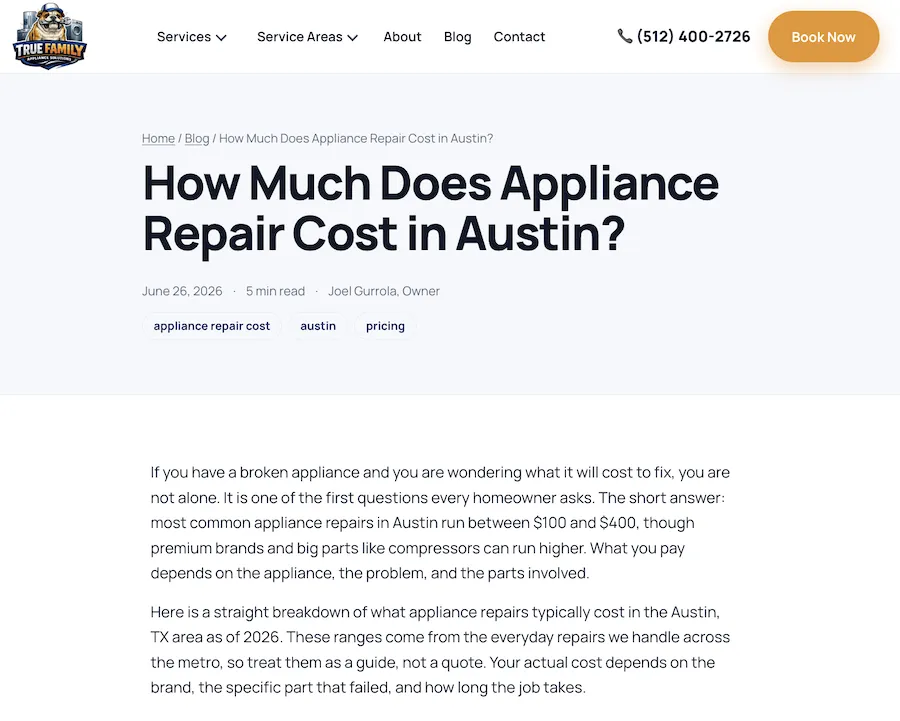
This page clearly outlines the estimated repair costs.
If you do add a negative, check what it blocks. A broad or phrase match negative for “cost” blocks every search that contains the word, including “dishwasher repair parts and labor cost.” An exact match negative for “dishwasher repair cost” blocks only that exact search.
Placement matters too. A campaign-level negative changes one campaign, while an account-level negative applies to every eligible campaign in the account. For the job searches, adding “jobs” to the repair campaign covers the obvious cases. Related terms like “careers” can be reviewed as they come up.
A relevant search can still cost more than it brings in. Dropping it is reasonable when the spend, tracking, and booking data all point that way. Zero bookings on its own won’t tell you why it isn’t working.
Don’t mistake generated prompts for customer research
Ask AI for appliance repair questions, and it might return 30 suggestions labeled “the most common prompts.” Unless it provides reliable usage data, you have no reason to trust that label. The questions may sound familiar, but that doesn’t tell you how often people ask them.
Getting similar suggestions from ChatGPT, Claude, and Gemini won’t confirm demand either. Several tools can produce the same reasonable-sounding ideas without evidence that your customers use them.
Ask AI to label its suggestions as generated. Then compare them with customer calls, emails, surveys, and available search data. Prioritize questions your team hears regularly, and keep the others as ideas to investigate.
For example, repeated calls about diagnostic fees give the Austin company a reason to answer that question clearly on its website. A generated question about overnight repairs has little value when the company doesn’t offer them.
You can monitor the questions you choose, but keep the results in context. Testing 10 prompts shows how your business appears in responses to those ten prompts. It doesn’t tell you how many customers ask them or how visible you are across all AI searches.
Google’s AI answers also involve searches you can’t see. According to Google Search Central, AI Overviews and AI Mode may run multiple related searches across subtopics and data sources to build a response. Google calls this “query fan-out.” A chatbot can suggest related questions, but its list won’t reveal which searches Google actually ran. My guide to how AI Overviews affect SEO explains the broader implications for your website.
Use generated questions to expand your research. Use customer evidence to decide which ones deserve your attention.
How to review AI-generated keywords to build one keyword shortlist
After reviewing the suggestions, the fictional Austin company has a shorter list with a clear next step for each term.
| Candidate | Possible mistake | Next action |
|---|---|---|
| Bosch dishwasher repair Austin | Assume authorized-provider status | Confirm model coverage and demand |
| washing machine not draining | Assign a page without checking intent | Review results and existing content |
| dishwasher repair cost | Exclude after a small sample with no bookings | Review performance and booking data |
| 24-hour appliance repair Austin | Promote a service the company doesn’t offer | Remove from the list |
The first three need further checks. The overnight repair term comes off the list because it doesn’t match the business. This gives the owner a manageable set of decisions instead of a long spreadsheet of suggestions.
What you check next depends on where you plan to use each term.
| Channel | What a keyword needs before you act on it |
|---|---|
| SEO | A suitable page on the site and a reason to target the query |
| PPC | Relevance to the campaign and a cost per booking that works |
| AI search | A real customer question worth answering on the site and monitoring over time |
Take “dishwasher repair cost.” For PPC, the owner should review tracking, pricing information, and spend before deciding to keep or exclude it. For SEO, the question may need an answer on the pricing page or dishwasher repair page.
For AI search, customer questions about pricing could guide tests such as “How much does dishwasher repair cost in Austin?” The owner can check which businesses and sources appear, and if the answer describes the company’s fees accurately.
The same topic can support different work across all three channels. Your shortlist should make that work clear, including what you still need to verify. For help deciding which terms deserve that effort, use the framework in finding keywords that still drive results in the AI era.
Test AI keyword research with one task you can check
Start small. Take one keyword export or one month of Google Ads search terms and upload it with your business brief. Include your services, location, availability, and anything you don’t offer.
Ask AI to flag searches that don’t fit your business, terms that need a closer look, and ideas worth investigating. Have it explain each recommendation so you can check the reasoning against your data.
Review the suggestions before changing pages or campaigns. If you find mistakes, clarify the brief or instructions and try again. Once the recommendations prove useful, apply the same process to another task.
Choose one change, record why you made it, and check what happens. That could mean adding pricing information to a service page or excluding job searches from a repair campaign.
You’ll get a better sense of the value of AI for keyword research by tracking the time it saves and the decisions it helps you make. Keep using it where those benefits hold up.
About the WordStream Blog
We've been a trusted source of data, news, and strategy for over 15 years. All of our content is written and reviewed by real people: a dedicated team of professionals with decades of combined experience in marketing and advertising for businesses of all sizes.


Add us as a preferred source on Google
Are you wasting money in Google Ads?

Meet The Author
Goran Mirkovic
Goran Mirković is a marketing leader with over a decade of experience in SaaS growth, SEO, content strategy, and demand creation, a freelance contributor for WordStream, and a 2x CMO. With a background spanning both agency and in-house leadership roles, he focuses on AI-era search, the evolution of content marketing, demand creation, and practical strategies that help businesses turn expertise into revenue. Outside of marketing, he is a dedicated cinephile with a particular obsession for horror films.
Recommended for you