About the Author


Are you generating dozens of leads in Google Ads, only to find that almost none of them are actually qualified?
This is an incredibly common struggle for growing businesses. When you tell Google Ads that your primary goal is simply a “form fill” or a “phone call,” the algorithm will relentlessly hunt down the fastest, easiest, and cheapest ways to get people to contact you. More often than not, that means a flood of low-quality leads, unqualified leads, or even spam.
After more than a decade working in Google Ads, I have 11 specific tips to help you get better quality leads in Google Ads. Let’s go!
Contents
- Use offline conversion tracking for better Google Ads lead quality
- Turn off search partners
- Proceed with caution on the Google Display Network
- Use negative keywords (but don’t fight the system)
- Leverage audiences through targeting or exclusion
- Turn off optimized targeting
- Turn off automated assets and text customization
- Embrace “creative-led targeting”
- Use Conversion-Based Smart Bidding
- Introduce strategic friction on your landing page
- Fight bot spam with tech
11 ways to improve Google Ads lead quality
Here are 11 of my top tips for better Google Ads lead quality so you can see the best return on investment for your PPC campaigns.
1. Use offline conversion tracking for better Google Ads lead quality
To get the best quality leads from Google Ads, there is one non-negotiable prerequisite you must have: Offline Conversion Tracking (OCT).
Tracking basic conversion actions like views, button clicks, or form fills is no longer sufficient; just because someone clicked a “contact us” button, it doesn’t mean they’re the right customer for you.
By connecting your CRM to Google Ads, either directly or via third-party lead tracking software, you can tell Google’s algorithms who actually become Marketing Qualified Leads (MQLs), Sales Qualified Leads (SQLs), and paying customers. That way, it can find more users like them. Smart Bidding is only as smart as the data you give it, and sending your offline conversion data back to Google trains the algorithm to hunt for quality over quantity.
If you do not have this data foundation in place, then Performance Max, broad match keywords, Smart Bidding, and all of Google Ads’ AI-powered features will likely fail you, bringing in low-quality leads because you aren’t providing the right data on what constitutes a quality lead.
Implementing offline conversion tracking with Smart Bidding could render most (if not all) of the following 10 tips unnecessary. But still, there are many businesses that either can’t or won’t import offline conversions into Google Ads, due to:
- Legal policies or restrictions
- Lack of technical capabilities
- Low conversion volume
- Long conversion lag
Luckily, you can adjust your Google Ads targeting, creative, bidding, and landing pages to stop the spam and start attracting high-value leads.

You can upload offline conversion actions to track in your account under the conversions section of the Google Ads platform.
⚡ Looking for more ways to optimize your Google Ads results? Start with a free, instant account report using our Google Ads Grader!
2. Turn off search partners
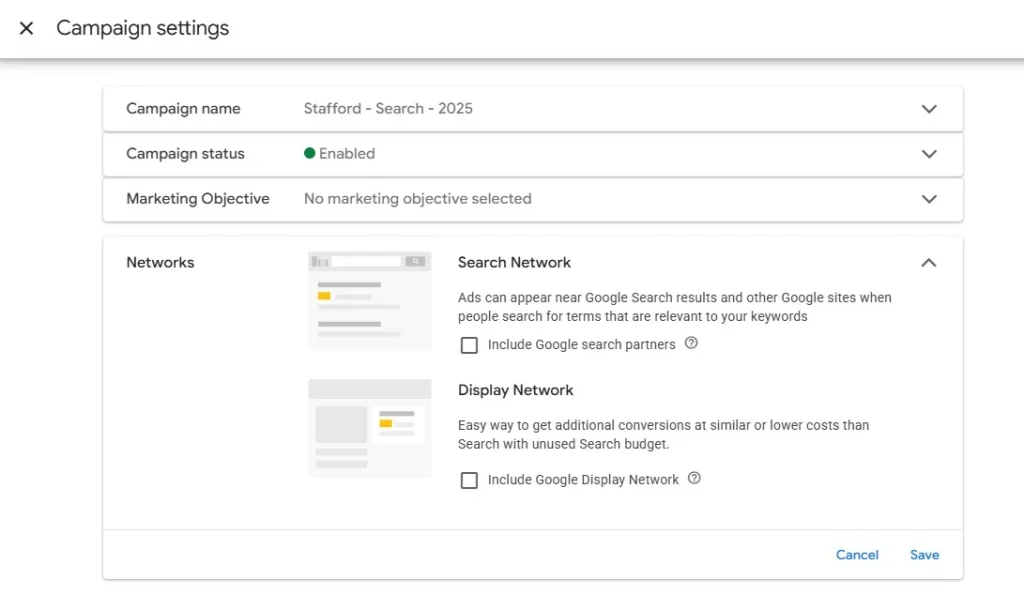
Google’s “search partner network” is a consortium of mostly low-quality, spammy websites. If your search campaign has a high volume of impressions and exceptionally low costs per click, but terrible lead quality, search partner placements are often the culprit.
Uncheck the “search partners” box in your Search campaign settings to ensure you are only advertising on Google Search, and keep an eye on your channel performance report in Performance Max to ensure Search partners aren’t eating up your budget.
3. Proceed with caution on the Google Display Network
The Google Display Network (GDN) consists of millions of websites and apps, many of which exist solely to farm ad clicks via AdSense. For lead generation, the GDN is a notorious driver of bot traffic, spam placements, and garbage inventory if used with the wrong campaign strategy,
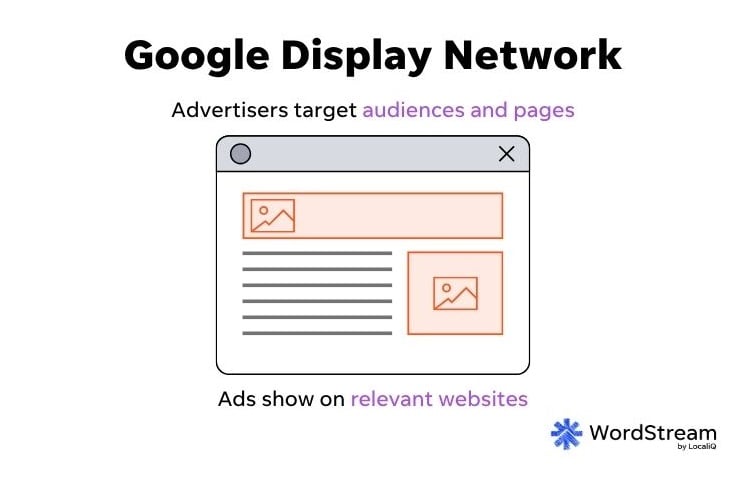
Ensure the Display Network box is unchecked in your search and Demand Gen campaign settings, or that video partners are turned off in video campaigns. In Performance Max, keep an eye on your channel performance report to ensure the Display network isn’t using up all your campaign budget.
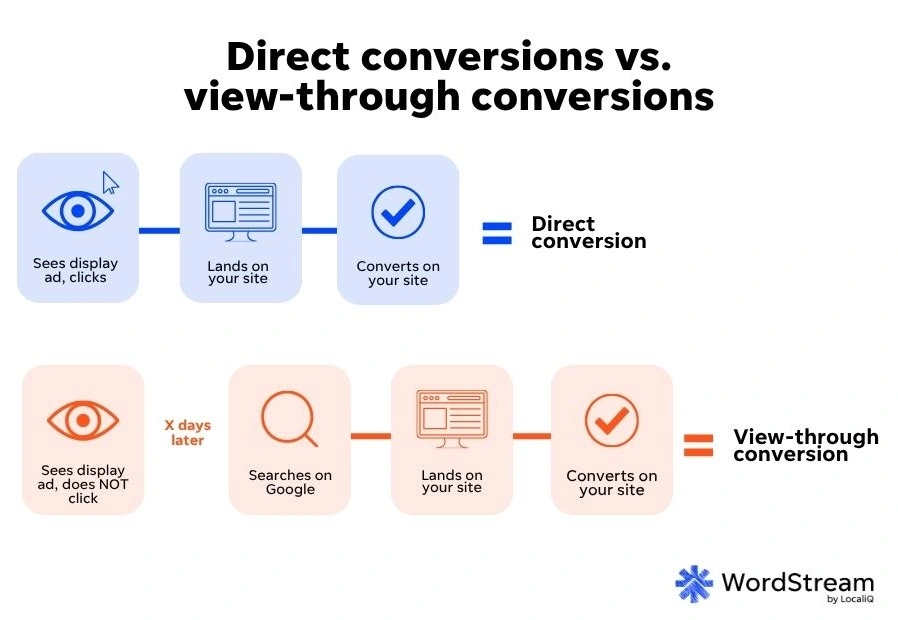
Overall, if you’re running display ads, be sure to have view-through conversion tracking set up, so you can still monitor any leads that came in from display campaigns indirectly.
4. Use negative keywords (but don’t fight the system)
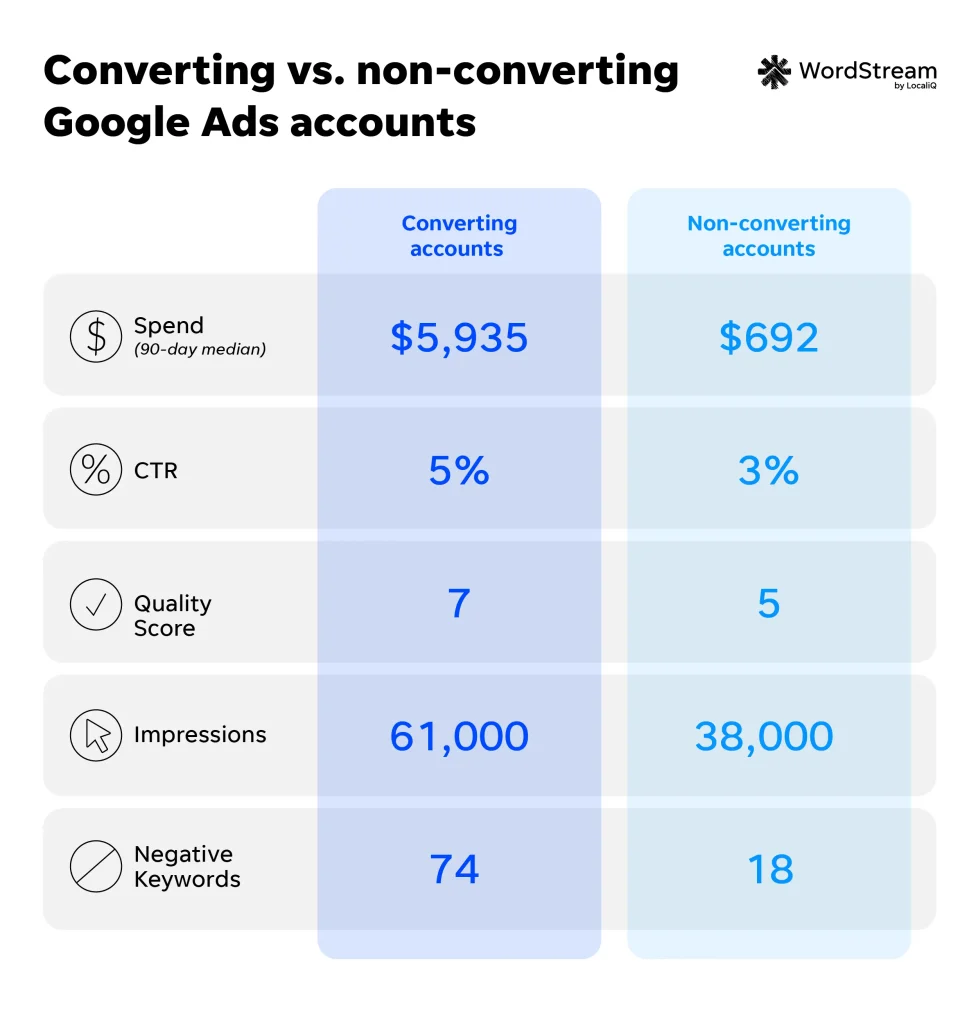
Negative keywords are important for blocking irrelevant queries and protecting your budget. In fact, WordStream’s study of over 15,000 Google Ads accounts found that adding just one negative keyword can improve conversion rate and Quality Score.
However, don’t fall into the trap of playing “Whack-a-Mole” with the algorithm.
If you find yourself adding more than 10% of your search, shopping, or Performance Max search terms as negatives, stop what you’re doing and re-evaluate. Negating that much traffic means you have a fundamental root cause issue that needs to be addressed first. For example, you may be using the wrong keywords, the wrong match types, the wrong ad targets, the wrong conversion tracking, and/or the wrong bid strategy.
By identifying and addressing the root cause of your irrelevant search terms, the Smart Bidding algorithm can re-learn what a good lead looks like and optimize away from low-quality searches without your micromanagement.
5. Leverage audiences through targeting or exclusion
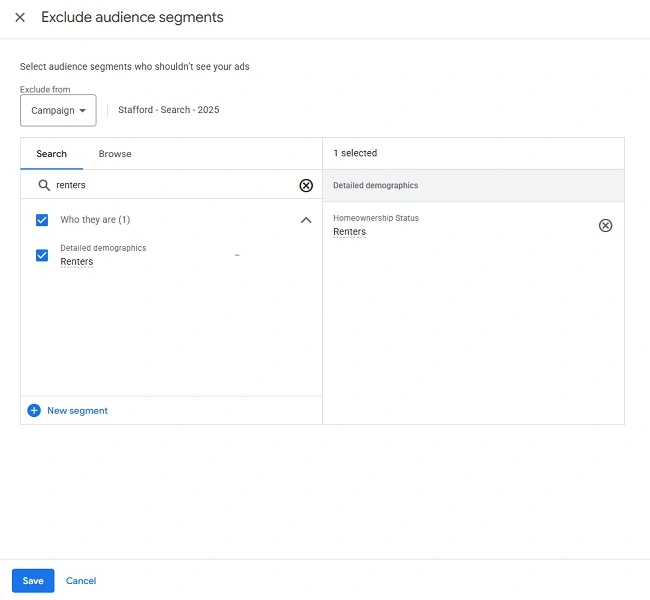
In search and shopping campaigns, you can restrict who sees your ads by layering specific audiences on “targeting” mode. To see your ads, a user must search for something that matches your keywords and belong to a specific audience you’ve chosen. The “detailed demographics” and business-related “in-market” segments will be especially useful here.
Alternatively, use audience exclusions to filter out unqualified users. For example, if you are a plumber looking for big residential jobs, you know that a renter won’t be paying for the fix. You can exclude the detailed demographic for “renters,” so your ads only show to homeowners or those with unknown homeownership status.
6. Turn off optimized targeting
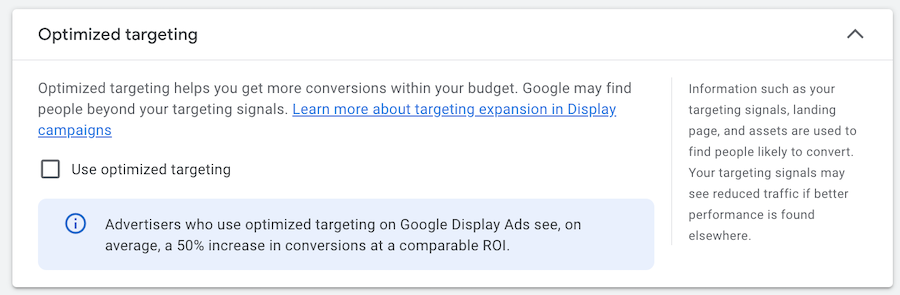
Optimized targeting turns your audience targeting into an audience signal in display and Demand Gen campaigns. Practically, this means you’re giving Google Ads permission to show your ads to whomever it thinks is most likely to convert, completely ignoring your original audience selections.
For lead generation businesses that aren’t using offline conversion tracking, optimized targeting usually results in a flood of irrelevant spam leads because it simply hunts down the easiest, cheapest form-fillers. Turn it off in your ad group settings to maintain strict control over who sees your ads.
7. Turn off automated assets and text customization
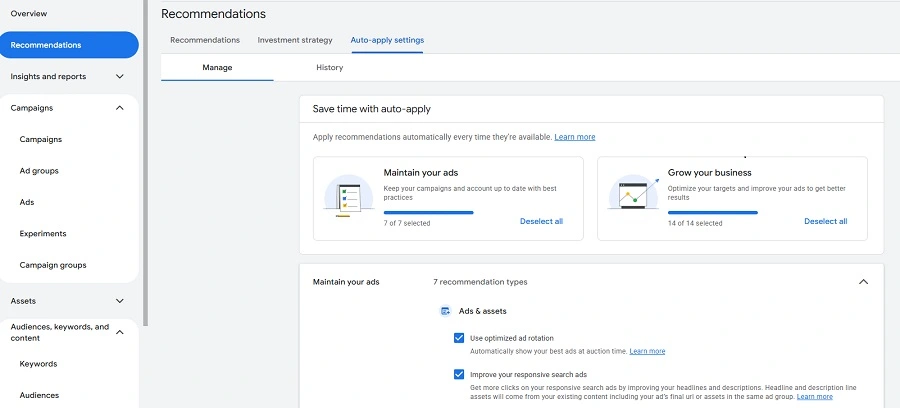
Many Google Ads features allow AI to create text, image, and video assets for you. While this can be helpful in certain scenarios, AI can completely miss the mark and attract the wrong users to your ads. For example, I’ve seen Google automatically create sitelinks for the careers page when the advertiser is looking to attract clients, not job seekers. I’ve also seen Google generate extremely generic headlines for B2B advertisers, attracting more clicks but not qualified clicks.
Turn off your account-level automated assets, and ensure asset customization is turned off in Performance Max, Search, and Demand Gen campaigns. Consider testing these features again once you have offline conversion tracking in place.
8. Embrace “creative-led targeting”
As automated targeting mechanisms increasingly take away your ability to choose exactly who sees your ads, your ad creative (text, images, video) must act as your ultimate filter. Exact match keywords are no longer exact, so writing highly specific ads is crucial to attract your ideal customer and actively repel your non-target audience.
B2B advertisers should use industry jargon, specific acronyms, or clearly state your “starting at” price in the ad copy. The point is to actively stop B2C searchers from clicking, saving your budget, and sending the quality engagement signals back to your targeting algorithm. That’s why I call this “Creative-Led Targeting,” and it will be familiar to anyone who runs social ads. In fact, this becomes even more important with image and video ads; your visual creative should grab your ICP’s attention right away, while being completely unappealing to your non-target audience.
9. Use Conversion-Based Smart Bidding
Manual CPC bidding tells Google to get you cheap clicks, which is often the exact opposite of driving high-quality leads. Remember this mantra: High CPCs are not the enemy; low-quality traffic is. Use conversion-based Smart Bidding so that you and Google Ads are aligned on your objective: quality leads.
If you’re just getting started with Smart Bidding, start with maximize conversions and transition to target CPA when you have approximately 30 conversions per month in your campaign. If you run multiple campaigns with low conversion volume, consider “linking” their learnings together via a portfolio bid strategy.
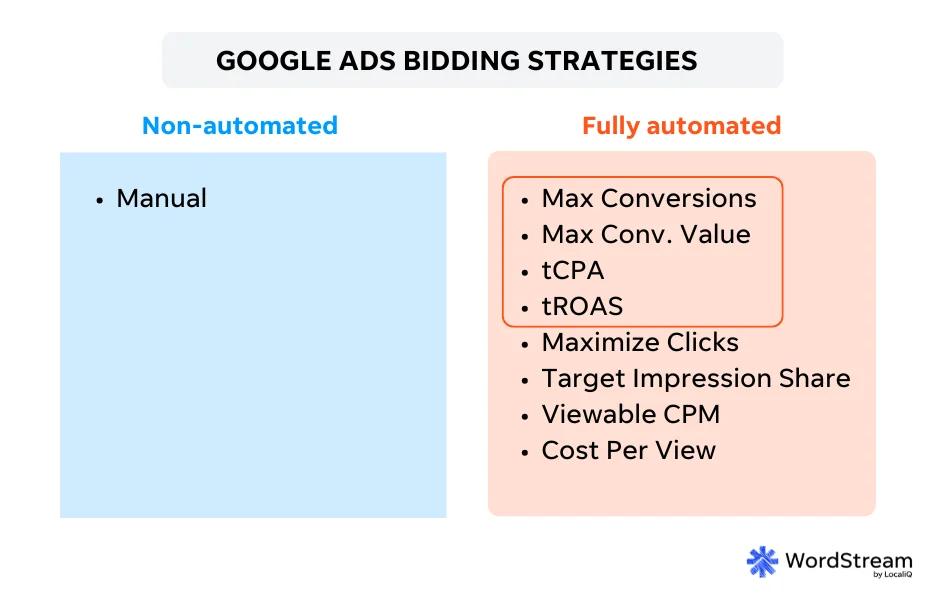
There are four conversion-based Smart Bidding strategies outlined above that you can use in Google Ads to improve lead quality.
💡 Ready to take advantage of Smart Bidding? Download our free, fool-proof guide to Smart Bidding, complete with tips on how to get started fast!
10. Introduce strategic friction on your landing page
As marketers, we’re often taught to make it as easy as possible for the user to convert. However, for lead generation and/or B2B advertising, a little friction can be a highly effective filter. Consider adding qualifying questions to your lead form that will let users filter themselves out.
For example, if you offer website development services for large businesses, add an “estimated budget” dropdown where the lowest option starts at “$50,000”. If someone looking for a $500 website build clicks your ad and sees they do not meet your minimums, they will likely abandon the form. This is a win! It signals to Google Ads that it was not a good click, steering the Smart Bidding algorithm away from similar users in the future.
Another example would be asking if the installation is for a business or a residence. You can program your lead tracking software to only let Google Ads count the lead as a conversion if the user selects “business.” If they select “residence,” you can still reach out to them, but your Smart Bidding algorithm will steer away from similar users in the future.

11. Fight bot spam with tech
Sometimes, poor lead quality isn’t the result of an unqualified human; it is a literal bot scanning the internet to fill out forms. As the agentic web (AI agents performing tasks on behalf of users) starts to grow, I expect this problem will get worse. If you’re experiencing a high volume of automated spam, with gibberish form fills or lots of hang-up phone calls, you have to fight tech with tech.
Try installing reCAPTCHA on your landing page, or use “honeypot” hidden fields on your forms. These tools are designed to stop bots from submitting their information in the first place, ensuring that fake conversions are never recorded and sent back to Google Ads.
Improve your Google Ads lead quality in a flash
High lead volume is a vanity metric if those leads don’t actually close. By establishing a rock-solid data foundation with offline conversion tracking and complementing it with these structured fixes across your targeting, creative, bidding, and landing pages, you can effectively guide Google’s algorithms to find the right customers for your business while leaving the low-quality leads behind for your competitors. For more ways to get better leads from your search marketing, see how our solutions can help!
About the WordStream Blog
We've been a trusted source of data, news, and strategy for over 15 years. All of our content is written and reviewed by real people: a dedicated team of professionals with decades of combined experience in marketing and advertising for businesses of all sizes.


Add us as a preferred source on Google
Are you wasting money in Google Ads?

Meet The Author
Jyll Saskin Gales
Jyll Saskin Gales is a Google Ads Coach, and the founder of the Inside Google Ads course, podcast, and bestselling book. She advises business owners, agencies, marketers, and freelancers across industries, helping them get the best ROI from their marketing. Jyll worked at Google for 6 years and has an MBA from Harvard Business School. You can find her on LinkedIn and YouTube @the_google_pro.