About the Author


The Google Display Network can be a powerful platform for promoting your business, but it can also be a super easy way to spend a lot of advertising dollars without seeing much in return. It’s important you know how this platform works, what your options are, and what you should expect in terms of performance before you get started to make sure it aligns with your campaign goals.
In this article, I’m going to go through all of this and more to make sure you have your campaigns set up for success on the GDN.
Contents
- What is the Google Display Network?
- Benefits of running ads on the Google Display Network
- How to run ads on the Google Display Network
- Google Display Network ad formats
- Targeting options on the Google Display Network
- Brand safety with Google Display Network ads
- Best practices for the Google Display Network
What is the Google Display Network?
Despite its name, the Google Display Network (GDN) is actually not owned and operated by Google. It’s a large network of websites, mobile apps, and videos (which include YouTube) that have placements for ads to be displayed. Aside from YouTube, those apps and websites are owned and operated by individuals and/or businesses. Those folks create spaces on their sites/apps for Google to show ads for a cut of the ad revenue.
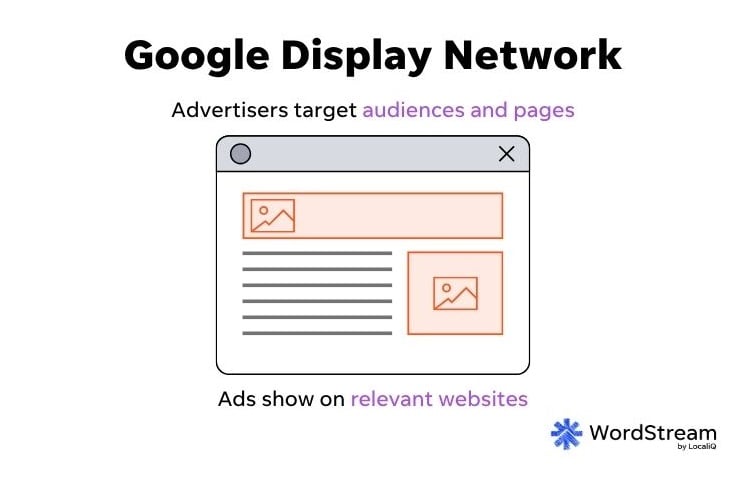
Essentially, the website owner creates a space, you create the ad, and Google is the middleman that places your ads on the owner’s website based on your targeting options. You pay Google to show your ads, and Google keeps most of that payment but gives a portion of it to the website owner for using the space.
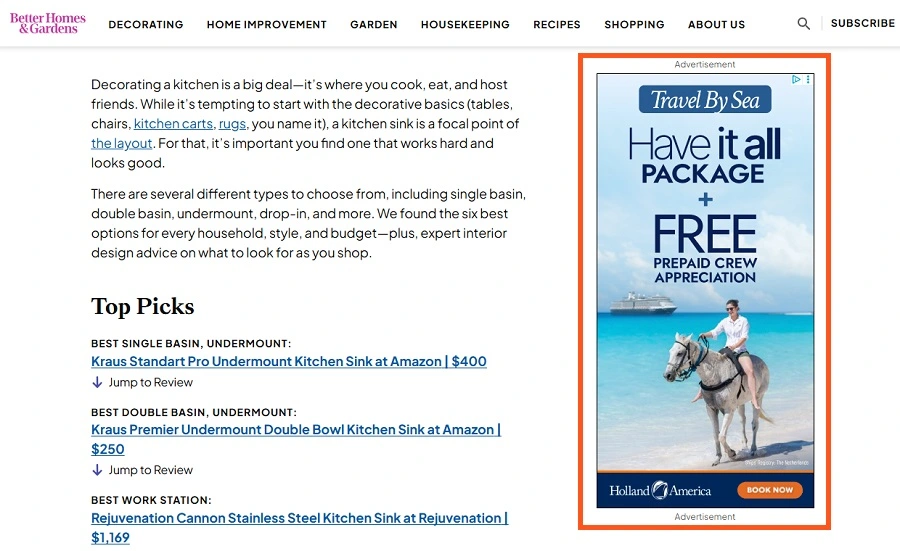
A Google Display Network ad example.
❓ Should you be running ads on the Google Display Network? Find out with a free, instant account report using our Google Ads Grader!
Why should your business run ads on the Google Display Network?
The GDN is a massive network of properties that allows advertisers to reach a large portion of global internet users. With that reach, there’s quite a lot you can accomplish.
Google Display Network ads generate brand awareness
No matter what type of business you run, there’s always a moment when your available customer base first becomes aware of you. For some, that’s through word of mouth; for others, it’s through search, but the Google Display Network can be a great way to introduce yourself to your available market while they’re browsing content that’s relevant to your business or based on their past user behaviors.
You can nurture existing users
As much as we might like it for a user to convert the first time they engage with our brands, that usually takes a few steps. The GDN can be a great tool for reengaging users who are already familiar with you, giving them more information and making them more interested in your company and what it has to offer.
Google Display Network ads help to drive conversions
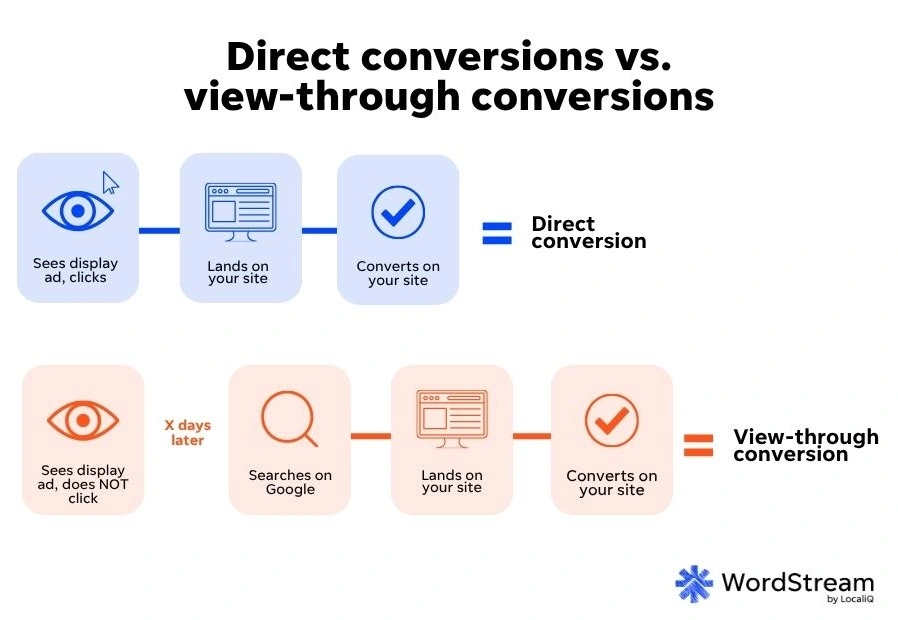
While I wouldn’t recommend the GDN for those marketers who are solely conversion-driven, that doesn’t mean that it can’t be a sales generator in some accounts. Depending on your offer, typical buyer cycle, and proper conversion tracking setup combined with automated bidding, the GDN can be a way to drive incremental conversions for your business. There’s even a metric called view-through conversions, which can indicate which conversions on a search ad originated from a display ad (a marketing partner can help you set up tracking for this).
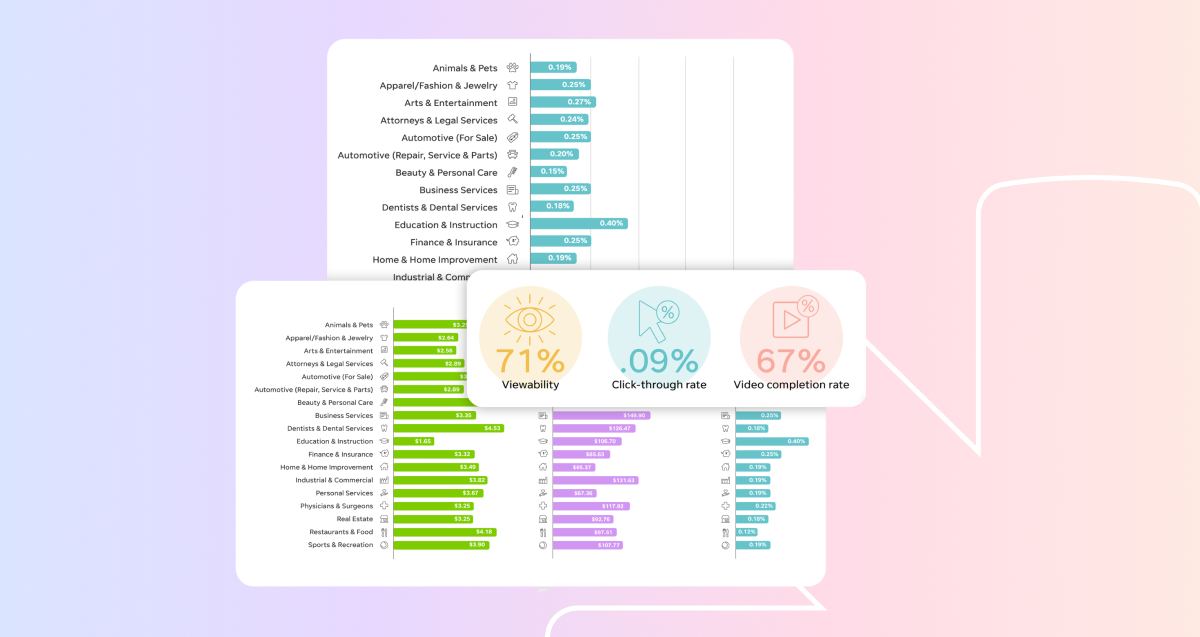
👀 What results can you expect from display ads? Find out in our Display & Video Ads Benchmarks.
Three ways to run Display ads on Google
Google makes it very easy (sometimes too easy) to show your ads on the Google Display Network by offering many different campaign types that will support those placements.
Depending on the campaign objective you select, you can then choose the type of campaign you want to use.
While the image below has only one listing for “Display,” this is a bit misleading, as all of these campaign types can have you show in the Google Display Network depending on your settings. (Yes, even Search.)
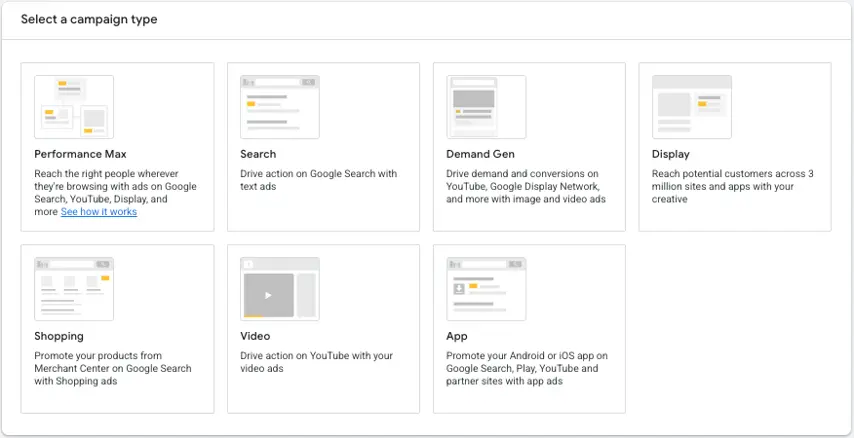
With that in mind, let’s go through how you can show on the GDN and talk about which campaign type might be a good fit for your needs.
1. Create a Display campaign
Although standard Display campaigns will be phased out next year, for now, this is the most straightforward use of the Google Display Network and the only campaign type that targets this network. This campaign focuses specifically on websites, apps, and videos that participate in the GDN and doesn’t include other placements like Gmail, Discover, etc.
When creating a new display campaign, you can choose any of the campaign objectives in orange in the image below to create a display-only campaign.
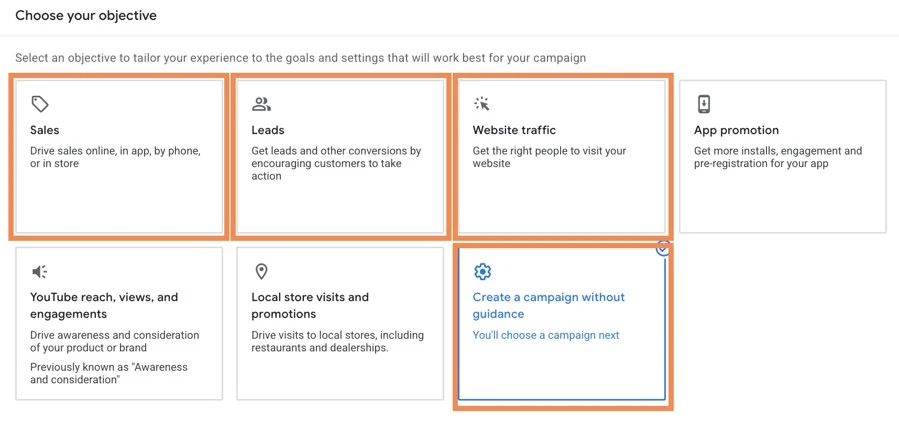
My preference is to almost always use a campaign without a goal’s guidance and then select display in the box that comes next. I find that gives me the most control, but sales, leads, and website traffic will also work well if those are what you need for your goals.
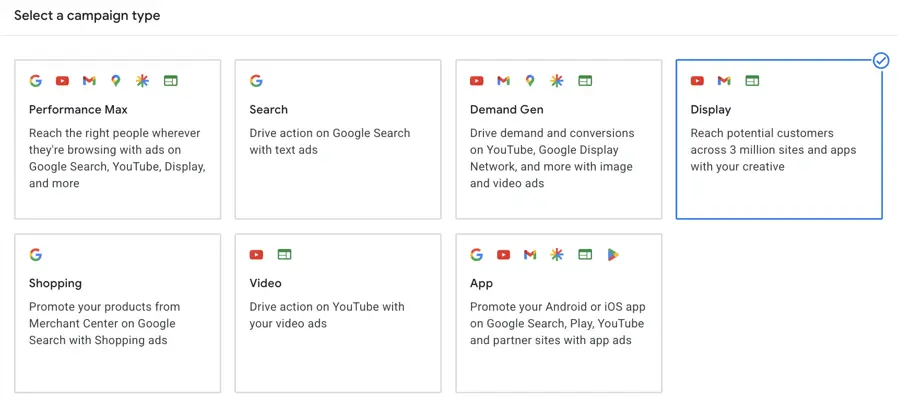
This campaign type can support all three of the ad formats we discussed above and allows for extremely granular targeting, which we’ll cover in a bit. Because of this, Display Campaigns give the most flexibility in Display Network-only control.
2. Run a Performance Max campaign
PMax campaigns span across all Google-owned properties, including search, YouTube, Gmail, Discover, Shopping, Maps, and the Google Display Network, and they are Google’s most automated campaign type. They include the Google Display Network but also include tons of other placements, so the ads are even more dynamic than simple Responsive Display Ads in the regular Display campaign.
In addition to machine learning that dynamically creates ads for each placement, Performance Max campaigns also rely heavily on Google’s Smart Bidding strategies to see results. Manual CPC is not an option here. Instead, advertisers select whether to focus on Conversions or Conversion Value, which will default your bidding strategy to either Maximize Conversions or Maximize Conversion Value. There is the option to check a box and opt into Target CPA or Target ROAS, depending on which goal you select.
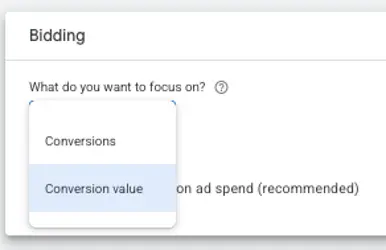
If you’re hoping to use Display campaigns to get lots of impressions and clicks, Performance Max can help you do that, but it will also focus on conversions and include all of the other placements within the Google Network.
If you’re primarily focused on sales and have a good amount of conversion volume, Performance Max could certainly be worth a test. The downfalls are that, again, you’ll be reaching into other networks, potentially taking away performance from your other campaigns, like Search.
Additionally, PMax campaigns can be harder to gain insights from and don’t offer transparency as easily as other campaign types.
Lastly, if your primary goal is lead generation, PMax can be very good at generating leads, but in my experience, the quality is very hit or miss. Be sure to use all of the controls you have to rein in the targeting and messaging to find the highest quality leads.
⚡ Ready to enable Smart Bidding with your display campaigns? Download our free, fool-proof guide to Smart Bidding, complete with steps to get started fast!
3. Enable Demand Gen campaigns
Demand Gen campaigns are Google’s latest campaign type that can target the GDN and are intended to help advertisers reach users earlier in their buying journey. It is also going to be the default campaign type when Google Display Campaigns are phased out completely in 2027.
Like PMax, Demand Gen reaches across multiple Google networks like YouTube, Discover, Gmail, the GDN, and more but doesn’t target Search since that is typically a lower-funnel channel. The goal of Demand Gen is to create demand and interest before a user actively begins searching for a product or service.
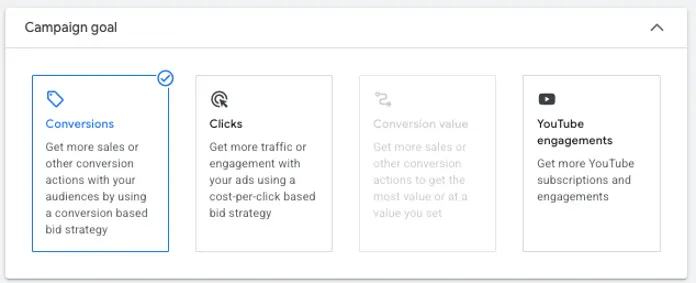
Demand Gen campaigns also have more flexibility in goal optimization than PMax campaigns. For a new campaign, you can optimize for conversions, clicks, conversion value (if your account has enough volume), or YouTube engagements.
Since Demand Gen is going to be the replacement for GDN-only campaigns, I’d be remiss if I didn’t mention the different ad formats available. In Demand Gen campaigns, you can create Single Image Ads, Video Ads, and Carousel Image Ads. These are going to operate similarly to RDAs, but are a little more structured in how they’re created.
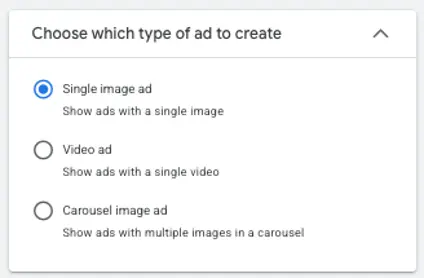
While Demand Gen isn’t only a display campaign, its expected role as the replacement for them makes these campaigns a must-try for anyone looking to be on the Display network in the coming years.
The three types of Google Display Network ad formats
There are three types of ad formats that can run on the Google Display Network, and depending on your campaign settings and targeting, any of them can be highly impactful.
1. Responsive Display Ads
RDAs are Google’s most recommended and most automated ad format for the GDN. Rather than designing and creating individual ads for every available banner size (we’ll get to that list in a minute), advertisers can upload a collection of assets, including headlines, descriptions, images, logos, and videos, and then Google will dynamically combine them to make single ad units that adjust to fit each placement.
The biggest benefit to this ad format is that you don’t have to have lots of design skills and resources to be able to have a large reach on the GDN.
The downside is control and brand aesthetic. Since Google simply combines the pieces you give them to fit the space and tries to accomplish your marketing goal, it’s not going to review the resulting ad unit with the same scrutiny that your brand manager would. If brand look and feel are a high priority for your brand, you can use the ad preview option to ensure the combinations you’ll see are safe, or you may want to opt for static banner ads.
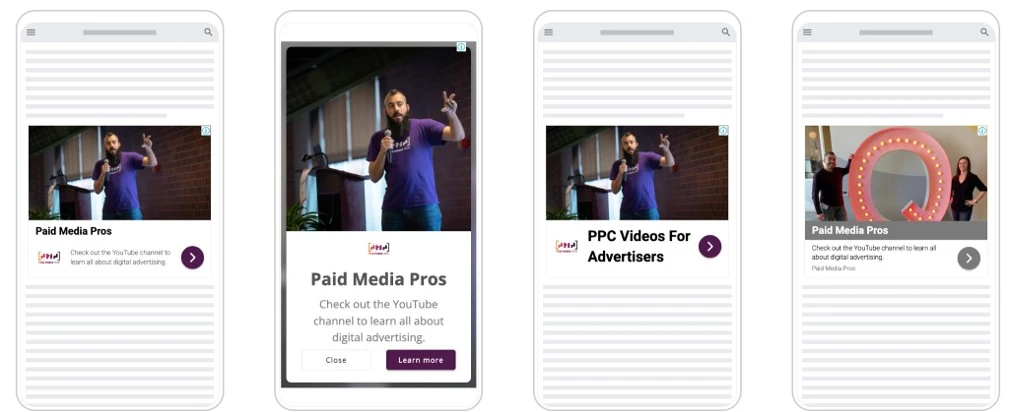
2. Static banner ads
These are going to be the more “traditional” types of ads and likely what most people think of when they think of display ads.
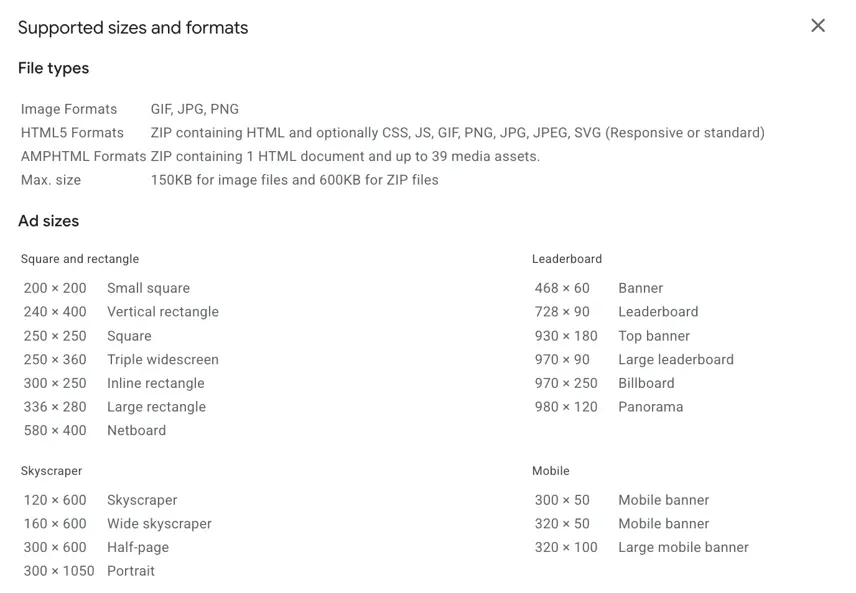
Static Banner Ads are fully designed creatives that fit into certain dimensions, such as 300×250, 728×90, 300×600, and so on.
These can be the preference for brands that want to have full creative control and ensure their ads look and feel exactly how they want, since Google doesn’t take any liberties adjusting them.
But that control comes with a price. Strong-performing banner ads can be tough to design. Additionally, there are 20 different ad sizes you can design for, so once you have the theme and messaging, you now have to make 20 different versions of it look good. For some teams, that’s a no-brainer, and they’re willing to do it. For others, that lift is insurmountable, and RDAs are their go-to format.
3. HTML5 ads
HTML5 ads are dynamic ads that use animation and motion and can support advanced user interactions.
When they’re executed well, HTML5 ads can be much more impactful than banner ads because they allow for a higher level of engagement from the user, like interactive experiences, product showcases, and others that are more compelling than static imagery. But they also still allow the advertiser to retain full control over brand look/feel, so they beat RDAs in that respect as well.
That said, this format requires far more experience and know-how than the other two. For that reason, they’re mostly used by larger brands promoting ecommerce sales or focusing on attention and interaction as the main campaign objective.
How to set up your targeting options on the Google Display Network
There are two main ways you can target users on the Google Display Network, no matter what campaign type you use:
- Audience targeting: This targeting group focuses on the individual you’re trying to reach and information about them.
- Contextual targeting: These options are focused on the information on the page the person is looking at, not the information about the person themselves.
Depending on the campaign type you’re using to advertise on the GDN, your targeting options are going to be different. Here’s a rundown of a few available for each of the categories above.
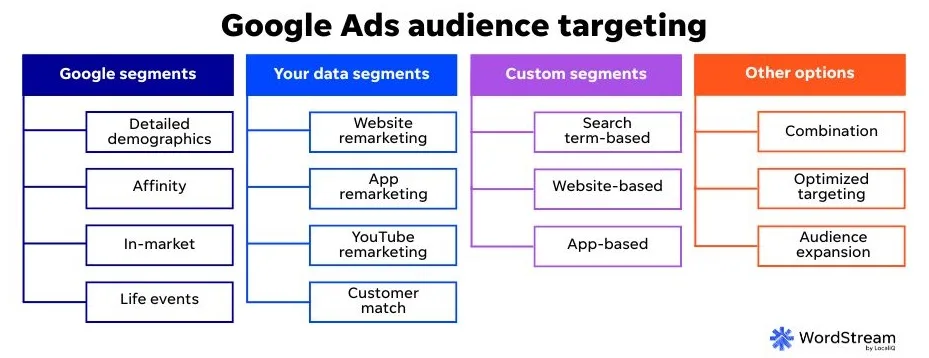
1. Audience targeting
These are your options for assigning audience lists to your Google Display Network campaigns.
- Remarketing audiences: Users who have previously visited your website, engaged with your content, watched your videos, or interacted with your business in some way.
- Affinity audiences: users with long-term interests and habits that align with specific categories such as fitness, travel, technology, or home improvement. These audiences tend to be very broad and higher funnel. Great for lower-cost brand awareness and impressions.
- In-market audiences: users actively researching products or services and showing signals that indicate they may be preparing to make a purchase. These are much more conversion-focused audiences, but are still determined by Google to be interested in large categories, so don’t expect magic, but they can perform really well.
- Custom audiences: groups of users created by advertisers based on specific keywords, URLs, interests, or behaviors relevant to their business.
2. Contextual targeting
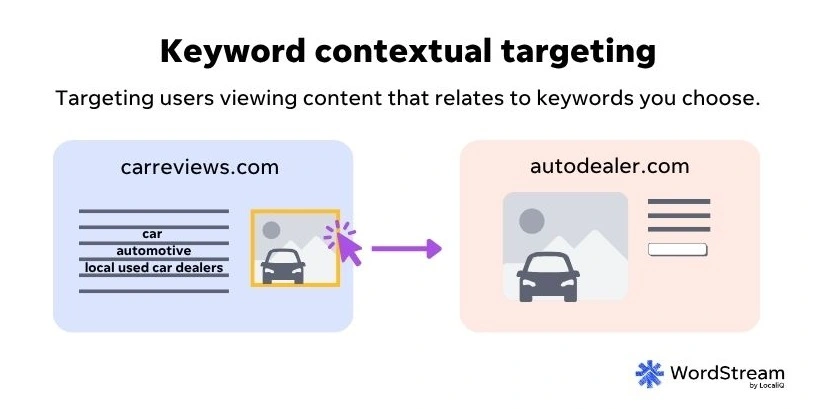
Remember, contextual targeting helps you control where your Google Display Network ads show, as you can choose what types of content on websites and apps they show alongside.
- Keywords: similar to Search, keyword targeting lets advertisers provide a list of valuable keywords and target webpages, videos, etc., that are relevant to those keywords to get in front of someone looking for that content.
- Topics: Advertisers can select from a list of categories (think Automotive or Finance), and Google will then show ads on placements that are related to those topics.
- Placements: This is the most specific type of contextual targeting, where advertisers can select individual websites, URLs, videos, etc. to target by providing the exact location on the GDN.
More ways to control where your Google Display Network ads will show
The most common concern from advertisers about the Google Display Network is around how their final ads will look. This has implications for both how the ad will be formatted to fit the space if using a dynamic format, as well as what your ads will show up next to, meaning the content they appear in. There are a few different ways we can control those factors to ensure all of your GDN ads are brand safe.
Content controls
Google has several different content control settings depending on the campaigns you’re using to help limit ads from showing in placements that wouldn’t be approved by advertisers.
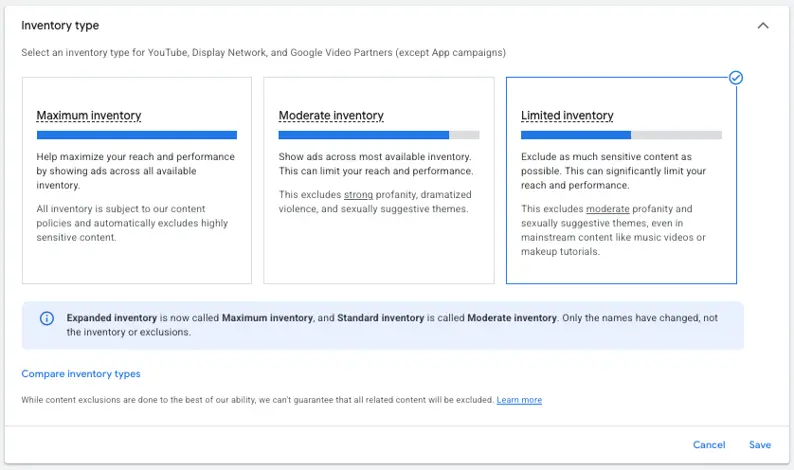
Inventory type
The first option is a broad selection of the inventory available throughout the Google Network. This setting lives at the account level and allows advertisers to choose, at a high level, the type of content they will show next to.
For most accounts, I would expect Moderate inventory to be acceptable, but if you’re particularly lax or strict, you can choose Maximum or Limited based on your preferences.
Advanced settings
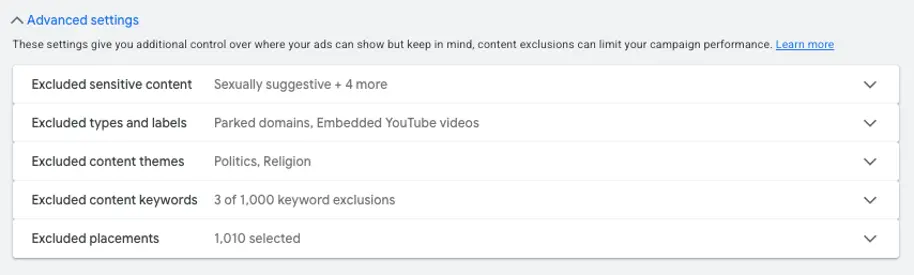
At the account level, there are additional content controls around sensitive content, types and labels, content themes, keywords, and placements you can set controls for as well.
Some of these exclusions can also be done at the campaign level if you so choose, but I find that if I locate a placement, keyword, or topic that’s not suitable for one campaign in my account, it’s likely not suitable for all.
Brand guidelines
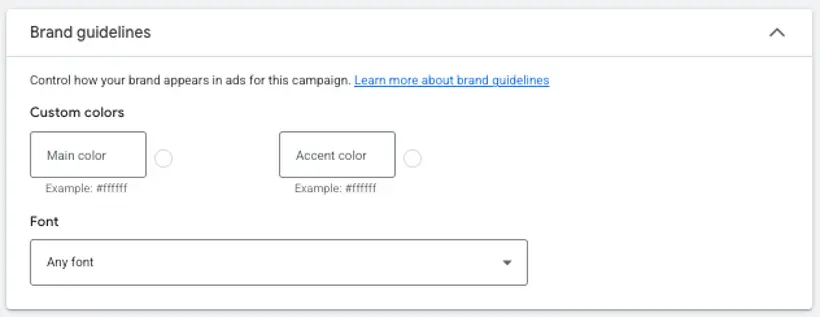
Google has also been developing and expanding its brand guidelines features, which allow advertisers to input custom colors, fonts, logos, and even provide qualitative text guidelines to help ensure all ads Google puts out are in line with brand specifications.
Best practices for the Google Display Network
Before you start running ads on the GDN, keep these best practices in mind.
Monitor placements regularly
The Google Display Network is constantly getting updates with new placements coming in and older placements going out. That means that even if you review placements and set up exclusions once, your job isn’t done. Find a cadence that works for you (likely once a week or every two weeks to start, then once a month or quarter once your campaign is established), and stick to it.
Choose the right bidding strategy for your goals
As mentioned above, depending on the campaign type you use, the bidding strategies available will differ. Google does a pretty good job of driving the actions you select based on bid strategy to ensure you’re using the one that optimizes for your actual goal.
Invest in good creative
The GDN is almost entirely a visual platform. Your creative is what’s going to do most of the heavy lifting to get the user’s attention and entice them to click. Make sure you’re investing enough effort into this piece to see good results.
Expand beyond the Google Display Network
The Google Display Network isn’t the only place you can serve image and video ads. Copying your display ads over to other owned networks of sites with available ad space, like the Microsoft Audience Network or USA TODAY Network, can push your business’s reach further.

Get found by potential customers on the Google Display Network
The Google Display Network is a great way to reach new or existing customers and get them to engage with your brand. The campaigns that run on the network can support just about any business goal you could have; just make sure you’re leveraging the proper brand safety controls and selecting the right settings to hit your target KPIs.
For more ways to make your business visible on the Google Display Network, see how our solutions can help!
About the WordStream Blog
We've been a trusted source of data, news, and strategy for over 15 years. All of our content is written and reviewed by real people: a dedicated team of professionals with decades of combined experience in marketing and advertising for businesses of all sizes.


Add us as a preferred source on Google


Meet The Author
Michelle Morgan
Michelle is the Co-Founder of Paid Media Pros. She has twelve years of experience in all aspects of PPC and brings a wealth of experience developing and executing campaigns across search, social, and display platforms in both agency and in-house settings. Her experience gives her an especially well-rounded and holistic view of the paid search landscape—one she shares regularly as an influencer, author, and industry speaker at events like SMX, HeroConf, and Pubcon, as well as the Paid Media Pros YouTube channel.
Recommended for you