About the Author


There’s a lot of hype and confusion about search query targeting in Google Ads. From “keywordless targeting” to “close variants,” the deprecation of dynamic search ads and the promotion of AI Max from Search to Shopping, confusion is understandable. And we’re seeing a lot of conflicting recommendations and sentiment, like:
“Broad match is terrible!”
“AI Max is dumb!”
“You have to use AI Max now!”
“Broad match or bust, baby!”
In this article, I’ll break down how broad match and AI Max are similar, what’s different, and how to choose the right features for your Search campaigns.
Contents
- The similarities: Why AI Max and broad match can feel like the “same thing”
- The key differences: What sets AI Max and broad match apart
- AI Max vs. broad match: Which works best?
The similarities: Why AI Max and broad match can feel like the “same thing”
Both broad match and AI Max are automated search targeting solutions that require you to use Smart Bidding. Both are designed to help you expand your reach and find novel queries that you wouldn’t capture with exact match or even phrase match keywords. They use a whole variety of signals like your landing page, your ad creative, other keywords in the ad group, and more to determine which ad auctions to enter, and–in combination with your bid strategy–how much to bid.
Because they are powered by AI, broad match and AI Max need data to learn. That means on day one of using either, you will check your search terms report and see a whole host of generic, irrelevant, or seemingly “stupid” searches. The more conversion data you can feed your Search campaign, the faster it will learn which queries and users are likely to be valuable for you, and which are not.
Contrary to popular belief, there’s no set timeframe for this learning. If your campaign gets 50 conversions a day, then it will learn what it needs to know within a day or two–and of course, continue learning after that as auction dynamics evolve. If your campaign gets five conversions a month, you will probably get fed up and turn off your campaign before it gets enough data to learn.
While broad match and AI Max both cast the widest net in terms of query eligibility, they respect your negative keywords. Still, keyword optimization can be tricky as 50-80% of your search terms are likely to fall under hidden “Other search terms,” so think carefully before applying negatives; they could have unintended consequences.
🛑 Want to know how your Google Ads campaigns are doing right now? Find out with a free, instant audit >> Google Ads Performance Grader
The key differences: What sets AI Max and broad match apart
While the “keywordless” part of broad match and AI Max is similar, everything else about them is different.
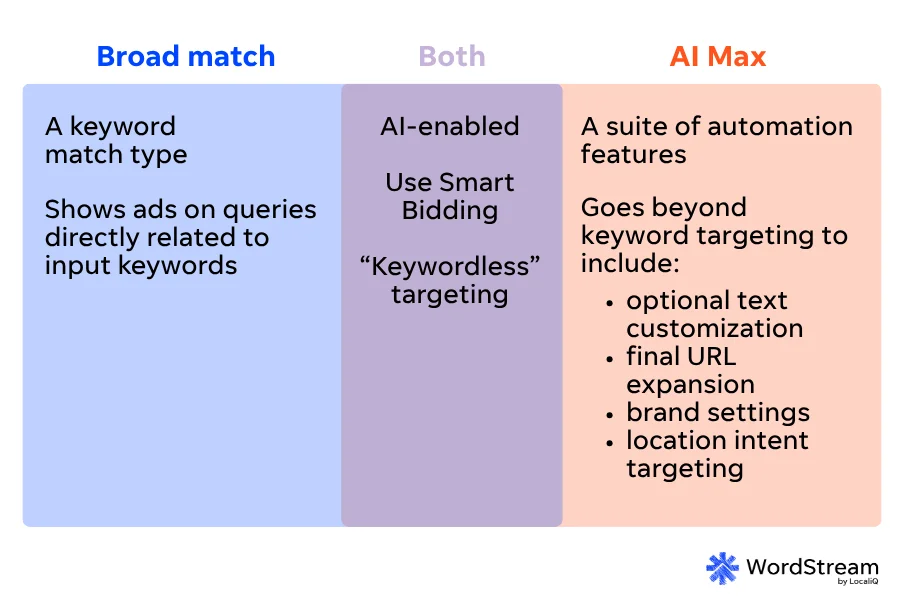
Broad match is a specific keyword match type that tells Google to find queries related to your keyword. AI Max for Search Campaigns is a suite of automation features that includes keywordless targeting, but also optional text customization, final URL expansion, brand settings, and location intent targeting.
Let’s explore these optional AI Max for Search features one by one.
Text customization
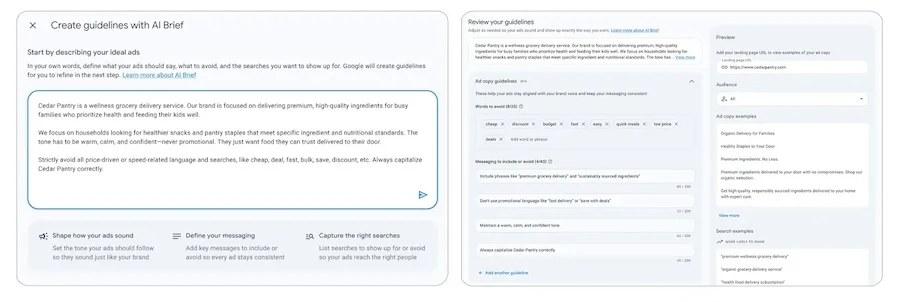
When you turn text customization on with keywordless targeting, Google’s AI can dynamically generate headlines and descriptions for you. While it can still use the 15 headlines and four descriptions from your Responsive Search Ads, I’ve seen text customization generate dozens of different headlines for my clients. Some may be very similar to or even the same as your existing headlines, while others can be…shall we say, a little out of left field.
The newly launched “AI Brief” feature, along with the highly anticipated “text disclaimers” option, should help text customization get better over time.
Final URL expansion
Performance Max (PMax) and AI Max both have the option to turn on final URL expansion, so that Google can send users to any relevant page on your site, not just your designated final URL.
In AI Max for Search (and now AI Max for Shopping as well), you must have text customization turned on in order to use final URL expansion.
Unlike in PMax, though, AI Max offers detailed landing page reporting so you’ll know exactly where final URL expansion sent your paid traffic, and how it performed (or didn’t).
Brand settings
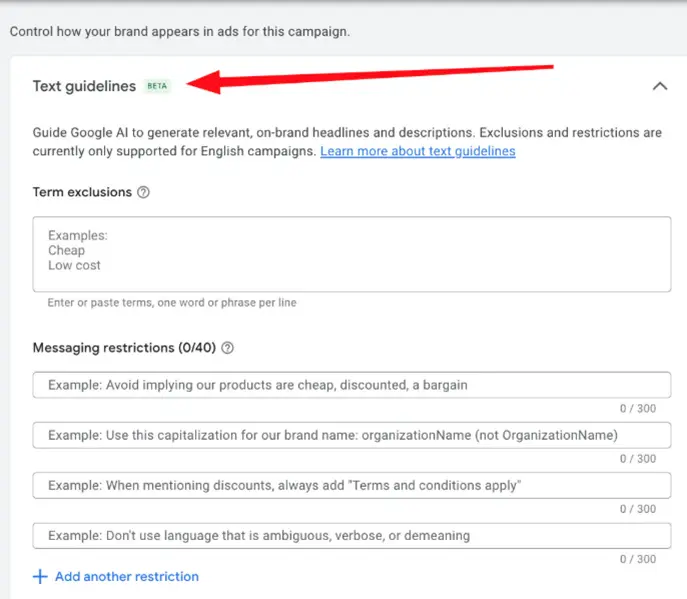
Brand inclusions and exclusions used to be compatible with broad match, but now they have been “upgraded” to AI Max. That means you must be using AI Max keywordless targeting in order to leverage brand settings.
As a quick refresh:
- Brand inclusion means you only want to advertise on searches that have to do with specific brands, whether they are your brands or competitor brands. This is designed as a substitute for using brand and/or competitor exact match keywords.
- Brand exclusion means you don’t want to advertise on searches that have to do with specific brands, whether they are your brands or competitor brands. This is designed as a substitute for using brand and/or competitor negative keywords.
- Unbranded only is a hot-off-the-presses feature that will prevent your ads from showing on any branded searches. Importantly, you don’t need to provide a brand list to use this setting, as you would with brand inclusion or brand exclusion; AI Max uses its semantic understanding of queries to automatically categorize (and exclude) any type of branded search from your campaign.
As with all AI-powered features, I’ve found that brand settings work best with more established brands/competitors and larger budgets.
Location intent targeting
AI Max introduced a new feature where you can set location intent at the ad group level. For example, let’s say you want to reach Americans looking for a hotel in Toronto. You would set your campaign location targeting settings to the United States, and your ad group intent settings to Toronto. Then, your keywords could simply be hotel or 5-star hotels, and the AI would match those ads with users expressing interest in Toronto hotels, specifically.
So if the user search for hotels in kensington market or skydome hotel, AI-powered location intent would understand that kensington market and skydome are both Toronto-specific locations.
⚡️ Free guide download >> PPC 101: Complete Guide to Google Ads
Enhanced search term reporting
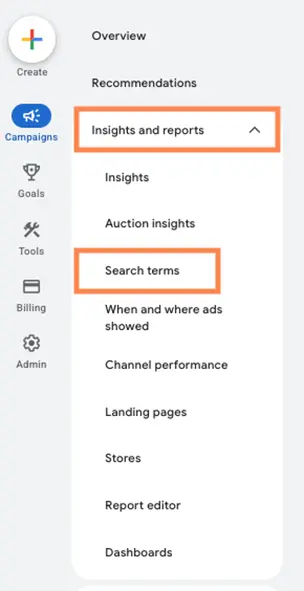
Last but not least: With broad match, you cannot see which specific Responsive Search Ad headline served alongside a search query. With AI Max, the enhanced search terms report will show you the exact search term, the specific headline(s) that served with it, and the landing page the user was directed to. Be sure to keep a close eye on this level of detail for the first few weeks of using AI Max, to ensure you don’t see any unintended behavior from Google’s AI.
AI Max vs. broad match: Which should you use?
Given the suite of AI Max-exclusive features like Brand settings, text customization, and AI Brief, I have recently changed my recommendation. I now recommend using AI Max instead of broad match keywords.
Broader query targeting is more likely to convert when paired with customized text and, if needed, a customized landing page; AI Max is better suited to achieve this than broad match, especially in new AI-first formats like Ads in AI Overviews and Ads in AI Mode.
| Capability | Broad match | AI Max |
| Runs in Search campaigns | ✅ | ✅ |
| Uses Smart Bidding | ✅ | ✅ |
| Expands reach beyond exact keyword wording | ✅ | ✅ |
| Matches based on search intent | ✅ | ✅ |
| Works with negative keywords | ✅ | ✅ |
| Aims to drive more conversions | ✅ | ✅ |
| Requires keywords as primary targeting method | ✅ | ⚠️ Optional—can also use keywordless signals |
| Discovers searches beyond provided keywords | ⚠️ Limited to keyword intent expansion | ✅ More aggressively uses AI to discover new queries |
| “Keywordless” targeting | ⚠️ Targets keywords beyond what’s input but base keywords are still needed | ✅ |
| Uses landing page content as a targeting signal | ❌ | ✅ |
| Uses website content to find new opportunities | ❌ | ✅ |
| Automatically customizes ad copy | ❌ | ✅ |
| Automatically selects the most relevant landing page | ❌ | ✅ |
| Final URL Expansion | ❌ | ✅ |
| Text customization/generative AI assets | ❌ | ✅ |
| Additional AI-driven query matching controls | ❌ | ✅ |
| Locations of Interest controls | ❌ | ✅ |
| Higher level of automation | ⚠️ Moderate | ✅ High |
| Greater advertiser control | ✅ | ⚠️ Lower due to automation |
| Best for advertisers wanting tighter control | ✅ | ❌ |
| Best for advertisers seeking maximum reach and discovery | ⚠️ Somewhat | ✅ |
If you’ve been using broad match keywords for some time and your Search campaigns are performing well, now is the time to test AI Max. There may be some queries that you can’t reach because you don’t have the right assets/landing page, and AI Max’s text customization + final URL expansion can fix that.
If you’re currently using phrase match keywords, your impression share is 50% or more, you’re happy with performance, and you’re looking to scale, I would feel comfortable skipping broad match and going straight to AI Max.
But if you’re in a similar scenario with exact match keywords, I recommend adding a single broad match keyword into your ad group(s) first, giving that 1-2 conversion cycles and evaluating results before either moving up to AI Max, or moving back to exact match.
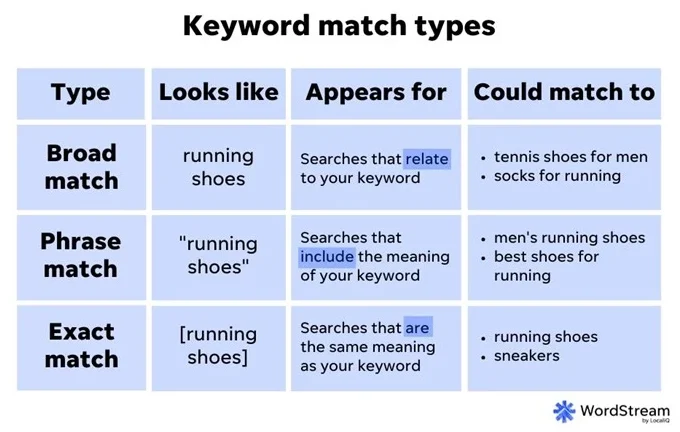
A refresher on keyword match types.
When you test AI Max, I recommend turning it on within an existing campaign rather than starting a new one. Remember, AI needs data to learn, and AI Max needs a lot of data. Let it learn from an already-established campaign rather than starting from scratch.
And if your keyword-targeted Search campaign is not meeting your performance goals, please do not turn on AI Max to “try to fix it!” AI is an amplifier, not a problem solver. A campaign that’s performing well has a good foundation to grow from with AI Max, while a campaign that’s not performing well will probably perform even worse with AI Max. Fix the root cause of your performance issue first, before you consider testing AI Max.
Of course, neither AI Max nor broad match can achieve your desired results without the right bid strategy and conversion tracking. If you cannot supply Google with the necessary data it needs (such as offline conversion tracking for lead generation), you will not get the results you need.
🚀 Want to learn how AI can supercharge your ads strategy? Free guide >> 9 Powerful Ways to Use AI in Google & Facebook Ads
AI Max vs. broad match: Are they actually different?
Yes, broad match and AI Max are different. While they share similar query targeting capabilities, broad match is a Search keyword match type, while AI Max is a full suite of AI-powered features for Search and Shopping campaigns.
In addition to keywordless targeting, AI Max for Search offers text customization with AI briefing, final URL expansion, brand settings, location intent targeting, enhanced search term reporting, and text disclaimers. The new AI Max for Shopping will offer text customization, final URL expansion, and format selection alongside your Standard Shopping campaign features.
About the WordStream Blog
We've been a trusted source of data, news, and strategy for over 15 years. All of our content is written and reviewed by real people: a dedicated team of professionals with decades of combined experience in marketing and advertising for businesses of all sizes.


Add us as a preferred source on Google


Meet The Author
Jyll Saskin Gales
Jyll Saskin Gales is a Google Ads Coach, and the founder of the Inside Google Ads course, podcast, and bestselling book. She advises business owners, agencies, marketers, and freelancers across industries, helping them get the best ROI from their marketing. Jyll worked at Google for 6 years and has an MBA from Harvard Business School. You can find her on LinkedIn and YouTube @the_google_pro.