About the Author


“Always be testing” is a great motto to live by when it comes to Google Ads. There’s almost always some new (or old) feature you can experiment with in your account to see if you get better performance.
The problem is sometimes knowing what to test. Depending on your Google Ads account performance situation, there is a slew of answers.
In this post, I want to help you find your way through the next phase of testing in your Google Ads account with some experiment ideas. Let’s get started!
Contents
- What to test in Google Ads to scale your account
- Google Ads tests for underperforming campaigns
- Google Ads experiments to help high CTR, low CVR performance
- Google Ads test ideas for campaigns with little to no data
- Google Ads experiment tips
❓Not sure what to test first? Instantly identify areas for account optimization and improvement with our free Google Ads Grader!
What to test in Google Ads to scale your account
If you’ve built strong performance in Google Ads and now need campaign growth, start with these experiment ideas.
1. Increase budget for more coverage
Are any areas of your account limited by budget? Those are easy places to add more funds.
There are a couple of caveats to this recommendation, though.
First, if you’re using automated bid strategies that have efficiency targets (think Target ROAS or Target CPA), giving a big budget increase all at once can have a negative impact on performance. If you’re trying to significantly scale, I recommend doing no more than 20% increases a day, then letting the algorithm catch its breath and regain performance before making another adjustment.
Second, some other bid strategies like maximize clicks, maximize conversions, and maximize conversion value will usually have a yellow alert that you’re limited by budget rather than red, but also, in my experience, it sometimes lags what’s actually possible to spend.
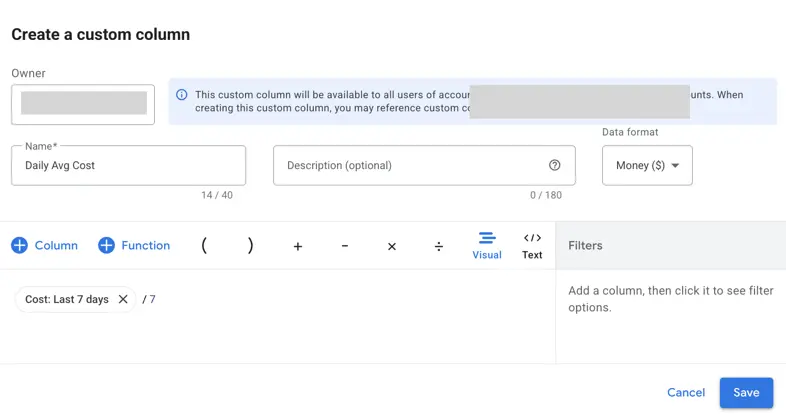
Try adding the daily average cost column into your view to see if you’re spending your full budget in the last 7 days rather than waiting for the alert to pop up.
2. Test new match types
If you’re leveraging only exact match keywords for search campaigns, it might be time to test out phrase match and see how it does.
If you’re using phrase and exact, it could be time to look into a controlled broad match test.
Each of these steps can help you get a little further from your root set of keywords to find other users who may also be interested in your products and services.
Before making these adjustments, I recommend adding in some proactive negative keywords (you could leverage the Google Keyword Planner for this if you need) to help curb some wasted spend, but also review your search query reports regularly for the first few days/weeks to make sure all queries are clean and have good intent behind them.
🔍 Ready to test some new keywords in your Google Ads account? Start with a free, custom keyword list complete with cost and competition data using our Free Keyword Tool!
3. Test AI Max for Search
If you’ve expanded to all match types and are still seeing strong performance and needing more volume, AI Max could be a great thing to test.
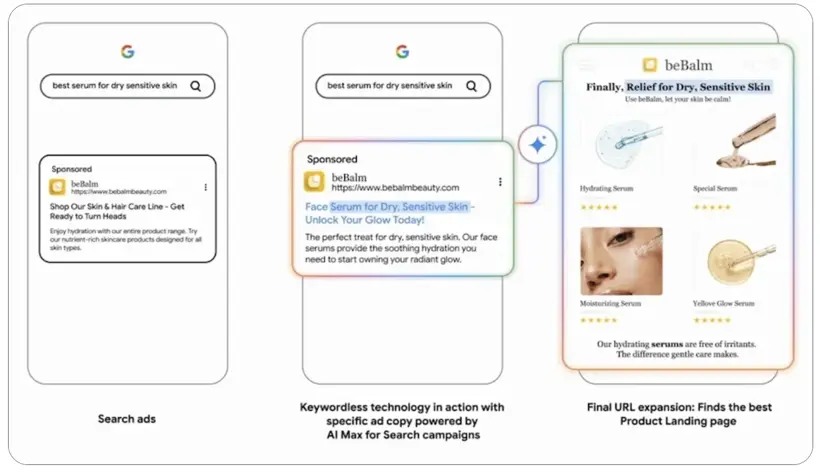
To help expand your reach, AI Max uses search term matching and combines broad match functionality plus keywordless targeting based on your assets and landing pages to trigger for search queries.
4. Expand geotargeting
If your business model allows, you could extend your reach to additional locations to get more customers. Many smaller businesses or folks new to advertising tend to be pretty restrictive with their geotargeting, and rightfully so. You don’t want to waste money on customers you don’t think you can support. But if performance is strong and you can extend your reach just a bit, you might find a nice amount of incremental traffic.
5. Fill the top and middle of the funnel
If all of your strong performance is coming from Search and you’re not able to simply increase budget or expand reach with the strategies I have listed above, it might be time to expand beyond Search and do a better job filling your funnel.
You’ve likely heard before that marketing is a funnel. Or a journey. Or a nurture sequence. No matter what you name it, there’s a process someone goes through before they’re ready to purchase from a company.
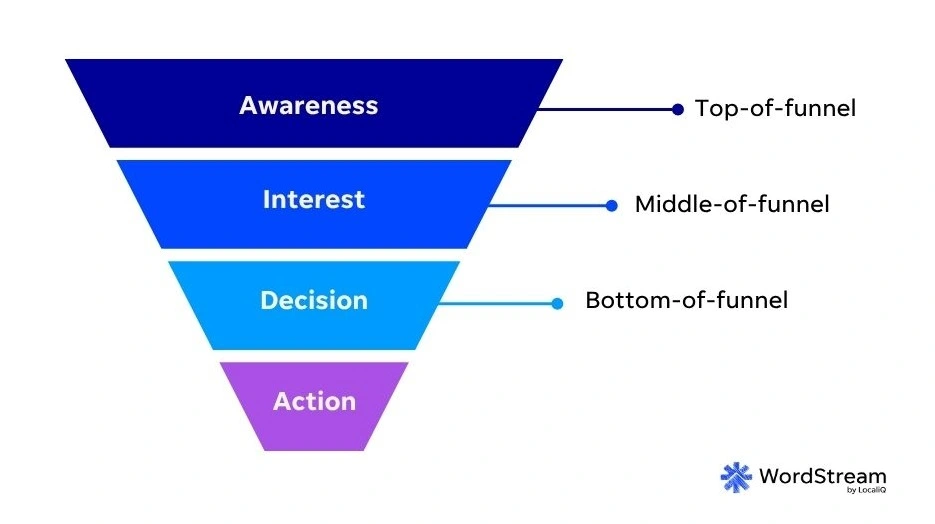
In college, they taught me the AIDA model: Awareness, Interest, Desire, Action.
For some purchases, like a candy bar or some other impulse buy (think things at the checkout in stores), that process can be really short. Just a few seconds to see the candy bar is there (become aware of it), develop an interest (what’s in that candy bar?), decide you want it (who doesn’t want a candy bar?), and take action (chuck it on the counter and pay your extra $1.25).
Other purchases can take much longer and likely can be influenced by multi-touch marketing strategies.
Campaign types like Demand Gen and Performance Max can help you reach a wider audience and make them aware of your product or service. Then that campaign, or a following search campaign, can help nurture them through the following stages to purchase.
The takeaway is: Search is a bottom-of-funnel channel. Someone actively searching for something is likely already aware and interested. Using higher funnel campaign types can help build that awareness and interest, so your Search campaigns can capture it later on, giving you increased sales volume through your strong-performing campaigns.
Google Ads test ideas for underperforming campaigns
If your campaign performance has declined and you need to increase efficiency, try these Google Ads test ideas.
6. Refresh ad copy
Sometimes one of the easiest ways to spur improvements is to update stale ad copy. If you haven’t rewritten or launched anything new in a month or two, maybe it’s time to switch up the message.
Here are some ideas of where to start:
- Review the assets report to see which headlines and descriptions are performing the best, then come up with new iterations of them.
- Review competitor copy to see what themes they’re leaning into and see how you can outflank them.
- Talk to your sales team and understand the questions/concerns potential customers normally have and address those in ad copy.
- Check out your reviews and pull snippets to use as compelling social copy.
I still stick to my RSA theme testing strategy for my clients and find it’s a great way to understand what messaging and angles work at a high level, while also letting me drill into the specifics of each to know exactly what moves the needle.
7. Review search terms to look for intent shifts
As part of regular optimizations, you should be reviewing your search terms report to find new keywords and negatives, but it’s also important to take a higher-level view and see if queries are trending one way or another.
Are your search terms becoming more educational rather than transactional over the last few weeks or months? Are competitor terms creeping in? Are people looking for knock-off versions of your offerings?
Whether these are happening because of actual market shifts or Google simply following a different pattern of queries based on its internal signals, it’s important to make sure you’re on the right intent path with your search terms.
8. Review Auction Insights
I’m a big fan of the Auction Insights report as there’s quite a lot you can do with it.
It’s useful in finding who your key competitors are for any given campaign or ad group in your account, but the better use is to spot trends within your competitor behavior.
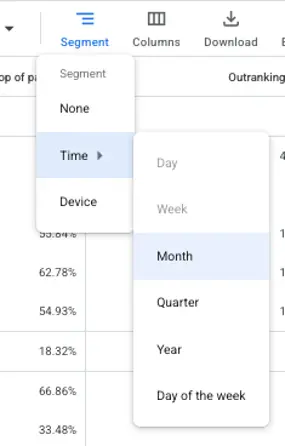
In the Auction Insights report, head over to Segment, hover over Time, then select either the week or month option depending on your time frame.
Now we can see trends in the data for our account. For example, in this campaign, we’ve been seeing increasing costs and diminishing returns, likely due to the two competitors surrounding us.
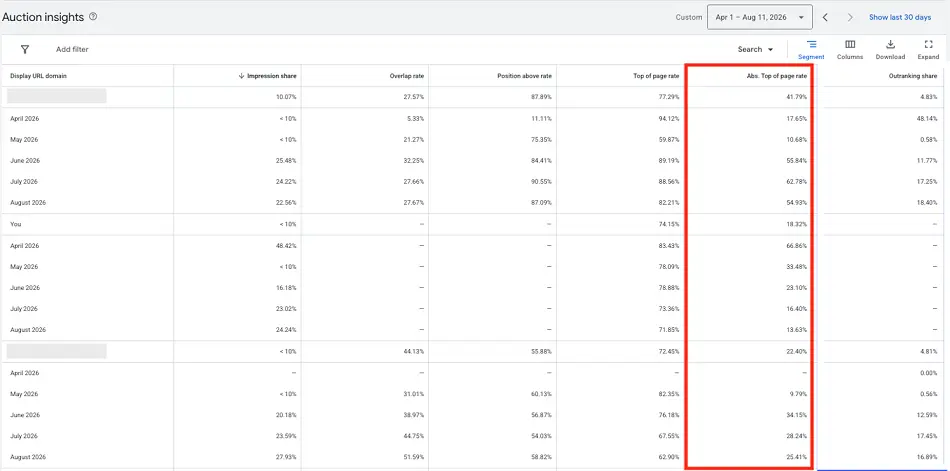
Both sites are seeing increases in impression share since April, but so are we. The more telling stat is the absolute top of page rate (red). This shows us losing ground to our competitors and likely causing lower returns.
In this instance, it may be that the queries have shifted and our competitors’ offerings make more sense, in which case we should adjust our keywords and add negatives. It could also be that these competitors are simply finding efficiencies here and are willing to outbid us. In that case, we might need to adjust our bid strategies, revisit our economics, or simply be willing to lose ground if we’re not able to break even.
9. Test a new bid strategy
Sometimes decreasing performance just needs a little kick in the butt from a change in bid strategy. While I don’t recommend changing bid strategies lightly, it might make sense to do a split test and see if a different set of parameters might be useful.
Oftentimes, I find campaigns that have been running on bid strategies like maximize conversions or maximize conversion value simply get a little out of hand after a while. Without any guideposts to rein them in, they can go a kind of nuts. Test using TROAS or TCPA strategies for these campaigns and see if that helps bring things back in line.
10. Develop new landing pages
Likely the biggest lift for this section is developing a new landing page. Just like everything else in marketing, landing pages aren’t just one and done. While the page itself might not be causing the decline (in my experience, pages usually either do well or don’t and don’t really trail off unless the functionality wanes), it can be a big upside if you create something with even incremental conversion rate wins.
Whether you have an in-house team that can whip up a new page, or you need to use a tool like Unbounce to get you moving, testing a new page layout can be a great way to move the needle.
Google Ads experiments to help high CTR, low CVR performance
If you’re getting traffic, but not conversions, here are some Google Ads experiments worth testing.
11. Add negative keywords
Just like I mentioned above, search query reviews should be a regular part of your campaign optimization. If you’re not monitoring these, it can easily be a source of unqualified traffic.
If you’re getting a good amount of traffic but not converting any of it, do a spot check and make sure all of the queries you’re showing for are relevant and add negative keywords where needed.
12. Revisit match types
Sometimes, negative keywords are just band-aids that are trying to fix bigger problems. When reviewing my search terms, I regularly check the match type and keyword columns as well.
We all know broad match is going to be the broadest with targeting, and sometimes that’s okay. But if I notice a pattern of certain keywords matching broadly to irrelevant queries, it might be time to focus that term with only phrase and/or exact.
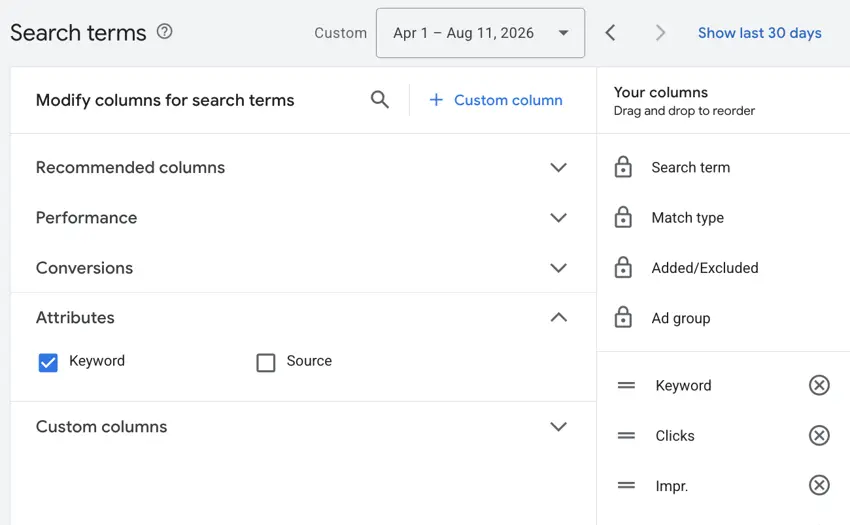
By default, the Keyword column is not added to this report. You can easily add it by clicking on the Columns editor, then choosing Keyword under the attributes section.
13. Add placement exclusions
Just like search queries, placements should be a regular part of your campaign reviews if you’re running campaigns that leverage the Google Display Network.
Adding individual placements as exclusions can be an easy win to help improve performance, but also look for patterns in the sites that have high click volume and no conversions.
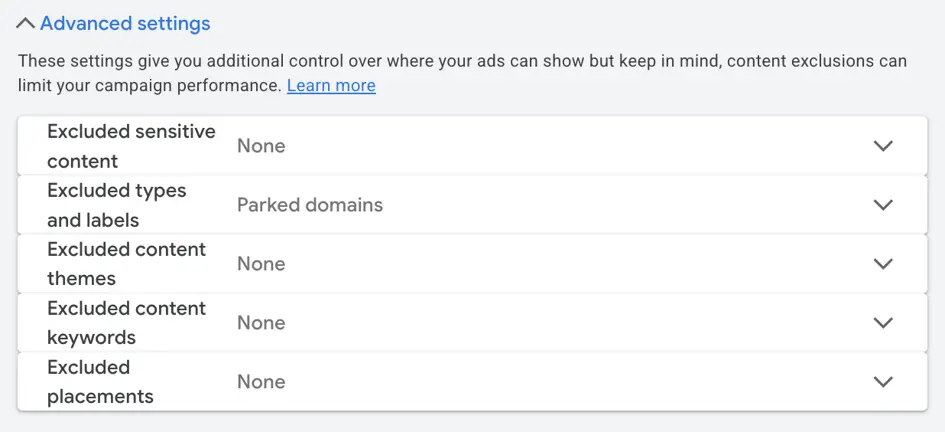
It may be easier for you to simply exclude certain categories of content. You can use any of the controls in the content suitability category to help focus your ads either by inventory type or by controlling specific content types, placements, keywords, types & labels, and content themes.
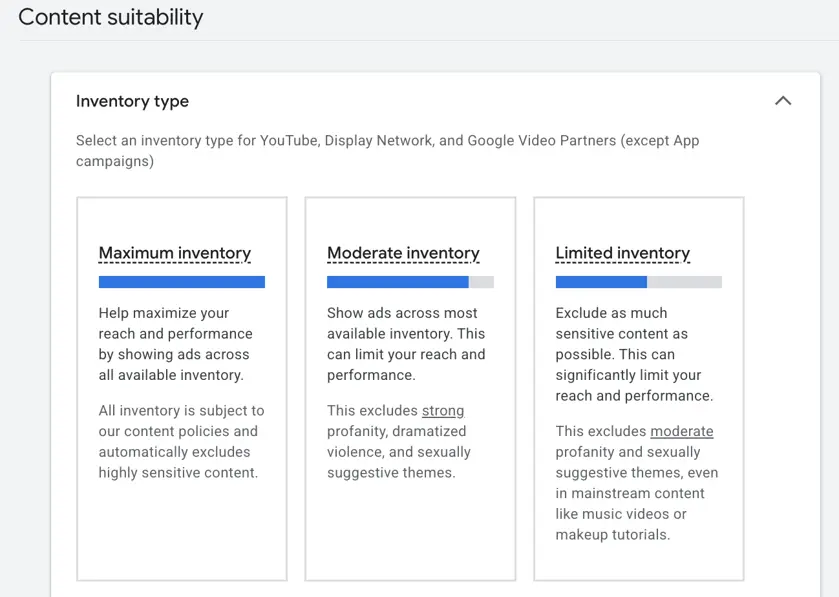
As a rule of thumb, if a placement or content type isn’t a good performer but it’s an okay fit, you can exclude it within a campaign with the option to show others where it could perform better.
If it’s not a good fit for your brand, it’s best to add it as an exclusion at the account level.
14. Provide more specific audience targets and opt out of auto-targeting
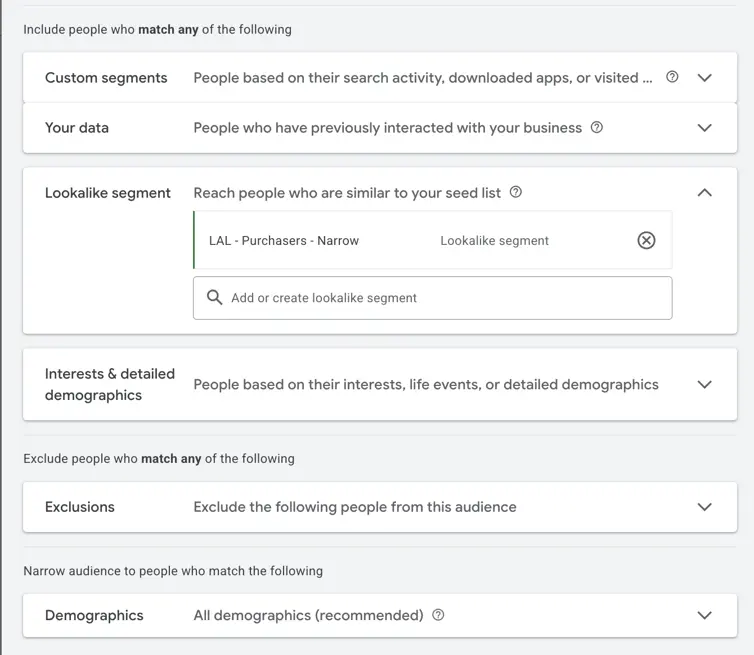
For any campaign that leverages audiences for targeting (think Demand Gen), two common issues I see are having too broad of targeting or not providing enough points to narrow down on.
For the audience breakdown below, we’re only targeting a lookalike audience of purchasers. That’s all. There’s no direction on customer search behavior, their interests, demographics, or even exclusions. While a lookalike audience can perform well, it usually does best with some additional context.
Another sneaky setting is the optimized targeting option. This lives at the ad group level and basically gives Google the option to go beyond your set targeting if it thinks it can find good performance. While every account is different and testing is generally encouraged, I have yet to find an account where Optimized targeting works at all, let alone better than my existing targeting.
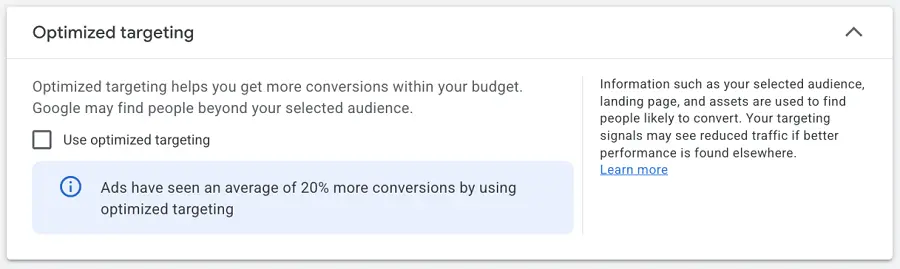
Make sure when leveraging these types of campaigns that you’re providing enough context for your ads to find the right users who are ready to convert and aren’t just letting Google run wild with targeting.
15. Write qualifying ad copy
While we usually want as high a CTR as possible, spending lots of money on clicks but no conversions can be very frustrating.
Many times, I find my clients have written ad copy that feels like it’s for everyone (which is why they all click) when the offer is actually catered to a specific audience.
Think about it this way: if you didn’t know the Rolex brand and their ads promoted an “everyday gold watch,” you might be inclined to click on it, not realizing the price point you’re walking into.
Writing qualifying ad copy helps you accomplish two things at once: you can ward off clicks from users who aren’t qualified and level-set expectations for the users who do click at the same time.
Rather than writing “Every Day Gold Watches” (which Rolex does not do, by the way; just sharing an example), they would be better off with something like “Luxury Gold Watches.”
16. Rework your AI Brief
One of the newest features to Google Ads is the AI Brief. This feature is so new I have to take images from help articles, as it hasn’t shown up in any of my accounts just yet.
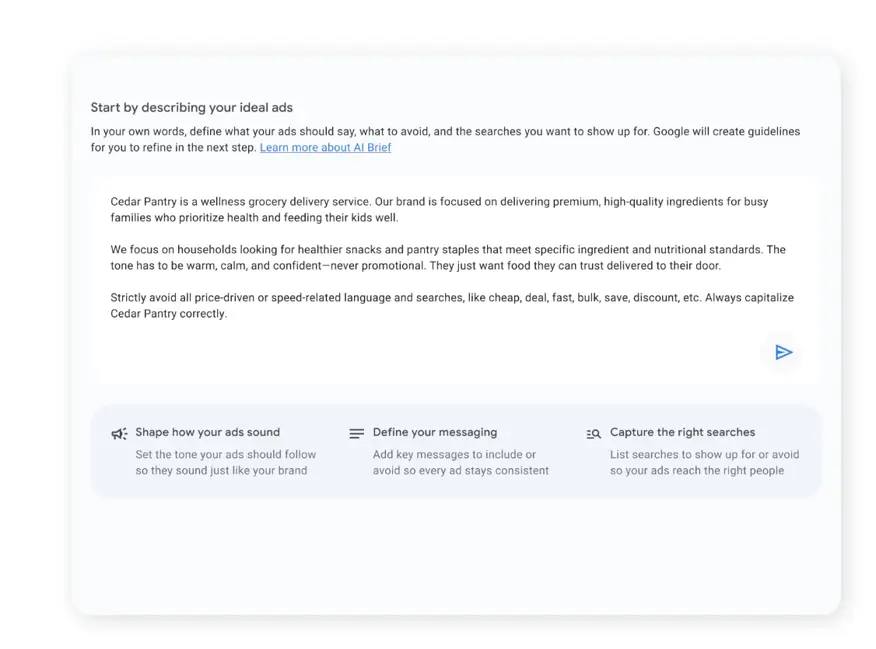
But! If you’re from the future and reading this while leveraging the AI Brief and also seeing decent traffic but no conversions, you may need to revisit these directives.
The AI Brief can have impacts on the search terms your ads match to, the audiences you show for, and the messaging that’s in your ads. If you haven’t put in the work to make this as accurate and helpful to Google as possible, now’s your time to do that.
17. Change your call to action
At the highest level, if you’re regularly driving traffic at an efficient level but not seeing conversions, assuming none of the other optimizations in this section have worked, it might be time to rethink your call to action.
Assuming your bid strategy is either Manual or optimizing for some form of conversion, seeing reasonable CTRs means your message is resonating with your target audience, but no conversions means either you’ve misled them or they’re not willing to take the next step and convert.
For these scenarios, I try to dig into search terms, placements, and review website engagement to determine what a better call to action might be and adjust campaigns accordingly.
Google Ads test ideas for campaigns with little to no data
If your campaigns aren’t seeing any traffic yet or your ads can’t seem to get traction, here are a few more Google Ads tests you can experiment with.
💡Get baseline data to compare your Google Ads performance to using our free Search Ads Benchmarks and Display Ads Benchmarks reports complete with data for over 20 industries!
18. Expand match types
Match type expansion is usually a strategy I reserve for campaigns that are performing well, but if you’re not getting any traction with your existing terms on restrictive match types, it might be worth loosening your grip a little. You can’t make any sales from no traffic, but you might be able to optimize your way to some incremental sales from broader traffic. You just need something to optimize.
19. Test upper funnel campaigns
We all want conversions and sales. Believe me, I get it. But if your campaigns don’t have any volume coming through with restrictive targeting, it’s likely worth a shot at higher-funnel campaigns.
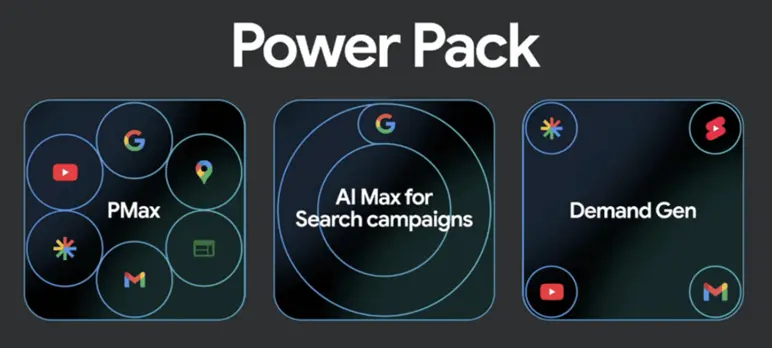
To be honest, after some optimization and functionality changes from Google, both Demand Gen and Performance Max campaigns have been a pleasant surprise when it comes to driving conversions for many of my clients. They have helped generate awareness and interest for their companies, and in some cases, even drive the bottom-of-funnel conversions right within the same campaign.
In other instances, we were able to finally generate enough traction and bottom-of-funnel interest to support Search campaigns. Google likes to call the combination of these 3 campaign types the Power Pack, and although that does sound a bit hokey to me, I have seen it work in some accounts.
20. Expand geographic coverage
Just like I mentioned in the section on expanding coverage for strong performing campaigns, sometimes a little wider geofence is just the thing it takes to get your campaigns off the ground. If you’re able to support a location, maybe add it to your mix and see if that gets the ball rolling.
21. Test new channels
While I would be astonished if you can’t get traction to some degree with the many different campaign types on Google, it’s worth noting that Google isn’t the only game in town. Customers are searching across platforms, so it’s reasonable to reach out to big players like Meta Ads, TikTok Ads, LinkedIn Ads, Reddit, Quora, or any of the others to get some traction.
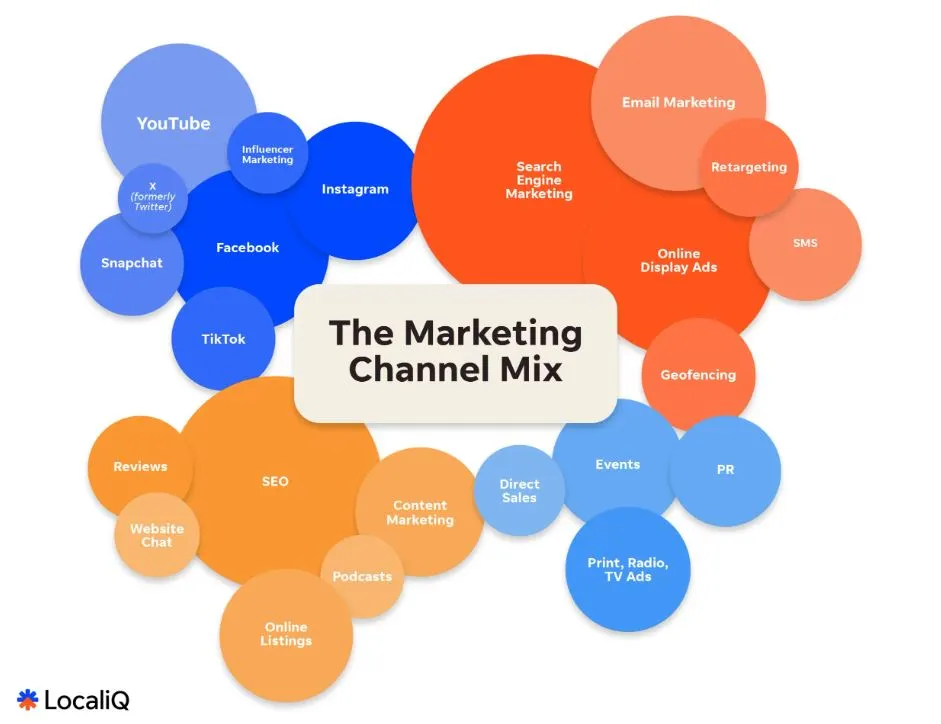
Examples of complementary marketing channels that can boost your Google Ads strategy.
Google Ads experiment tips
Now that you have some options of things to test in Google Ads, I want to leave you with some best practices on how to test them.
State goals before the test begins
Experimenting with a new bidding strategy or campaign type is great, but if you don’t know what you’re trying to achieve, you won’t know if you’ve succeeded. Set some parameters for what you are hoping performance will be. Once you get your initial results, you’ll know if you’re close to your targets and could optimize your way there, or if you’re completely off base and might need to cut bait.
Give a reasonable timeframe
As much as we’d all love for an experiment to have confident conclusions in just a couple of days, that simply isn’t realistic. Human nature is too fickle for that, but additionally, with the increasing impacts of AI on your campaign successes, it’s important you give them enough time to learn and iterate on the success/failures they see early on.
The shortest time frame I would ever recommend is one week, and that’s only for super high-volume tests and likely only a “cut bait” scenario if performance is abysmal. Two weeks is an easy-to-hit minimum, with some tests needing one month, two months, and sometimes a quarter to finish.
Depending on your industry, tests that run for over three months don’t tend to yield significantly different results for my accounts than they did at that three-month mark. If you hit that time frame, maybe give it a little more, but don’t be averse to calling it before you reach statistical significance if you’re not even close to it by that point.
Minimize the variables
Nothing is more frustrating than running a test, feeling like you have a conclusion, then having others poke holes in your findings. While it’s not always possible to test only one variable at a time (or very few), it’s in your interest to try and focus on just one to two things at a time so as to come away with a clear conclusion and winner without caveats.
Don’t pause your Google Ads assets; test them first instead
For just about every scenario with a Google Ads account, there’s a potential move you can make to help improve your performance. Hopefully this list gets you thinking of ways you can address the challenges you’re having in your account and get you on a path to better performance. For more ways to maximize your Google Ads campaigns, see how our solutions can help!
About the WordStream Blog
We've been a trusted source of data, news, and strategy for over 15 years. All of our content is written and reviewed by real people: a dedicated team of professionals with decades of combined experience in marketing and advertising for businesses of all sizes.


Add us as a preferred source on Google
Are you wasting money in Google Ads?

Meet The Author
Michelle Morgan
Michelle is the Co-Founder of Paid Media Pros. She has twelve years of experience in all aspects of PPC and brings a wealth of experience developing and executing campaigns across search, social, and display platforms in both agency and in-house settings. Her experience gives her an especially well-rounded and holistic view of the paid search landscape—one she shares regularly as an influencer, author, and industry speaker at events like SMX, HeroConf, and Pubcon, as well as the Paid Media Pros YouTube channel.