About the Author


When it comes to campaigns in Google Ads, there’s really no shortage of optimizations you can make. They provide tons of levers for you to pull to try and get the best performance from your campaign, but the act of pulling levers in and of itself doesn’t guarantee good performance. If anything, I’m finding more folks are actually hurting performance by making moves that they view as “optimizations.”
It’s a double whammy: you’re working harder and seeing less results.
In this article, I want to try to help you avoid that fate. Here are the most common mistakes I see folks making under the banner of “optimizations” that are actually shortchanging their results.
The biggest Google Ads optimization mistakes:
- Chasing optimization score
- Making drastic bid changes too often
- Oversegmenting campaigns
- Not leveraging Responsive Search Ads dynamic capabilities
- Pausing efforts too soon for low performance
- Tracking too many low-value conversions
1. Chasing optimization score
The first common optimization mistake really sucks. They even have it in the name! Optimization score.
Logic would follow that having a high optimization score would result in strong performance. And sometimes, it can. But it doesn’t always.
Chasing this metric is really just a fundamental misunderstanding of what optimization score is.
Here’s an example of an account I actively manage that has been delivering great results month after month:
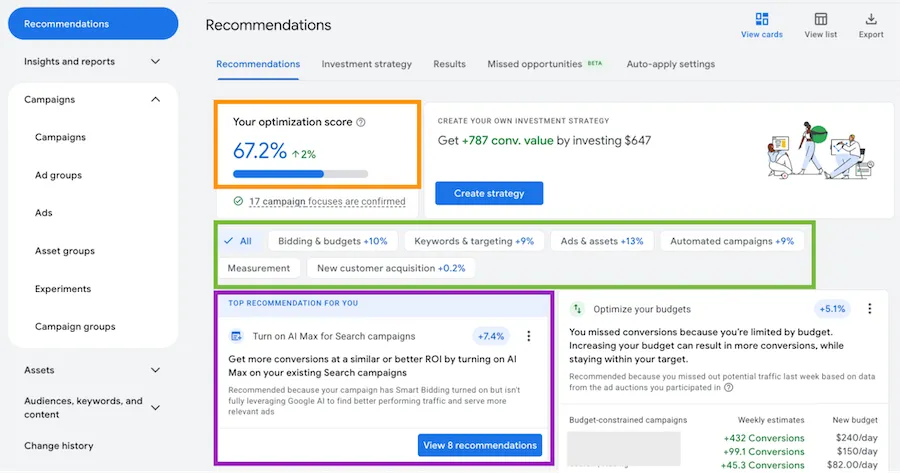
Let’s break down this image a little to show why optimization score isn’t what we’re after:
- Orange: The optimization score is only 67% despite hitting all of our business goals. Not very often do you get a D on a test when you’re meeting all of the requirements.
- Green: Here are the actions and the expected increase in optimization score based on the suggestions in each category. These are the levers that will increase optimization score.
- Purple: This is the single suggestion Google has that will increase the optimization score the most: Turn on AI Max. But here’s the thing…AI Max was tested in this account, and it didn’t perform well.
The problem with optimization score is that it’s solely based on Google’s recommended best practices. Making the recommendations they suggest will improve your score, but they may or may not help your performance. For this reason, optimization score shouldn’t be your campaign goal. It can be something to regularly check and see if the suggestions make sense for you, but blindly accepting recommendations to make an arbitrary score go up isn’t going to help your accounts.
🛑 Want to know how your Google Ads campaigns are doing right now? Find out with a free, instant audit: Google Ads Performance Grader >>
2. Making drastic bid changes too often
One of the most powerful parts of Google Ads is the bidding system. Full stop. It’s just…really good.
But it’s still based on machine learning. It still needs to see and identify patterns of performance to succeed.

I have two rules of thumb for you to follow when it comes to bidding optimizations:
The two-week rule
For large changes in bidding, like testing a new bid strategy, give it 14 days. During that time frame, the algorithm is still in a learning phase. There may be some really terrible performance days, but you may also find some really strong days mixed in as well.
If you change bid strategies, give it at least 14 days before you make another adjustment to let the platform get its feet under it and see if it can hit the goals you’ve given it.
The 20% rule
This originated on the Meta Ads platform, but I find it works well for Google Ads as well.
For marginal changes within a bid strategy, only adjust things 20% at a time, then give the algorithm a chance to hit your new target for a few days before making another change.
Let’s say your current target ROAS is set at 200% and you want to change it to 300%. Your first change should be to 240% because 40% is 20% of 200. (Clear as mud, right?)
Once your campaign is performing at the 240% mark, then you can bump your target ROAS up another 48%. (48% is 20% of 240%.) Now you’re at 298%, so your last little change can be to 300% (or you could probably sneak it in in the round prior.)
The point is, don’t go from 200% to 300% in one jump. Break it up, establish your new baseline, then adjust again. Moving too far too quickly can starve the platform for information and cause it to lock up.
3. Oversegmenting campaigns
Back in the day, it used to be beneficial to heavily segment your campaigns because you, the manager, had to manually optimize the account. With everything in its designated space, it was easier to keep an eye on what was performing, what wasn’t, and pull the levers to see improvements.
But that’s no longer the case. With Google’s machine learning doing a much larger portion of the decision-making, it’s now less helpful to segment and more beneficial to keep data consolidated.
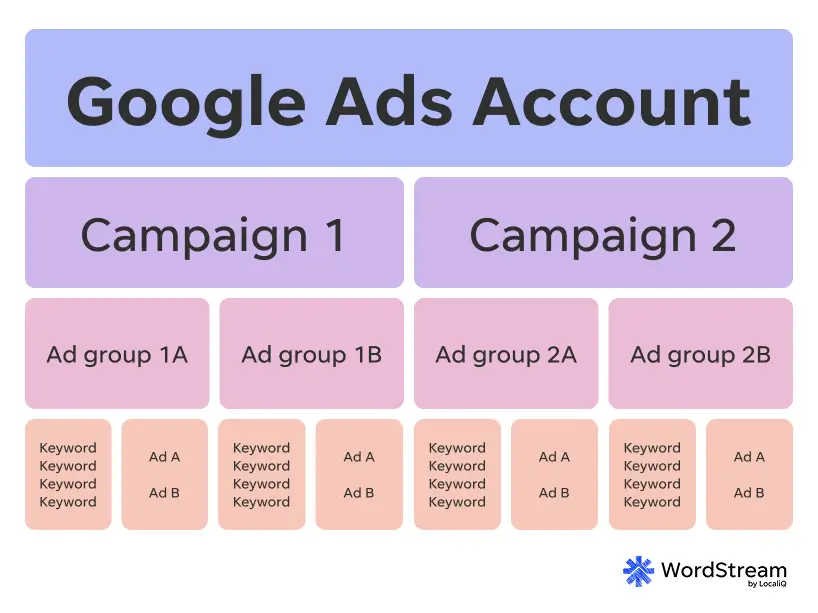
When performance is consolidated, even in a large account, that means there are more data points all within the same context for the algorithm to make decisions on. It might be easier for you to see and control bids with keywords in different ad groups, but the machines don’t need them to be segmented. It can see things just fine, not to mention other signals that we don’t even have access to.
Moving forward, when you’re trying to decide if you should create a new campaign or a new ad group to segment your account, I want you to think about the following questions:
- Does this require a different conversion action to optimize for?
- Do I need to control the budget for this effort compared to the rest of the account?
- Does this require different messaging from my other ads?
- Do I need to send users to a different landing page?
If you answered yes to any of these, then you likely need to segment. If you didn’t, then you might not need to. This isn’t an exhaustive list, but it should at least get you started to think about when you should and shouldn’t segment something in your campaign structure.
⚡️ Is your Google Ads account set up for success? Download now: The Last Guide to Google Ads Account Structure You’ll Ever Need >>
4. Not leveraging Responsive Search Ads dynamic capabilities
Pinning assets in Responsive Search Ads can be a good way to ensure some of your preferred messaging always finds its way into your ad creatives. But when taken too far, it can lock down Google’s dynamic capabilities and can limit how often your ad serves.
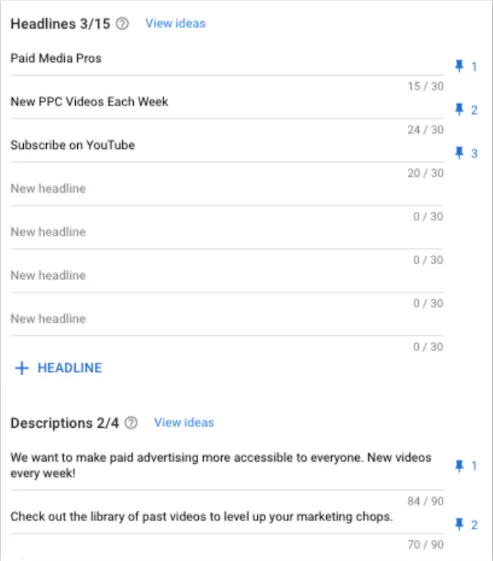
While I understand that it might feel like you’re optimizing your ad copy for the keywords in your ad group by locking down creatives like the image above, it’s actually going to end up hurting you in the long run.
Most advertisers are going to benefit most from having a range of headlines and descriptions that highlight their business from different angles and let Google decide which is going to resonate best with the searcher.
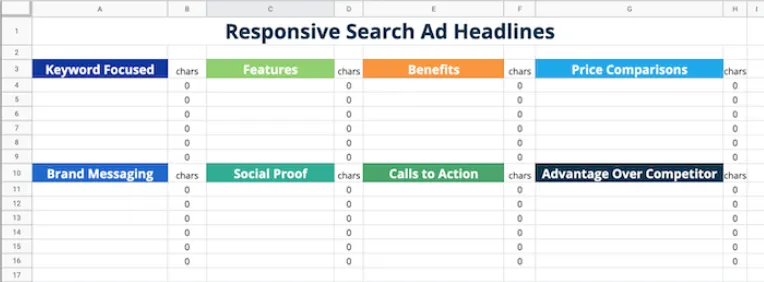
Instead, we have found it’s best to control messaging by creating themes for the Responsive Search Ad as a unit, then let Google determine which combination of assets it wants to show within that theme. Then at the ad level, you can use labels to mark which messaging is in which copy and understand how each theme performs compared to each other.
This strategy retains your control over messaging and allows you to optimize for what’s working best at a high level, while letting Google handle the nitty-gritty details.
5. Pausing efforts too soon for low performance
We all want our newly launched campaigns, ad groups, keywords, ads, and other things to perform well. Of course we do. That’s why we launched them in the first place.
But not every effort is launched in its most optimized form. If it were, this job would be easy.
In many accounts, I see things get launched, run for a couple of days, then be turned off when performance isn’t immediately strong. No optimizations. No change in tactics. Just turn it off.
When you do that, you write off an area of marketing that could perform well if you just gave it a bit of time.
Here’s an example: We launched a new set of campaigns for a regional medical clinic. The first few weeks of search queries were full of specialty searches this clinic didn’t support, as well as the names of doctors and practices not associated with them. ROAS was very low to start, but we worked at it.
After four months of query cleanup, we’re now at a 90% clean query rate, and ROAS is positive for a first appointment. Not to mention being higher for the lifetime value of the patient based on an average of two visits per year and a 5-year average lifespan.
Some of you might think, “I don’t have four months to optimize. I need business now.” Or “I can’t afford to run at full budget for four months before I break a profit.”
And I hear those objections, but the point is, there’s no silver bullet to marketing. You have to test and iterate. Start with a small budget, make early, quick-win optimizations on things that aren’t aligned with your business, then gather more data and optimize again.
Turning things off doesn’t get you anywhere. Start small. Learn. Optimize. Then scale when you’re ready, able, and profitable.
Try these Google Ads experiments if you’re looking for options of what to test within your account.
6. Tracking too many low-value conversions
A common theme in digital advertising is more data = better performance. But that needs to be tweaked a little bit.
More good data = better performance.
When it comes to conversion tracking, you can set up just about anything in your account to be considered a conversion, but that doesn’t always mean it’s in your best interest.
Google’s bidding algorithm is really good at finding patterns and driving the conversion actions you tell it to. The challenge: if one conversion action is drastically easier to get than another, say a page view vs. a form fill, Google is going to end up driving pretty much only page views.
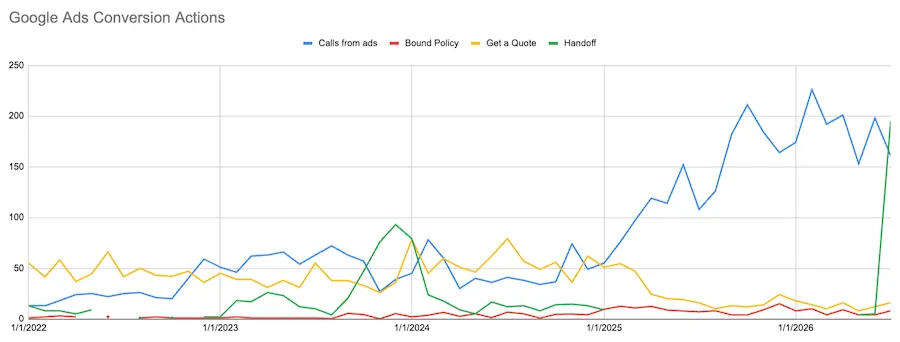
In the image above, you can see this account has seen this pattern twice now. In early 2025, Calls were shifted to be part of the conversion optimization goal, and since those only needed to last for 60 seconds compared to the custom quote call to action, Calls quickly took over the conversion performance.
Then, in May of 2026, conversion tracking was fixed for a previous action, and the criteria was softened a bit. After some initial data in May and June, that action took off in July and also dominated the conversions along with phone calls.
You can see we’re still getting conversions from the higher-value touchpoints, but they’re quite a bit lower in volume than they were before these other actions took over.
For conversion tracking, pay attention to how you set up your account and campaigns. Focus on the higher-value conversions where possible and only leverage lower-value ones where needed. And even then, adjust the associated value of that action to be lower than the others and leverage a bid strategy like Maximize Conversion Value or tROAS. You can read more about setting up conversion tracking for best returns here.
Don’t make these Google Ads optimization mistakes
While I don’t want to discourage anyone from optimizing their account, I do want to make sure that the actions you’re taking are having the desired impacts. Hopefully you’ve not been making any of the mistakes I outline above, but if you are, that’s okay! Now you can shift course and think about your optimizations differently.
Need help optimizing your account? Reach out to learn what we can do for you >>
About the WordStream Blog
We've been a trusted source of data, news, and strategy for over 15 years. All of our content is written and reviewed by real people: a dedicated team of professionals with decades of combined experience in marketing and advertising for businesses of all sizes.


Add us as a preferred source on Google
Are you wasting money in Google Ads?

Meet The Author
Michelle Morgan
Michelle is the Co-Founder of Paid Media Pros. She has twelve years of experience in all aspects of PPC and brings a wealth of experience developing and executing campaigns across search, social, and display platforms in both agency and in-house settings. Her experience gives her an especially well-rounded and holistic view of the paid search landscape—one she shares regularly as an influencer, author, and industry speaker at events like SMX, HeroConf, and Pubcon, as well as the Paid Media Pros YouTube channel.