About the Author


It’s no secret that Google’s AI is only getting better and smarter year after year. There’s not really a world anymore where a human advertiser alone will do a better job at:
- Setting bids
- Deciding when a user is ready to convert
- Choosing the exact right placements
- Finding the right time to show up
But the thing Google can’t do? Know what is going to meaningfully impact your business.
To Google, you’re just another account number. It doesn’t know how your sales process works or what your margins are. It’s simply a machine going after a number, and it’s damn good at it.
As marketers, our job is now very different than it used to be, but just as important: we have to tell Google what we want.
In this article, I’ll walk you through how to create a winning Google Ads conversion strategy so you can track and impact the most important results for your business.
Contents
- Determine what’s valuable
- Figure out how to track it
- Match the valuable action to the tracking functionality
- Configure settings to maximize outputs
How to create a winning Google Ads conversion strategy (in the age of AI)
Let’s get started.
Determine what’s valuable
The first step to having a winning Google Ads conversion strategy is to outline exactly what is valuable to your business. This will be different for every company based on your sales processes, margins, conversion rates, customer retention strategies, and so on, which is why Google isn’t able to make these decisions for you. It needs these inputs for success.
But this stage shouldn’t outline only the final sales on your site. With some exceptions, very few businesses have only a purchase action to consider a positive engagement with a company. Depending on your business model, there may be a slew of them that we want to outline.
Start by writing down all of the ways someone can meaningfully engage with your company. No, page views don’t count, unless it’s a very important page.
We’re looking for actions like:
- Signing up for a newsletter
- Entering to win a drawing
- Requesting a demo
- Clicking to call
- Making a purchase
- App installs
- Completing a sales call
- Downloading a report
- Joining a loyalty program
- Starting a free trial
- Upgrading to a paid account
- Registering for a webinar
Any action that could be part of a customer journey should be a part of this list. For this portion, we really just need to know what’s valuable. In a little bit, we’ll get to outlining just how valuable something is.
🛑 Worried you’re wasting spend in Google Ads? Find out with a free, instant audit >> Google Ads Performance Grader
Figure out how to track it
All of these actions hold some level of value to your marketing campaigns, whether they’re the end goal of every campaign or just a quality indicator along the way. In my experience, it’s best to have as many of these actions as possible tracked in your Google Ads accounts for two reasons.
First, you’re able to optimize to that goal in your campaign settings. We’ll talk about this more later, but if you want to have more newsletter signups, Google is going to be best able to do that if you have confirmed that newsletter signups are tracked so it can model past behavior and know when it sees success.
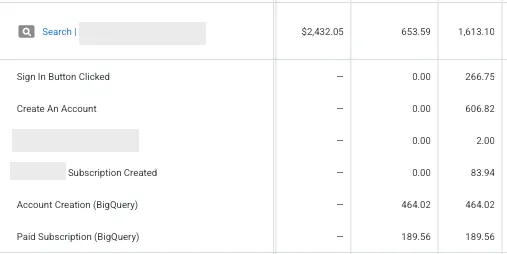
Second, these actions can be good indicators of performance in other campaigns. While each of these actions might not fit into a perfectly linear funnel, it’s logical that someone who regularly downloads your content is more likely to engage with your brand on a revenue-generating basis than someone who doesn’t know who you are. These actions can be used simply as observations in your account to help you better understand how your campaigns are performing throughout the funnel.
Types of conversion tracking in Google Ads
While the idea of tracking many different types of conversion actions might be a novel idea to some, it’s not to Google. They’ve been developing loads of ways to track meaningful interactions with companies over the years. Here’s a rundown of the high-level options:
Website conversions: This strategy leverages the Google Tag on your website and can help track actions like purchases, newsletter signups, form submissions, and more based on how the user engages with your website.
App conversions: This is similar to website tracking, but for your App instead. This can track when someone installs your app or takes specific in-app actions like completing a level of a game or making a purchase.
Phone call conversions: Google’s options allow advertisers to track calls from three different sources: calls from call assets or the ad itself, calls made from a forwarding number on the website, or calls generated on a mobile device by clicking on the phone number (click to call).
Offline conversions: This measures actions that are valuable to your company, but take place in the physical world and not the digital one. This can include in-store purchases, CRM lead progression, and other actions either provided to Google through a CRM integration, importing a file, or through the Google Ads API.
👀 What conversion rate can you expect from your Google Ads? Download our latest Google Ads Benchmarks to find out >>
Match the valuable action to the tracking functionality
Now we need to determine which tracking methodology makes the most sense for our goals and get it set up. I’m not going to walk through how to implement tracking for each type of these goals here (you can do that by reading this article), but I do want to give some examples of how you can use each.
Looking at our list of valuable actions above, each has multiple different ways to track it depending on your setup:
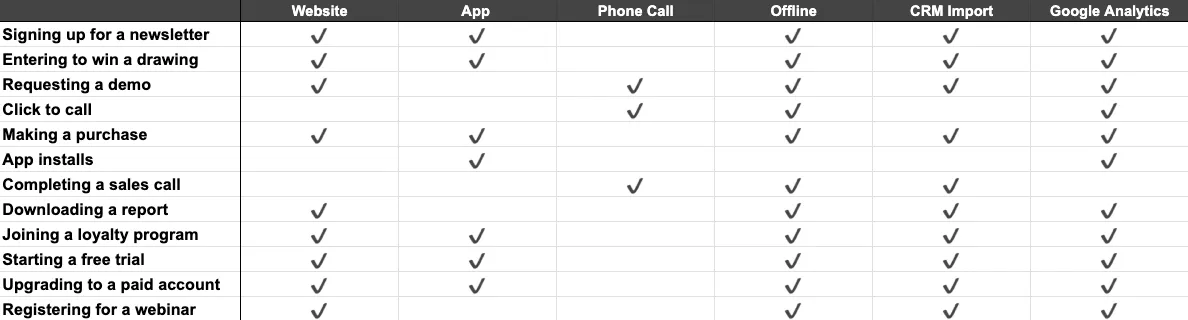
It’s up to you to determine which makes the most sense and which is going to be the most accurate, but odds are there’s some option for you to track your valuable events.
Some of these options are certainly more involved than others. You may be able to set these up yourself, or you might need to get help from a developer or someone a bit more technically minded. Either way, at this point, your challenge is simply to get the conversions set up so you can see them in the Google Ads interface.
Configure settings to maximize outputs
Now comes the fun part, or at least what I consider the fun part: configuring conversion settings in Google Ads to make the most of your valuable actions.
Understanding goals vs. conversion actions
In Google Ads, there are two levels of organization when it comes to conversion tracking. A conversion action is a single event that someone can convert on. Think about a purchase or filling out a lead form.
Goals are a group of conversion actions that are similar (or at least are intended to be similar) and are named by their intended outcome.
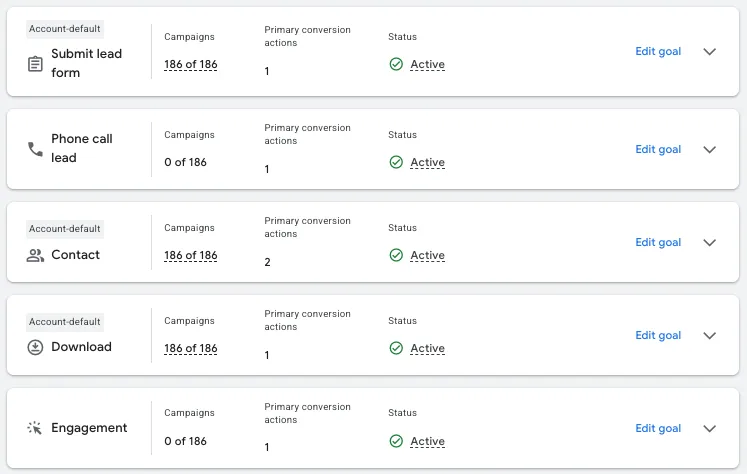
In the image above, you can see there are five Goals: Submit lead form, Phone call lead, Contact, Download, and Engagement. You can see how many campaigns those goals are applied to, how many Primary conversions they have, and their status.
Understanding the settings of Goals and how they impact your account is very important. For three of the Goals above, you’ll see “Account-default” over their name. That means every new campaign that’s created will use that Goal as part of its target conversion setup.
This is important to know, because Google uses these Goals as the actions they’re going to optimize for. If you’re regularly creating new campaigns that have all different sorts of conversion targets, you want to make sure you’re leveraging the right optimization goals, or else Google can go off the rails driving actions for a campaign that you’re not trying to get.
If you click Edit goal in blue on the right, you’ll be given these settings:
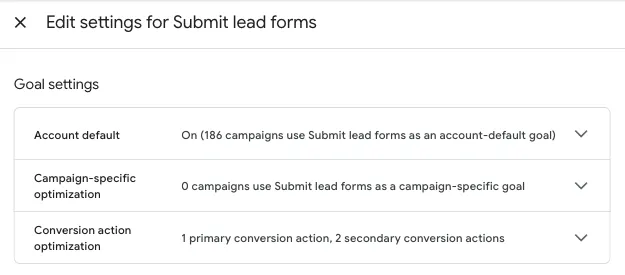
From here, you can decide if this group should be an Account Default, you can select certain campaigns that should use this goal, and you can get a quick view of the conversion actions in each Goal.
🚀 Ready to quickly increase your conversions and win more customers? Download our guide: Super-Fast Ways to Boost Conversions >>
Campaign-specific goals
If your account has multiple campaigns that are aiming for different outcomes, think Demo Request vs. Content Download vs. Online Purchase, you’re a good candidate for Campaign-specific goals.
Rather than using the Account-default goals, you can select custom Goal settings by campaign. You can do that from the Goal settings as we show in the picture above, or you can do it in the campaign-level settings.
In the campaign settings, navigate to the Conversion goals section. There you’ll find a dropdown that says Account-default or Campaign-specific.
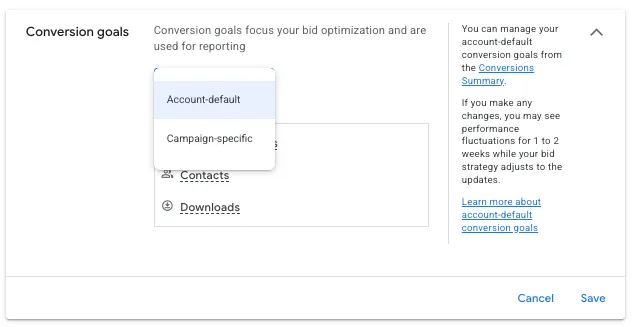
Once you’ve selected Campaign-specific, you can select which Goals you want this campaign to consider conversions.
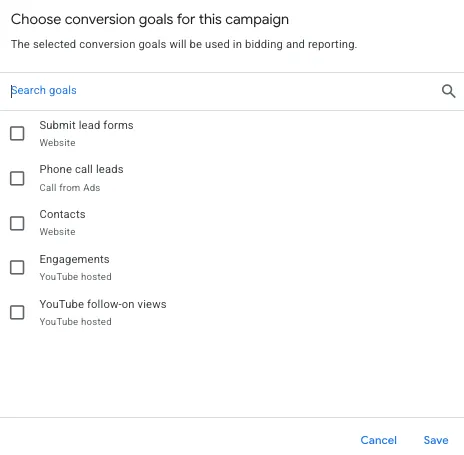
Just remember, whatever Conversion actions you have in those Goals will then count for that campaign, and that’s what Google’s machine learning will optimize for. It’s important for you to keep track of which actions are in which goals so it’s easy to know which should be applied to the account and which should be applied to your respective campaigns.
⚡️ Is your Google Ads account set up for success? Download now >> The Last Guide to Google Ads Account Structure You’ll Ever Need >>
Conversion action settings
Now that you understand the organization and how it impacts Google’s optimization strategies, let’s focus on the settings for each conversion action and talk about why they’re important.
Each conversion action you create will have a screen that looks like this for the settings:
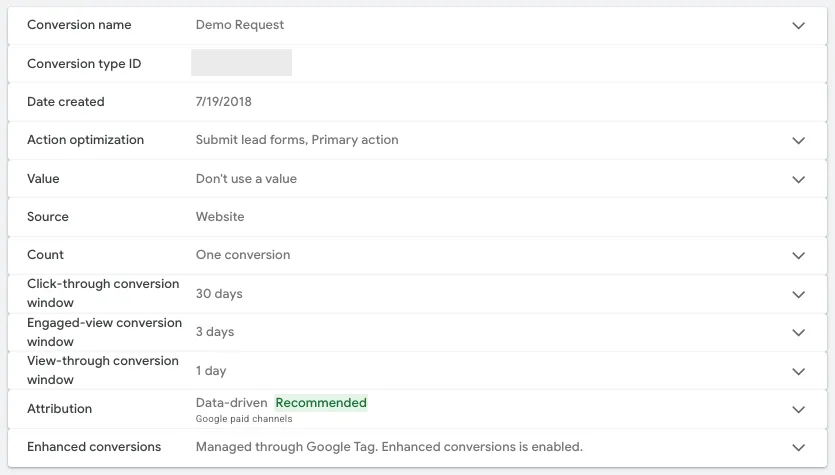
Let’s go through them in order.
Conversion name is important simply for ease of understanding what the conversion action is tracking. For this account, we have a single conversion action that tracks every Demo Request across all sites and microsites, so a simple name is all we need. If your actions are more involved than this, I implore you to create a naming convention that’s clear and straightforward.
Try to name things so that anyone who looks at your list of conversions has an idea of what they’re tracking, even if they know nothing about the account. Conversion type ID and Date created aren’t important for the purposes of this article.
Action optimization
Action optimization is simple, but very important.
Each conversion action can be deemed a Primary or Secondary action.
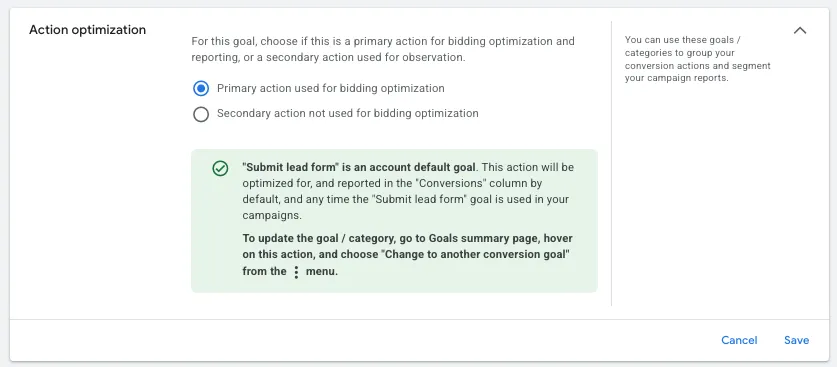
Primary actions are used for bidding optimizations, meaning Google will leverage this data to find more users likely to take this action and will be counted in the Conversions column.
Secondary actions will not be used in bidding, but will still be tracked and can be seen in the All Conversions column in the interface.
It’s simple: if you want Google to use an action and optimize for it in bidding, then that action is Primary. If you simply want to see how many of these actions are taken, but you’re not interested in optimizing for it, choose Secondary.
Note: We already talked about Google optimizing only for the Goals applied to a campaign, whether with account settings or at the campaign level. If a Goal isn’t applied to a campaign but a conversion action in that Goal is set to Primary, that action will be counted in the All Conversions column since that Goal isn’t assigned to that campaign.
Conversion values
Adding the value of a conversion is always recommended, even if it’s an approximation.
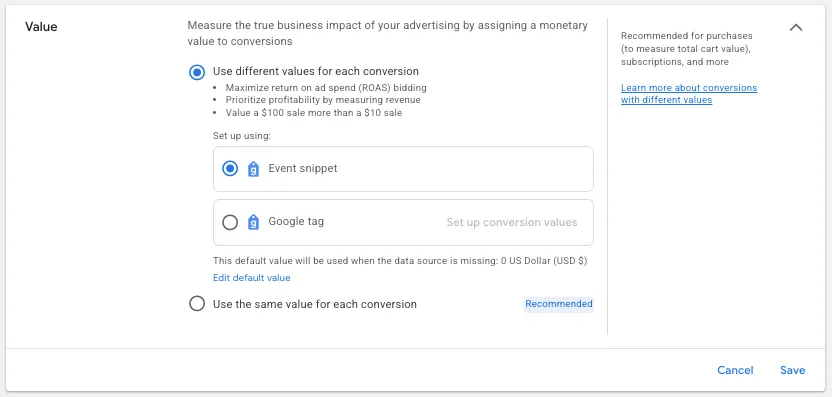
Ecommerce companies will likely use the “different values for each conversion” setting so they can track the actual revenue generated from each sale.
For this setting, you’ll use either the Google Tag or an Event snippet to pull in the value of these sales. This tracking requires some additional coding to dynamically include revenue numbers, but is definitely worth it.
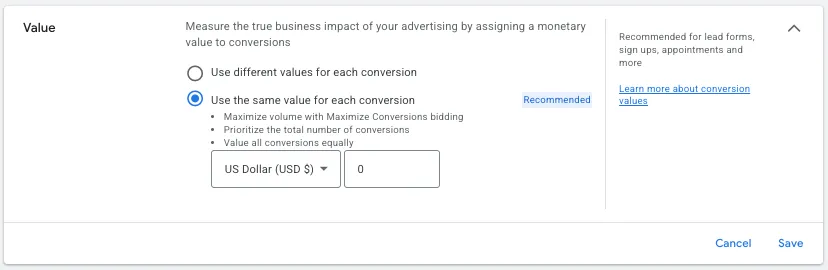
For many lead generation companies, we end up using stable values for conversion actions and employ the “same value for every conversion” setting. Here, we’ll assign a monetary value to that conversion action that can be applied to our Conversion Value column.
Some of you lead gen folks might be saying, “but I don’t know the value of a lead” or “all my deal sizes are different, so one value doesn’t make sense.” I hear you. Here are a few questions for you that could help you plan out your next steps:
- Can you calculate your sales pipeline conversion rates for each step and determine an average value per lead to add here?
- Are you able to use a different conversion tracking type (Offline conversion or CRM Import) to pull in closed deals and their associated revenue?
- Do you know how valuable a lead is to you in relation to another goal? I.e., 10% of people who fill out a newsletter form end up making a purchase. You can take the average purchase price, multiply it by 10%, then determine an estimated average value per newsletter signup.
Tracking values for your conversions is important for Google’s machine learning because that tells Google how valuable something is to your business. It can then use that information to distinguish the value of one action vs. another and leverage that information in automated bidding.
Maximize Conversion Value and Target ROAS bidding lean heavily on these values for direction and feedback into the bidding algorithm to tell Google it’s delivering on your goals.
Conversion count
Google’s bidding algorithms also need to know if you want multiple conversions from the same person (purchases are a good example) or if you only want one (think lead generation where you don’t want to pay for the same user’s information twice).
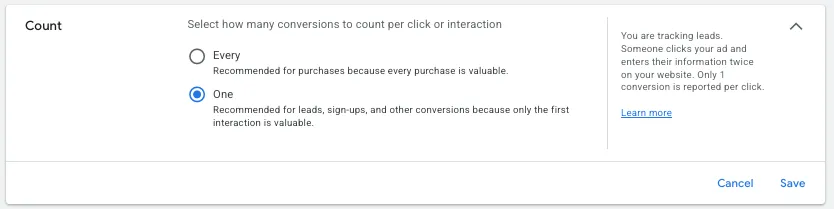
Conversion attribution
The next four settings are all about conversion action attribution and effectively tell Google’s AI how far to look back for each type of action and how to model out reporting for it.
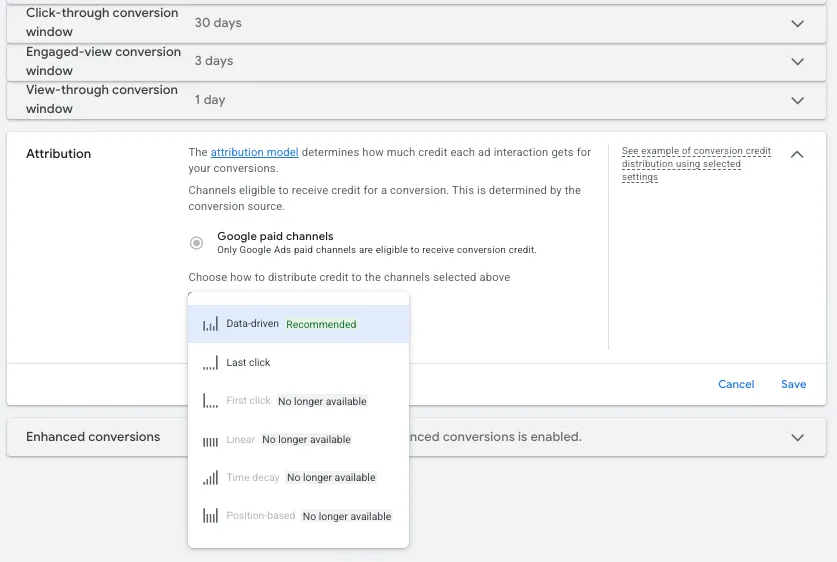
The Attribution windows for Click-through, Engaged-view, and View-through conversions all have different time frames you’re able to use, but it’s up to you to decide how far you want Google to look back and claim success.
The cascade of time frames here is pretty standard, with Click-through being the longest, then Engaged view, then View-through being the shortest, but the date ranges shown above are simply the ones that made sense for this client. I have others with a 90-day Click-through window and some with only one week.
Determine the settings that make sense for your business based on these conversion types and get those set up as needed.
Lastly, the Attribution Model tells Google how to attribute success across the account. Data Driven is the recommended model and is likely the right choice for just about every account.
In a scenario where a user views a video ad through a Demand Gen campaign, then later converts on a Search campaign, Google can give a small amount of the conversion (and conversion value) credit to the Demand Gen campaign based on the Engaged-view attribution settings since it likely played a role in the final conversion. This helps Google’s AI be more efficient over time, because it can see the whole picture and measure the impact of all campaigns together rather than just one.
Last click is still an option (you’ll notice none of the others listed are available anymore), but there are very few instances where I think this model makes sense.
Enhanced conversions
If you have a Google rep, you’ve likely been hounded about informed about Enhanced Conversions. This is an additional layer of tracking that helps Google match conversion actions to specific users in your account by using your first-party data to fill in tracking gaps for more accurate reporting.
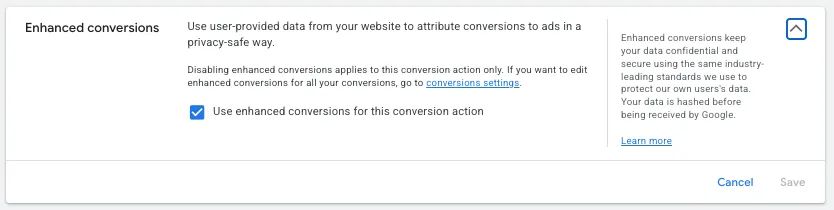
This also requires some additional setup in Google and potentially on your website or CRM, so it’s a little involved, but the main goal is to have accurate tracking. With these holes filled in, Google’s AI can better know if it’s generating conversions or not and then in turn have better performance on the other side.
Get your conversion tracking right to see how Google’s AI is impacting your campaigns
Google’s AI is great at doing many of the tedious, technical tasks that we advertisers used to do on a regular basis. It’s our job now to provide guidance for those algorithms to get the best results from our accounts.
Accurate conversion tracking is the foundation for success because it’s what directs Google as to what our business needs to thrive. It all starts with finding a way to track the actions your business views as valuable, then feeding those into the Google platform. From there, Goal organization and individual conversion action settings will direct Google on what to optimize for, how valuable those actions are, and give the algorithm the data it needs to succeed.
About the WordStream Blog
We've been a trusted source of data, news, and strategy for over 15 years. All of our content is written and reviewed by real people: a dedicated team of professionals with decades of combined experience in marketing and advertising for businesses of all sizes.


Add us as a preferred source on Google
Are you wasting money in Google Ads?

Meet The Author
Michelle Morgan
Michelle is the Co-Founder of Paid Media Pros. She has twelve years of experience in all aspects of PPC and brings a wealth of experience developing and executing campaigns across search, social, and display platforms in both agency and in-house settings. Her experience gives her an especially well-rounded and holistic view of the paid search landscape—one she shares regularly as an influencer, author, and industry speaker at events like SMX, HeroConf, and Pubcon, as well as the Paid Media Pros YouTube channel.