
Google Ads vs. Meta Ads: Key Differences & Considerations
Google Ads and Meta Ads are two of the most widely used advertising platforms for businesses of every size. In our small business trends research, over 90% of small businesses said they use Facebook for marketing and advertising, and nearly half said they use paid search advertising.
But the two platforms work in very different ways, and when your budget is limited, you want every dollar going to the right place. Google Ads reaches people when they search for what you sell. Meta Ads, which covers Facebook, Instagram, and the rest of Meta’s apps (and was formerly known as Facebook Ads), reaches people as they scroll.
In this guide, we’ll break down the key differences between Google Ads and Meta Ads, compare costs using our latest benchmark data, and help you decide which platform fits your business. We’ll also show you how running both together can get you better results than either one alone.
Contents
The main differences between Google Ads vs. Meta Ads
Google Ads is Google’s advertising platform that shows your ads to people searching on Google, plus across YouTube, Google Maps, Gmail, and millions of partner websites. Meta Ads is Meta’s advertising platform that shows your ads to people as they scroll Facebook, Instagram, and Messenger (plus its network of partner apps).
While both platforms help you reach new customers and grow your business, they offer different ways to do it, and often at different times in the discovery and buying process.
Here are the key differences to understand before you decide where to spend your budget.
| Difference | Google Ads | Meta Ads |
|---|---|---|
| Intent | Reaches people actively searching for what you sell | Reaches people before they start looking, while they scroll |
| Ad locations | Google Search, AI Overviews and AI Mode, Shopping, YouTube, Maps, Gmail, Discover, and partner sites | Facebook, Instagram, Messenger, Threads, WhatsApp, and partner apps |
| Audience targeting | Based on what people search for, plus location, demographics, and audience segments | Based on who people are, including location, demographics, interests, and behaviors |
| Ad formats | Mostly text, plus Shopping, display, and video ads | Mostly visual, including image, video, carousel, lead, and messaging ads |
| Campaign objectives | Sales, leads, website traffic, app promotion, YouTube reach, and local store visits | Awareness, traffic, engagement, leads, app promotion, and sales |
| Measurement and attribution | Mostly credits conversions after a click | Credits clicks, engagements, and ad views that lead to conversions |
Intent
People use search engines when they’re actively looking for a solution, and social media when they’re catching up with friends, following interests, or passing time. That difference shapes where your ads reach people in the buying process.
Google Ads catches people at the moment they’re searching for what you sell. Someone typing “emergency plumber near me” has a problem and wants it solved now, so your ad shows up right when they’re ready to act.
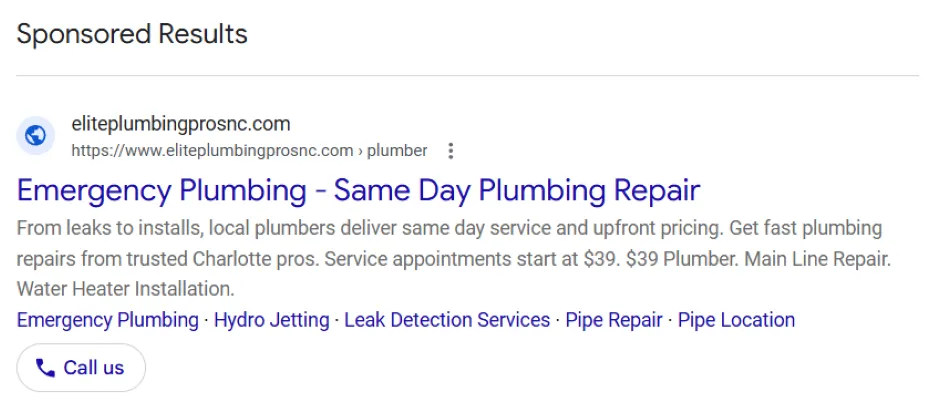
Google Ads are great for meeting an immediate need.
Meta Ads put your business in front of people before they start searching. Someone scrolling Instagram may not need a new patio set today, but a well-timed ad targeting new homeowners can spark interest and keep your brand in mind when they’re ready to buy.
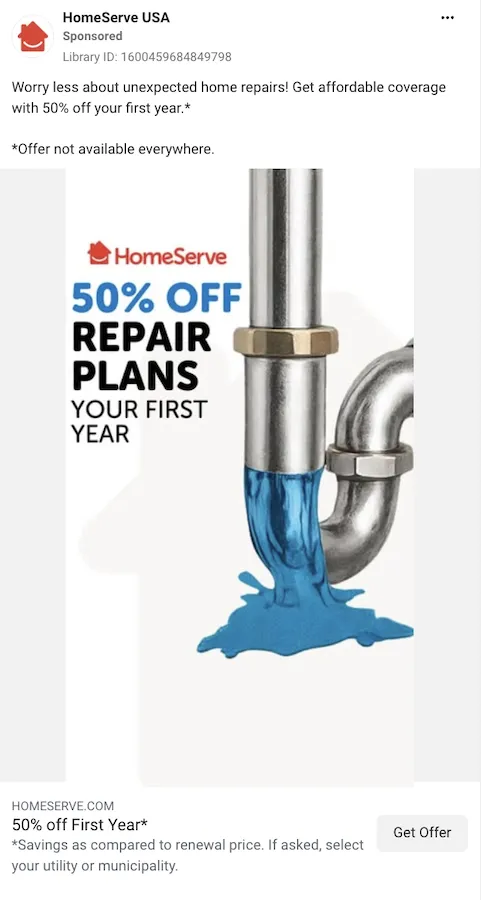
Meta Ads can engage people before they’ve begun to search for a solution.
Ad locations
Both platforms reach far beyond their flagship sites. Here’s where your ads can appear on each.
- Google Search: Text ads at the top and bottom of search results.
- AI Overviews and AI Mode: Text and Shopping ads that appear within or alongside Google’s AI-generated search answers.
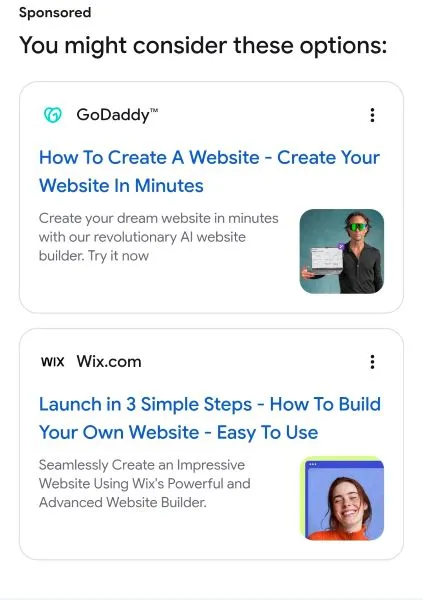
- Google Shopping: Product listings with images and prices.
- Google Maps: Promoted listings when people search for nearby businesses.
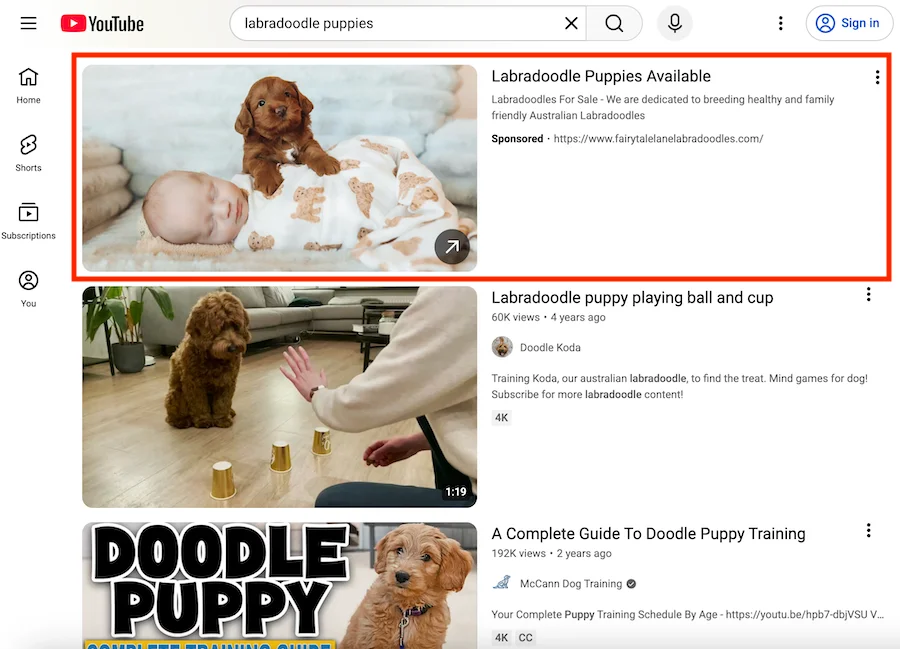
- YouTube: Video ads before, during, and between videos, including Shorts.
- Gmail and Discover: Ads in inbox tabs and the Google app’s content feed.
- Google Display Network: Banner and image ads across millions of partner websites and apps.
Meta Ads placements:
- Facebook: Feed, Stories, Reels, Marketplace, and search results
- Instagram: Feed, Stories, Reels, and the Explore tab

Instagram offers several ad types and placements on the app.
- Messenger: Ads in the inbox and Stories
- Threads: Ads in the Threads feed
- WhatsApp: Ads in the Status section of the Updates tab
- Audience Network: Ads in partner mobile apps
You don’t have to choose every placement yourself. Google’s Performance Max and Meta’s Advantage+ can spread your budget across placements automatically based on where your ads perform best.
Google’s YouTube, Gmail, and Discover placements work more like social media, where people see ads while browsing. But search placements are still where Google stands out, because they reach people who are actively looking.
Also, you can’t target AI Overviews or AI Mode directly. Your existing Search, Shopping, and Performance Max campaigns can show there automatically.
Audience targeting
Google Ads targets people based on what they’re searching for. Meta Ads targets people based on who they are and what they’re interested in.
Google Ads targeting starts with keywords. You choose the search terms you want to show up for, like “roof repair Charlotte,” and Google shows your ad when someone searches for them or something close. You can layer on other options, too:
- Location: Target a city, ZIP code, or radius around your business
- Demographics: Age, gender, household income, and parental status
- Audience segments: People Google identifies as researching or ready to buy in your category
- Your data: Past website visitors or your customer list
Meta Ads targeting focuses on the person. Meta uses what people share and do on its apps to help you reach:
- Location: Target a city, ZIP code, or radius around your business
- Demographics: Age, gender, education, job title, and life events like a recent move or engagement
- Interests and behaviors: Hobbies, pages people follow, and shopping activity
- Custom and lookalike audiences: Your past customers, website visitors, and people who resemble them
On both platforms, AI now plays a bigger role in finding your audience. Your targeting choices work more like suggestions, and the platforms will often show your ads to people outside them if the system predicts they’re likely to convert.
Ad formats
Google Ads leans on text, because most of its ads show up in search results. Meta Ads leans on visuals, because its ads compete with photos and videos in people’s feeds. However, that difference continues to blur as each platform expands its available ad types.
Google Ads formats:
- Text ads: A headline, description, and link in search results
- Assets: Extra details that make text ads bigger and more useful, like your phone number, address, or links to specific pages
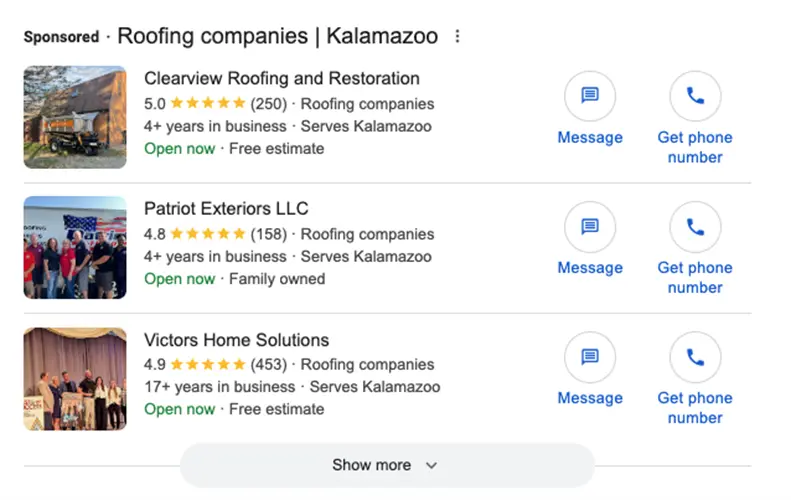
The call button is a popular Google Ads asset.
- Shopping ads: Product photos with prices and store names
- Display ads: Image and banner ads on partner websites and apps
- Video ads: Ads on YouTube, from short bumper ads to longer skippable ones
- Local Services Ads: Listings for service businesses like plumbers and electricians that appear at the top of local searches with a Google Verified badge, where you pay per lead instead of per click
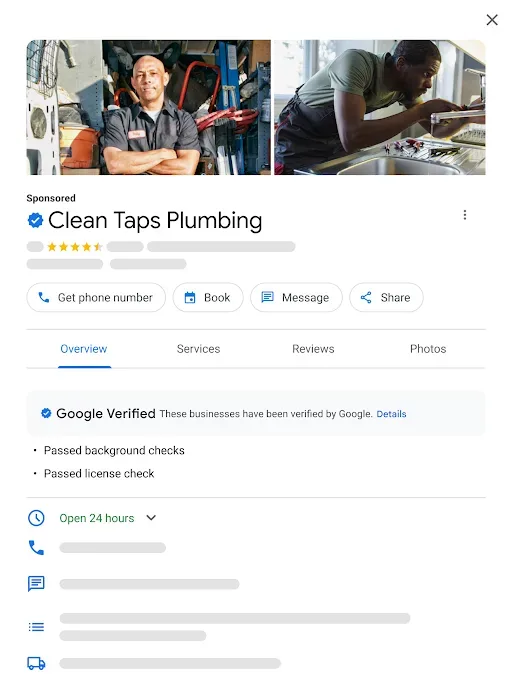
Google Local Services Ads are available to service-based businesses.
Meta Ads formats:
- Image ads: A single photo or graphic with text
- Video ads: Short videos in feeds, Stories, and Reels

Instagram Reels Ads capture attention with video.
- Carousel ads: Up to 10 images or videos people can swipe through
- Collection ads: A main image or video with products below it
- Messaging ads: Ads that open a chat with your business in Messenger, Instagram, or WhatsApp
- Lead Ads: A built-in form people can fill out without leaving the app
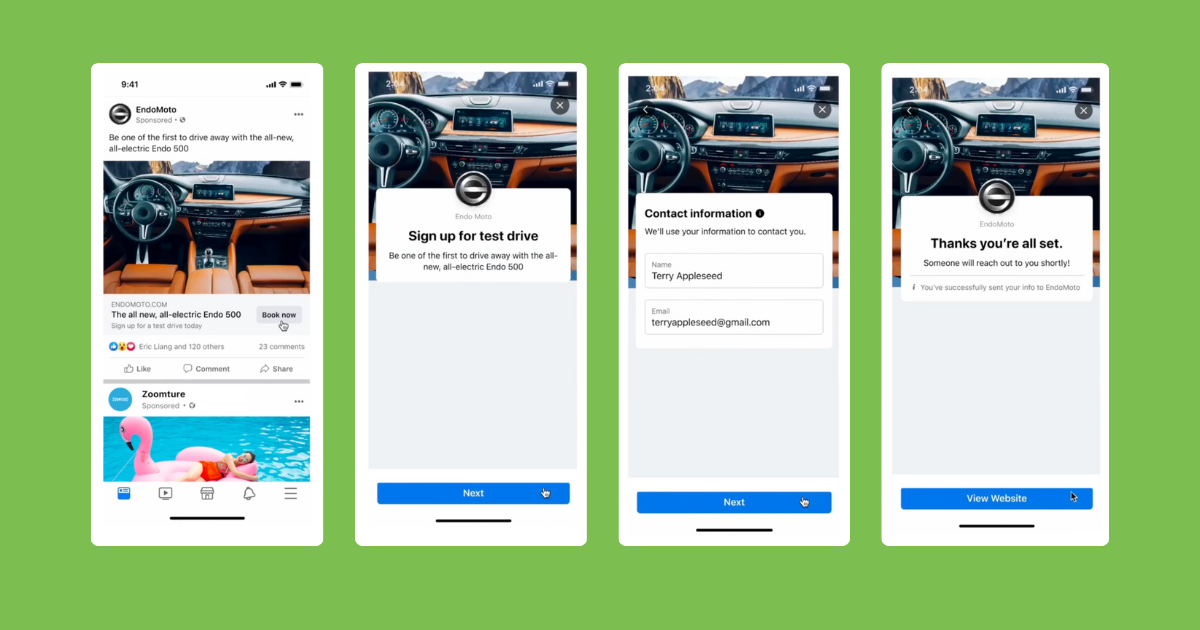
Facebook Lead Ads deliver high-intent buyers.
For many small businesses, this comes down to time and resources. You can launch a Google search campaign with nothing but well-written ad copy. On Meta, you’ll need a steady supply of images or videos, and you’ll need to refresh them often so your audience doesn’t tune them out.
Campaign objectives
On both platforms, you start a campaign by choosing a goal. The platform then shows your ads to the people most likely to complete that goal.
Google Ads objectives include:
- Sales
- Leads
- Website traffic
- App promotion
- YouTube reach, views, and engagements
- Local store visits and promotions
After you pick an objective, Google asks you to choose a campaign type, like Search, Performance Max, Shopping, Video, Display, or Demand Gen. That choice decides where your ads show and what they look like.
Meta Ads objectives:
- Awareness
- Traffic
- Engagement
- Leads
- App promotion
- Sales
Pick the objective that matches the action you want. If you want phone calls or form fills, choose Leads. If you choose Engagement, Meta will find people who like and comment. That’s great for brand awareness.
Conversion attribution
Both platforms offer robust measurement and analytics. But one key difference is how they count conversions differently. That’s why your Google Ads and Meta Ads numbers often won’t match each other or your actual sales.
Google Ads mostly gives credit for conversions after someone clicks your ad. Its default model, called data-driven attribution, splits the credit across the ads a person clicked or engaged with before converting. You track results with the Google tag on your website, plus call tracking for phone leads.

Meta Ads counts more than clicks, because people often see an ad in their feed and buy later without ever clicking it. By default, Meta gives your ad credit for a conversion if someone:
- Clicks your ad link and converts within 7 days
- Likes, comments, shares, or saves your ad and converts within 1 day
- Sees your ad without clicking and converts within 1 day
You track results with the Meta Pixel on your website. Adding Meta’s Conversions API, which sends data straight from your website or CRM to Meta, helps fill in gaps from browser privacy settings and ad blockers.
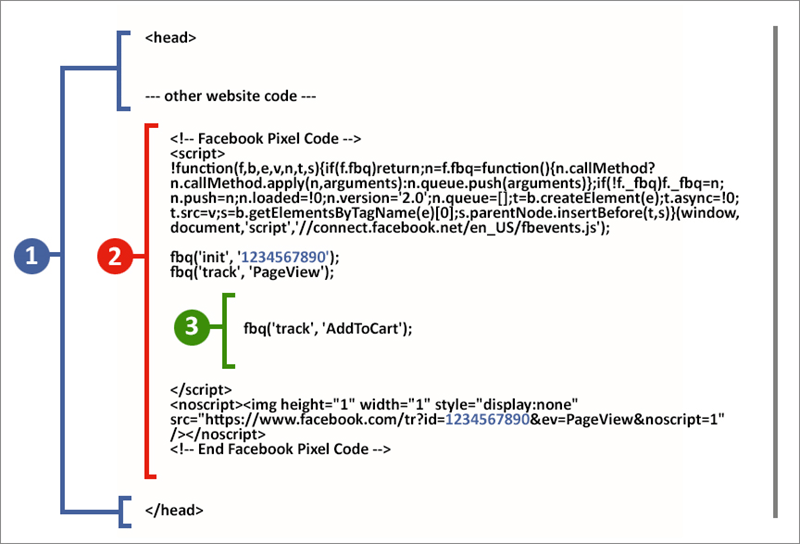
Facebook conversion tracking starts with a pixel on your website.
Note that each platform can take credit for the same sale. If someone sees your Instagram ad, then searches for you later and clicks your Google ad, both platforms may report that conversion. To get the real picture, compare what the platforms report with your actual leads and sales. Even asking new customers “How did you hear about us?” can help.
Cost comparison of Google Ads vs. Meta Ads
Both platforms run on auctions, so there’s no set price to place an ad. You choose your budget, and your costs depend on your industry, your competition, and how well your ads perform.
Our benchmark data for each platform shows that Meta Ads cost less per click and per lead than Google Ads from the same time period.
| Metric | Google Ads | Meta Ads (leads campaigns) | Meta Ads (traffic campaigns) |
|---|---|---|---|
| Click-through rate | 6.64% | 2.70% | 1.93% |
| Cost per click | $5.42 | $1.80 | $0.60 |
| Conversion rate | 8.18% | 8.54% | N/A |
| Cost per lead | $66.69 | $27.39 | N/A |
On average, a lead from Google Ads costs about 2.4 times as much as a lead from Meta Ads. Conversion rates on the two platforms are nearly the same, so most of that gap comes from what you pay per click.
So why do so many businesses pay more for Google? Intent. People who click a search ad are already looking for what you sell. You can see it in the click-through rate. Google search ads earn more than double the CTR of Meta ads. Those searchers are often ready to call, book, or buy.
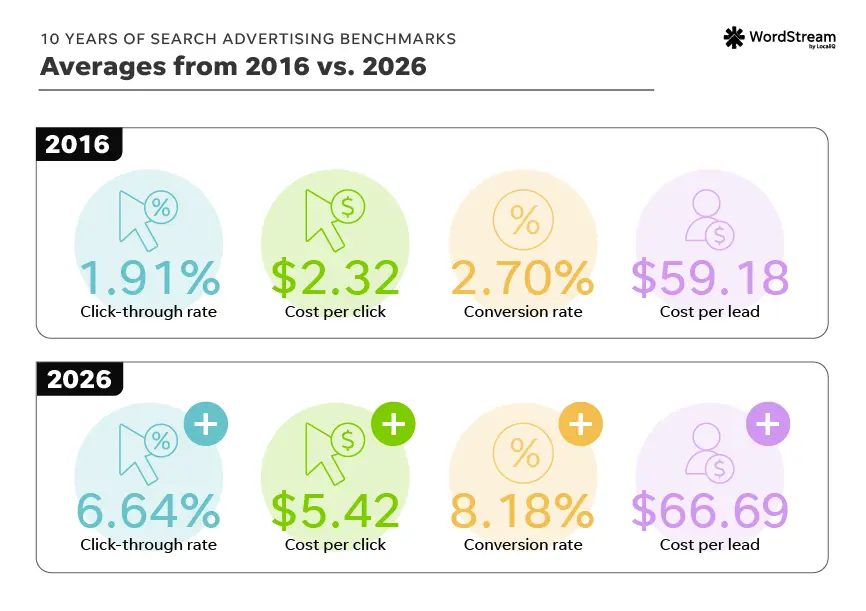
The click-through rate on Google Ads has increased dramatically over the years.
Meta’s lower costs come with a trade-off. Lead ads let people sign up without leaving the app. That keeps costs down, but some of those people are just browsing. Follow up fast, and check how many of your leads are a good fit before you judge results.
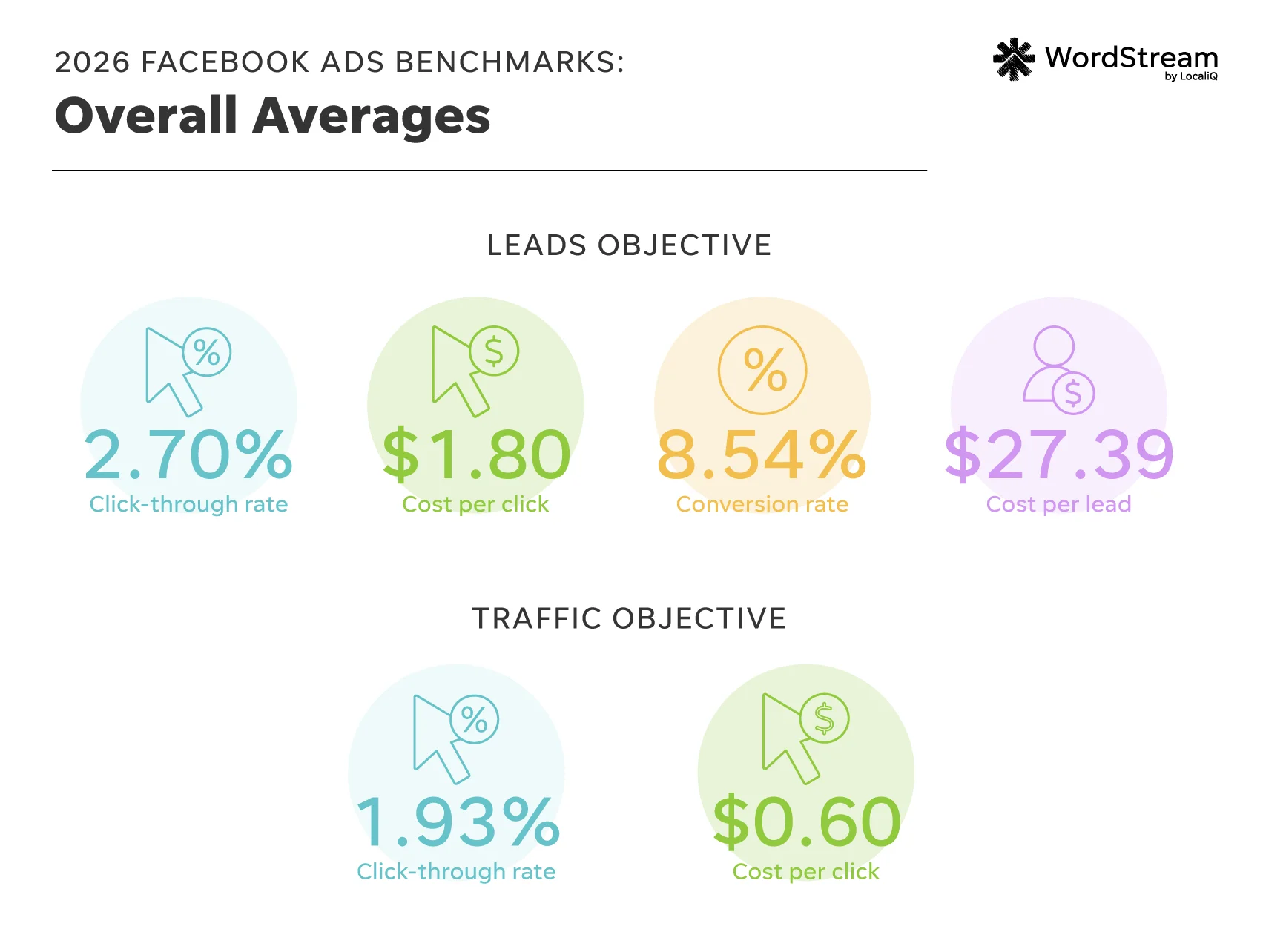
Facebook Ads is often less expensive than Google Ads.
The gap also varies by industry. For dentists, a lead costs $72.97 on Google and $61.56 on Meta. For real estate, it’s $102.51 on Google and $13.74 on Meta.
The cheapest lead isn’t always the best value. Compare your cost per lead with how many of those leads turn into paying customers to decide where your budget should go.
When to use Google Ads vs. Meta Ads
The right platform depends on where your customers are in their buying journey, and on how people look for businesses like yours.
Google Ads works well at the bottom of the funnel, when people know what they need and are choosing who to call. Meta Ads works well at the top and middle of the funnel, when people are discovering new businesses or deciding between options.
Use Google Ads when:
- People already search for what you sell, like “dentist near me” or “AC repair.”
- Customers need help fast, such as plumbers, locksmiths, towing, or urgent care.
- You want leads who are ready to call, book, or buy.
- You compete for high-value jobs where one customer covers a lot of ad spend, like legal services or home remodeling.
- You don’t have the time or resources to create new images and videos often.

Google Search Ads are quick to produce.
Use Meta Ads when:
- Your business is visual, like restaurants, salons, boutiques, or fitness studios.
- You’re launching something people don’t know to search for yet.
- You want to build awareness in your local area.
- You can describe your ideal customer by who they are, like new homeowners, parents, or recently engaged couples.
- You’re promoting a time-sensitive event, sale, or seasonal offer.
- You want more leads on a tighter budget and can follow up quickly.
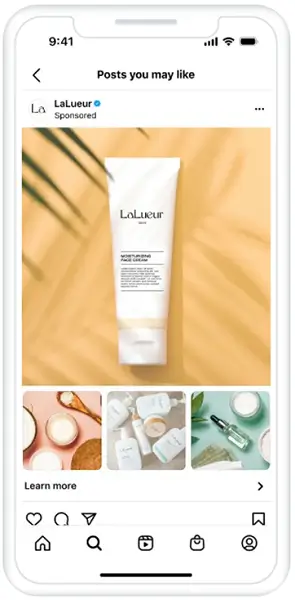
Facebook Ads are often visual.
Most businesses fit both lists. A roofer might rely on Google for urgent storm-damage searches and use Meta to reach homeowners before they notice a problem. That’s where running both platforms together comes in.
The combined Google Ads and Meta Ads strategy
Most businesses find they get the best results with a strategy that leverages both Google Ads and Meta Ads. That gives them access to buyers across a huge population, no matter where those buyers are in the process of consideration and purchase.
Meta Ads, for example, is good at creating demand early. It puts your business in front of people before they start looking, so they recognize your name later.
Google Ads is good at capturing that demand. When those same people search for what you offer, they’re more likely to click on a name they’ve already seen. That lift in brand recognition and searches is known as the halo effect.
The two also work together in the other direction. Someone who clicks your Google ad and leaves without calling can see your Meta ad the next day as a reminder.
To make both platforms work together:
- Retarget across platforms: Show Meta ads to people who visited your website from Google.
- Keep your message consistent: Use the same offers, branding, and visuals so people connect the dots.
- Watch your branded searches: If more people search for your business name after you start Meta ads, the halo effect is working.
- Judge results together: Look at your total leads and cost per lead across both platforms, not just each one alone. Meta can look weak on its own when it’s driving searches that convert on Google.
- Shift budget toward what’s working: Check performance monthly and move money to the platform that’s bringing in better leads, while keeping enough on the other to maintain the halo.
Balancing budgets across platforms takes time and a LOT of attention when you do it manually. LocaliQ’s cross-media optimization (XMO) technology does it automatically, moving your budget across channels in real time based on what’s driving results for your goals.
Google Ads vs. Facebook Ads FAQs
Here are quick answers to common questions about choosing between the two platforms.
Is Google Ads or Facebook Ads better for small business?
Whether Google Ads or Facebook Ads are better for small businesses depends on how your customers find you. Google Ads is great for small businesses when their customers search for fast solutions. Facebook Ads is a good option for visual or local businesses that benefit from awareness and want to engage buyers before they search. Most of the time, the best results come from using both platforms in tandem.
Are Google Ads or Facebook Ads cheaper?
Facebook Ads is usually cheaper. While Google Ads leads cost more, they often come from people who are ready to buy. Actual costs for either platform can be influenced by your industry, ad quality, targeting, and more.
Can I run both with a small budget?
Yes, you can run both Google Ads and Facebook Ads with a small budget. Start with the platform that fits your business best, then add the other once you see what’s working. A small Facebook retargeting campaign aimed at your website visitors is an easy, low-cost way to start using both.
Google Ads and Meta Ads are a winning combination
Google Ads and Meta Ads reach your customers at different moments. Google puts you in front of people who are already searching for what you sell, which can make its leads more expensive, but more likely to convert. Meta reaches people while they scroll, so you can build awareness and get leads at a lower cost and set your business up as the top choice before people search.
You don’t have to pick just one. When you run both, Meta helps people get to know your business, and Google is there when they’re ready to act. Start with the platform that fits how your customers find you, track your results across both, and move your budget toward what’s bringing in real customers.
Reach out to learn how our local marketing experts and proprietary technology team up to help you get the most out of all your marketing efforts.

Meet The Author
Rob Glover
Rob is the Senior Copywriter at WordStream and LocaliQ, with over 10 years of experience in paid and organic marketing—including SEO, social media, content marketing, and local search. He’s worked across dozens of industries, from SMBs to enterprise, and now specializes in helping businesses build sustainable growth strategies. His work has appeared in Search Engine Land, eMarketer, and more. Outside of marketing, he loves to travel, camp, and mountain bike with his wife and dog.
