About the Author


Apple introduced Maps ads in August of 2026, and it’s causing quite a shake-up in the online advertising world.
Advertisers don’t get to be early adopters of a new advertising tool on an established platform like Apple Maps every day. If you’re in charge of marketing for a local business—whether you’ve been running search ads for decades or are new to the game—it’s worth getting to know more about this fresh advertising channel.
Read on for a full rundown on ads on Apple Maps: What they are, how they work, a step-by-step setup guide, and why your business should consider them.
Contents
- What are Apple Maps Ads?
- Why advertise on Apple Maps?
- How to run Apple Maps ads: Step-by-step guide
- How much do Apple Maps ads cost?
- Apple Maps ads FAQs
What are Apple Maps ads?
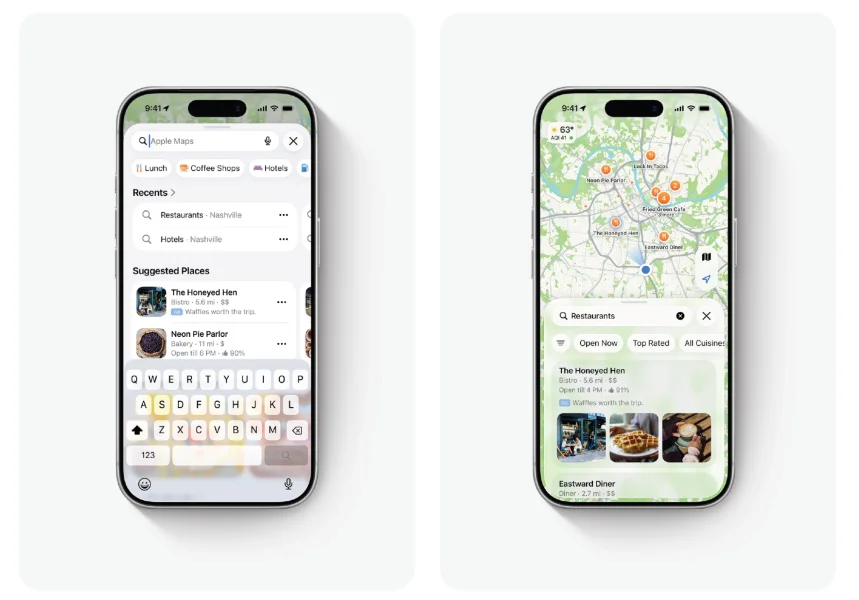
Apple Maps ads are a way to reach Apple customers in the native Maps app on their phone, iPad, or computer. Like with Google Maps ads, businesses can bid to win preferential placement in the Maps interface. Apple allows you to run two types of ads. Your listing can appear as a suggested nearby business before the user even runs a query, or your ad can appear as a sponsored result in search.
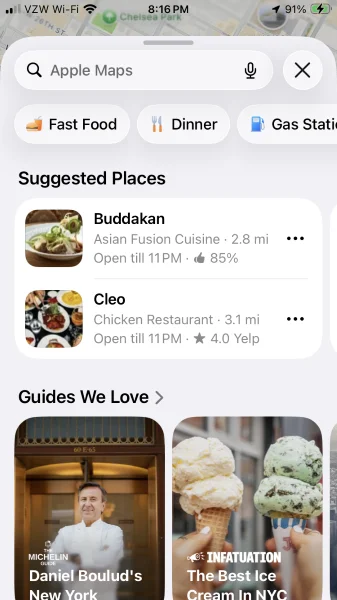
These “Suggested Places” appear when a user opens the app.
Apple uses contextual data in its audience targeting, showing ads to users based on their location, recent searches, and other relevant information. This helps your ads appear in front of people who are most likely to find your listing helpful and valuable.
🛑 Start with a strong foundation! Get PPC 101: The Complete Beginner’s Guide to (Succeeding at!) PPC
Why advertise on Apple Maps?
Advertising on Apple Maps offers several benefits, from high search volume to strong search intent. Here are some highlights:
- Apple reports 1 billion queries per month in its Maps app. That gives your business plenty of opportunities to get discovered.
- One in two queries on the app results in users taking an action. People who search for your business on Maps may be looking for an immediate solution to their need.
- Apple Maps comes pre-loaded on every Apple device. People don’t need to take additional steps to download, install, and configure the app; it’s immediately accessible.
- Users can’t opt out of ads on Apple Maps. This means advertisers have the potential to rack up more impressions from anyone who uses the app.
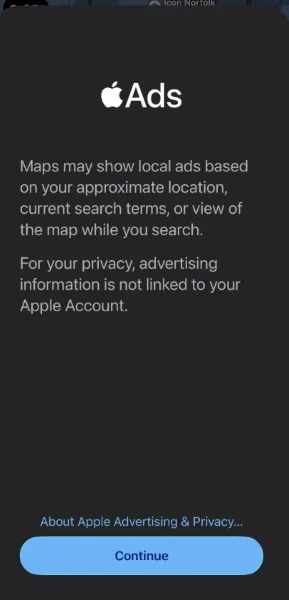
All Apple Maps users are opted in to receive advertising.
Beyond the app’s features, it also supports consumer behavior. People want to help small businesses, with 95% of consumers saying it’s important to do so. Apple Maps is one vehicle to connect consumers to nearby local businesses.
“Our own tracking shows Apple Maps traffic converts at about 2X the rate of organic visits from Google overall, even though Apple Maps still accounts for a very small share of organic traffic to websites,” said Katia Hausman, VP of Product for LocaliQ.
“Several location-driven service categories perform even better. And because this only captures referral traffic to websites, rather than all the activity happening within Apple Maps, it likely understates the channel’s total impact.”
💡Running Google Ads, too? Success starts with The Definitive Guide to the Perfect Google Ads Account Structure >>
How to run Apple Maps ads: Step-by-step guide
Getting started with ads on Apple Maps is pretty simple. This six-step process will have your ads up and running in no time!
1. Create or update your Apple Business account
To establish an Apple Maps listing for your business, you first need to create an Apple Business account.
Apple Business offers a range of functionality for small businesses. You can manage company mobile devices; integrate your email, calendar, and directory services; and build your Apple Maps profile to enhance your business’s discoverability. The sign-up process is free and simple.
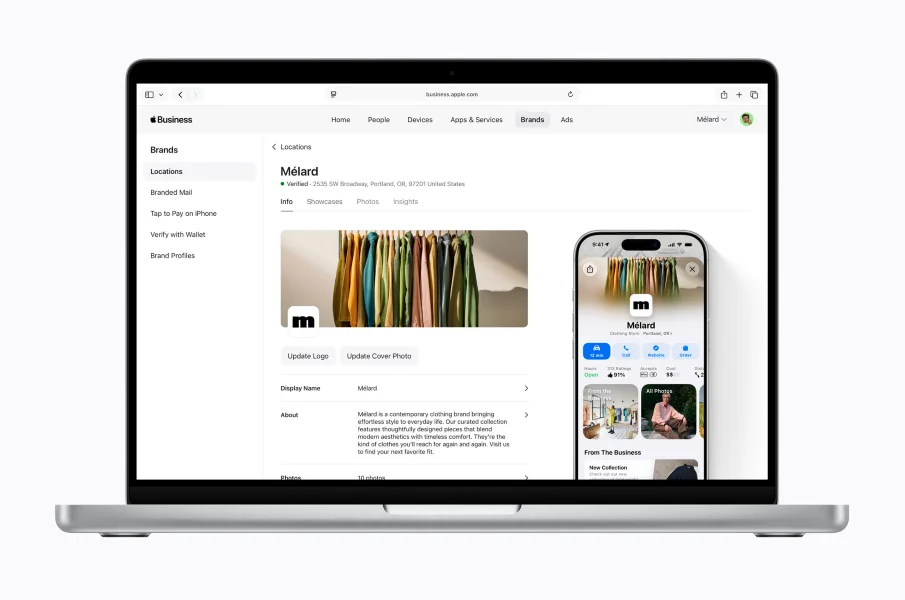
2. Claim your business location(s)
Once you’ve established your Apple Business account, you’ll be able to claim your business locations in Apple Maps. Open your Maps app and search for your business name. Scroll down to the bottom of the listing and click on the “Claim This Place” button. If your business is missing, you can also add it by scrolling to the bottom of existing listings and selecting “Add a Missing Place.”
This process establishes you as the legitimate owner of your location and gives you access to update and optimize your listings. If you have more than one location, be sure to claim each one on the platform.
3. Update your Apple Maps business listing
Next, you can build out your listing. Filling out your profile completely makes it more useful for those who are discovering your business in Apple Maps.
To create an optimized listing, you should:
- Add your logo: This helps people who are already familiar with your brand recognize you instantly, and it builds awareness among those who are finding you for the first time on the app.
- Update your hours and contact information: Ensure these details are correct and current, so people can easily stop by your location or reach out if they need assistance.
- Complete your “About” section: Fill out your business’s bio to give visitors some background on your brand, mission, and offerings. This helps people determine if what you do can address their need.
- Upload photos: You can add a cover photo to your listing, plus additional supporting videos. Share pictures that show off your space, your products, and your friendly team. This helps build trust and highlights your work.
- Add custom actions: You can customize the buttons on your Maps listing to make it easier for people to take a next step with your business. Apple allows you to select from actions like “Call Now” and “Rate Us” to encourage the actions you’d like to drive.
 A great ad in Apple Maps starts with a great business listing.
4. Set your budget
When launching your first ad, Apple Maps will ask you to set a maximum monthly budget. This is the amount you want to spend over the course of the average calendar month. You’ll have the option to either set your own budget or go with one Apple suggests. Either way, you have control throughout the month to pause or stop ads at any time.
5. Establish your first campaign
To start, Apple will ask you to choose where you want your ad to run. You can either have it appear in Apple Maps when users open the app, or it can vie for placement in search results, or you can do both.
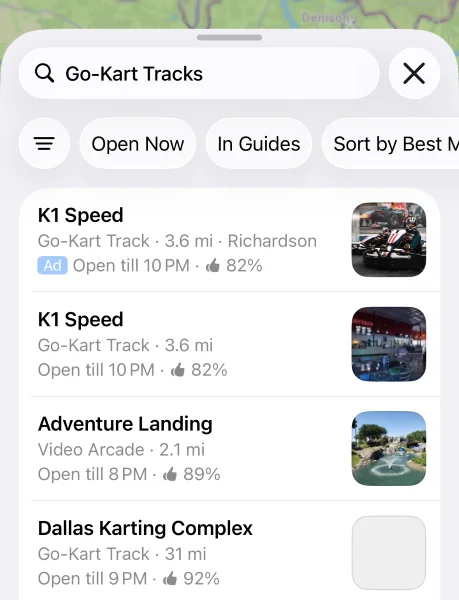
Here’s what the search results ads look like in Apple Maps
From there, you’ll select a bid strategy. Apple Maps also allows you to choose between an automated bidding strategy, which it calls “Maximum Engagements,” or its “Manage Bids” option, where you set your own manual price and keywords. If you go for the automated “Maximize Engagements” option, your ad will automatically run on a cost-per-tap (CPT) model, with the goal of getting you the most engagement within your established budget. If you opt for “Manage Bids,” you can set your own strategy for keywords, which can be structured as either cost-per-tap (CPT) or cost-per-thousand-impressions (CPM).
At this stage, you’ll also be prompted to select:
- The business locations for your ads: If you have multiple locations, you can run ads for some or all of them. You can also create location groups to run ads for specific subsets of your locations more easily.
- Search Match: This feature helps your ad get automatically matched with relevant search queries. You can turn this on or off for each campaign.
- Keywords: You can select specific keywords or categories you’d like your ads to target. You can also add negative keywords to omit your ad from searches for certain terms.
- Audience settings: While ads that run when users open the app are set to reach all eligible users automatically, you can define geographic targeting for search ads. You also have the option to define an ad schedule, running your ads only during certain times or on specific days.
6. Design your ad
Once your campaign is configured, you can upload your ad creative. Apple Maps ads allow you to include up to three images or run the ad with your logo (note: you can’t run an ad with your logo and images).
You also have the option to add promotional text. This copy appears in your ad and can highlight a specific offering, deal, or other business update that can help increase foot traffic to your small business.
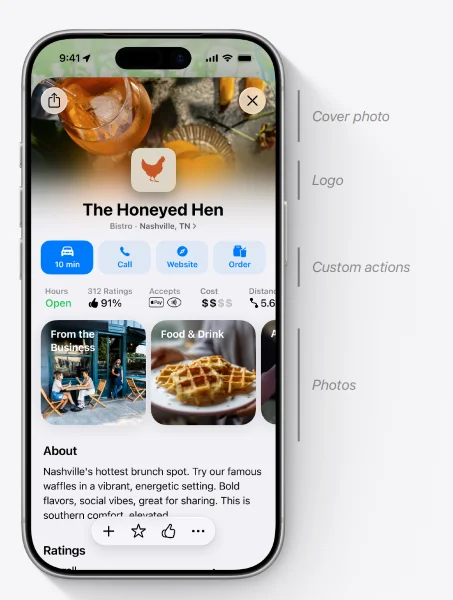
Once you’ve input your visuals and text, you can see a preview of your ad before publishing it. If everything looks good, it’s time to go live with your very first Apple Maps ad!
How much do Apple Maps ads cost?
Apple Maps ads only launched in August 2026, so there’s not a lot of historical data available for benchmarking advertising costs.
However, if you’re concerned about staying within budget, Apple gives you plenty of control over your ad spend. First, it invites you to select a monthly maximum budget, which allows for flexibility in day-to-day spending while ensuring you stay under a monthly limit. Additionally, you can opt to set daily budget limits for your campaigns.
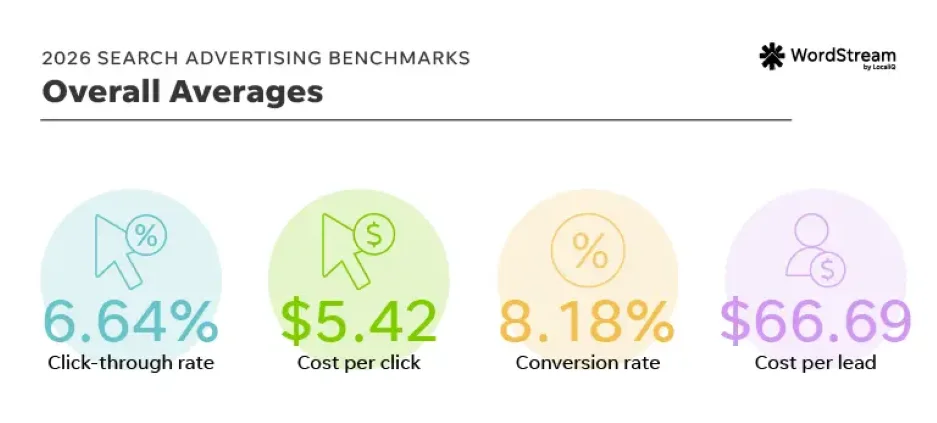
These average search advertising benchmarks can help you understand general CPC and cost per lead across platforms.
As mentioned earlier, Apple Maps also allows you to choose between an automated bidding strategy, “Maximum Engagements,” or its “Manage Bids” option, where you set your own manual price and keywords. With the Maximum Engagements bid strategy, you’ll be charged only when someone taps on your ad–the cost-per-tap (CPT) model. With the manual bidding option, you can select between CPT and cost-per-thousand-impressions (CPM) pricing.
The actual cost of running your ad will vary based on several factors, including the bidding strategy you select, general competition in your industry and location, and the relevance of your ad as compared to users’ search terms and intent.
🛑 See even more ad costs: Download Display & Video Ads Benchmarks: Exclusive Data & Insights for Every Industry
Apple Maps ads FAQs
Apple Maps ads are new, so there are bound to be many questions. Here are a few of the most common.
When will Apple Maps ads be available?
Apple Maps ads are available to marketers as of August 2026.
Can users turn ads off in Apple Maps?
No, there is currently no “off” switch for ads in Apple Maps. Even paid subscriptions to Apple ONE or iCloud do not remove them.
Where do ads show in Apple Maps?
There are two ad placement options in Apple Maps. The first is sponsored locations. These show inside the new “Suggested Places” section on the search screen. The second is paid business results, which appear at the top of relevant search lists (these are marked with an “Ad” tag).
How much do Apple Maps ads cost?
There is no fixed cost for ads in Apple Maps. Instead, costs are determined by a live auction system. Characteristics like industry niche, target locations, and your account setup (manual or automated) will influence ad spend.
Are you ready to add Apple Maps ads to your marketing strategy?
If your small business is looking to connect with a local audience, Apple Maps ads might be a smart addition to your multichannel marketing strategy. As with any new marketing tactic, evaluate how it aligns with your broader business goals and where it fits into your existing marketing plans before deciding whether to add it to the mix. And if you implement Apple Maps ads, watch key metrics over time to assess how the ads contribute to your overall growth.
Have more questions about getting leads and customers from digital marketing? Reach out, and we’ll show you how we can help.
About the WordStream Blog
We've been a trusted source of data, news, and strategy for over 15 years. All of our content is written and reviewed by real people: a dedicated team of professionals with decades of combined experience in marketing and advertising for businesses of all sizes.


Add us as a preferred source on Google
Are you wasting money in Google Ads?

Meet The Author
Amanda Rodhe
Amanda Rodhe is a freelance content marketing writer. She’s passionate about the power of the written word and loves helping brands craft compelling stories that stick. You can connect with her on LinkedIn or learn more on her website.
Recommended for you